Chapter 6: Subagents and Workflows — Multi-Agent Orchestration
Scale beyond a single conversation. This chapter covers spawning subagents for parallel work, delegating specialised tasks, and building repeatable multi-step workflows.
Why Multiple Agents?
A single Claude Code session is powerful, but some tasks benefit from parallel or specialised work:
- Reviewing multiple files simultaneously — A code review that fans out across 10 modules
- Gathering information from different sources — Research that checks docs, issues, and code at once
- Separation of concerns — One agent writes code while another writes tests
- Long-running background tasks — Monitoring a deployment while you continue working
Claude Code addresses this with two mechanisms: subagents for on-demand delegation and workflows for repeatable pipelines.
Subagents — The Agent Tool
The Agent tool spawns a child agent that runs a specific task and reports back. Think of it as delegating work to a colleague.
How Subagents Work
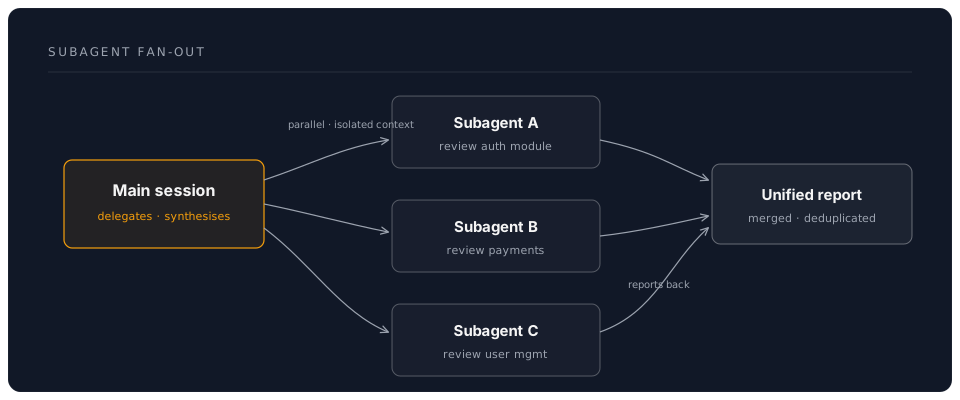
When you ask Claude Code to perform a task that would benefit from parallelism, it can spawn subagents automatically. You can also request it explicitly:
> Review all the API route handlers. Use subagents to review each module in parallel.
Claude spawns multiple subagents, each reviewing a different module. The results are collected and synthesised into a unified report.
Subagent Characteristics
| Property | Behaviour |
|---|---|
| Context | Each subagent has its own conversation context, separate from the main session |
| File access | Subagents can read files in your project |
| Tool access | Subagents have access to the same tools as the main session |
| Isolation | Subagents do not see each other's conversations |
| Cost model | Each subagent consumes its own tokens (typically uses a lighter model for efficiency) |
| Reporting | Results flow back to the main session |
When to Use Subagents
Good use cases:
- Fan-out tasks: review N files, check N modules, analyse N dependencies
- Research: gather information from multiple sources simultaneously
- Parallel validation: run type checks, lint, and tests concurrently via different agents
- Specialised analysis: one agent for security review, another for performance analysis
Poor use cases:
- Sequential tasks where each step depends on the previous (use normal conversation)
- Tasks requiring shared state between agents (they are isolated)
- Very small tasks where the overhead of spawning outweighs the benefit
Practical Example: Multi-Module Code Review
You: I need a thorough code review of the entire src/services/ directory.
     Each service should be reviewed independently. Focus on error handling,
     type safety, and adherence to our repository pattern.

Claude: I'll review each service module in parallel using subagents.

[Spawns subagents:]
  - Agent 1: Review src/services/auth.service.ts
  - Agent 2: Review src/services/order.service.ts
  - Agent 3: Review src/services/payment.service.ts
  - Agent 4: Review src/services/notification.service.ts

[Each agent reads its file, analyses against the criteria]

[Results synthesised:]

## Code Review Summary

### auth.service.ts
- Missing error handling in token refresh (line 45)
- Type assertion should use Zod validation instead (line 78)

### order.service.ts
- Direct database call bypasses repository layer (line 112)
- Race condition in concurrent order updates (line 89-95)

### payment.service.ts
- No issues found. Clean implementation.

### notification.service.ts
- Retry logic missing for email sending (line 34)
- Hardcoded timeout should use config value (line 56)
Workflows — Scripted Pipelines
While subagents handle ad-hoc delegation, workflows define repeatable, structured pipelines. A workflow is a predefined sequence of steps that Claude executes.
The Workflow Tool
The Workflow tool runs a scripted multi-step pipeline. It is useful for tasks you perform regularly:
- Deploy checklist: lint, test, build, version bump, tag, push
- Release notes: gather commits since last tag, categorise, generate markdown
- Onboarding: read project structure, analyse dependencies, generate overview document
Designing a Workflow
A good workflow has:
- Clear inputs — What does it need to start?
- Defined steps — What happens in order?
- Expected outputs — What does it produce?
Example workflow for generating release notes:
Input: Git tag range (e.g., v2.3.0..HEAD)

Steps:
1. Gather all commits in the range
2. Categorise by type (feat, fix, chore, docs)
3. Look up linked issues for each commit
4. Generate markdown release notes
5. Write to CHANGELOG.md

Output: Updated CHANGELOG.md entry
You can ask Claude to execute this as a workflow:
> Generate release notes for everything since v2.3.0. Categorise commits,
  link to issues, and update CHANGELOG.md.
Claude executes each step, using its tools (Bash for git commands, Read/Edit for files, optionally GitHub MCP for issue details).
The /loop Command — Recurring Tasks
The /loop command runs a prompt or slash command on a recurring interval. This is useful for monitoring and continuous tasks.
Syntax
/loop 5m /review
This runs /review every 5 minutes. Useful when you are making rapid changes and want continuous feedback.
Practical Uses
# Check deployment status every 2 minutes
/loop 2m Check the deployment status at https://api.example.com/health

# Run tests every time you pause
/loop 3m Run npm test and report any new failures

# Monitor a log file
/loop 1m Check the last 20 lines of logs/app.log for errors
Omit the interval to let Claude self-pace — it decides when to run the next iteration based on context:
/loop /review
Press Ctrl+C to stop a running loop.
The /schedule Command — Automated Cloud Runs
The /schedule command creates automated agents that run on a cron schedule in the cloud. This is for tasks that should happen without you being present.
Creating a Scheduled Agent
/schedule create --cron "0 9 * * 1" --prompt "Review all open PRs and post review comments"
This creates a cloud agent that runs every Monday at 9:00 AM, reviewing your open pull requests.
Managing Scheduled Agents
/schedule list                    # Show all scheduled agents
/schedule update <id> --cron ...  # Change the schedule
/schedule delete <id>             # Remove a scheduled agent
/schedule run <id>                # Run immediately (test)
Use Cases for Scheduled Agents
| Schedule | Task | Benefit |
|---|---|---|
| Daily 9 AM | Review open PRs | No stale PRs lingering |
| Weekly Monday | Generate dependency update report | Stay on top of security patches |
| Hourly | Check error logs for new patterns | Early issue detection |
| Daily 6 PM | Generate end-of-day summary | Team visibility |
Orchestration Example: Full Code Review Pipeline
Here is a complete example combining subagents, workflows, and the concepts from previous chapters:
You: Run a comprehensive code review of the changes in this PR branch.
     Check for bugs, security issues, performance problems, and style
     violations. Post findings as PR comments on GitHub.

Claude:

Step 1: Gather changes
  [Bash: git diff main...HEAD --name-only]
  → 12 files changed

Step 2: Fan out reviews (subagents)
  - Security agent: Review all files for security vulnerabilities
  - Performance agent: Review for N+1 queries, unnecessary allocations
  - Style agent: Check against CLAUDE.md conventions

Step 3: Synthesise findings
  [Collects reports from all three agents]
  [Deduplicates and prioritises findings]

Step 4: Post to GitHub
  [Uses GitHub MCP to post inline comments on the PR]

Result: 4 findings posted to PR #47
  - HIGH: SQL injection risk in search handler (security)
  - MEDIUM: N+1 query in user listing endpoint (performance)
  - LOW: Missing return type annotation (style)
  - LOW: Import order does not match convention (style)
This pipeline combines:
- Bash tool for git operations
- Subagents for parallel specialised reviews
- MCP server for GitHub integration
- CLAUDE.md for style conventions
Best Practices for Multi-Agent Work
-
Give each agent a clear, focused task. "Review this file for security issues" is better than "review this file for everything."
-
Use subagents for fan-out, not fan-in. Subagents are great for parallel independent tasks. For tasks that require building on previous results, use a single conversation.
-
Keep subagent tasks small. A subagent reviewing one file is fast and focused. A subagent reviewing an entire codebase loses the efficiency benefit.
-
Monitor token usage. Subagents each consume tokens. Five subagents reviewing five files costs five times a single file review. The speed benefit is worth it for large tasks; for small tasks, a single session is more economical.
-
Combine with hooks for automation. Use hooks to trigger workflows automatically — for example, a
PostToolUsehook that runs a mini code review after every edit. -
Test workflows interactively first. Before scheduling a workflow to run unattended, run it manually to verify each step works correctly.
Next: Chapter 7: Practical Patterns — Real-World Use Cases
DreamLab AI Self-Guided Workshop | June 2026