Chapter 4: MCP Servers — Extending Claude's Capabilities
The Model Context Protocol lets you connect Claude Code to databases, APIs, and services. This chapter shows you how to set up, configure, and use MCP servers.
What Is MCP?
The Model Context Protocol (MCP) is an open standard that connects AI models to external tools and data sources. When Claude Code has access to an MCP server, it gains new capabilities — querying a database, managing GitHub issues, sending Slack messages, browsing files on a remote server, or interacting with any service that exposes an MCP interface.
Without MCP, Claude Code can only work with what is on your local filesystem and what it finds via web search. With MCP, it becomes a bridge between your conversation and your entire tool ecosystem.
How It Works
- You configure MCP servers in
.mcp.json - Claude Code connects to them at session start
- Claude discovers the available tools from each server
- When relevant, Claude calls those tools during your conversation
- The MCP server handles the request and returns results
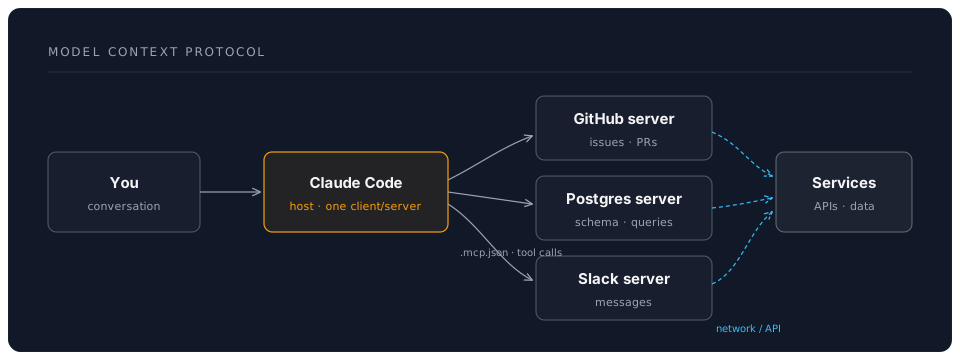
Claude decides when to use MCP tools based on your request. If you ask "show me open bugs assigned to me", and a GitHub MCP server is connected, Claude will use it automatically.
Built-In MCP Support
Claude Code has native support for MCP servers. No plugins or additional software needed — just a configuration file.
Popular MCP Servers
The MCP ecosystem has grown substantially. Here are the most useful servers:
| Server | What It Does | Source |
|---|---|---|
| GitHub | Issues, PRs, repos, actions | @modelcontextprotocol/server-github |
| Postgres | Query and manage PostgreSQL databases | @modelcontextprotocol/server-postgres |
| Filesystem | Read/write files on remote or restricted paths | @modelcontextprotocol/server-filesystem |
| Slack | Send messages, read channels | @modelcontextprotocol/server-slack |
| Google Drive | Read and search documents | @modelcontextprotocol/server-gdrive |
| Browser | Navigate web pages, take screenshots | Various community servers |
| SQLite | Local SQLite database operations | @modelcontextprotocol/server-sqlite |
| Memory | Persistent key-value storage across sessions | @modelcontextprotocol/server-memory |
Many more exist. Check the MCP server registry at modelcontextprotocol.io for the full list.
Configuring MCP Servers
MCP servers are configured in a .mcp.json file at the root of your project (or in ~/.claude/.mcp.json for global servers).
Basic Structure
{
  "mcpServers": {
    "server-name": {
      "command": "npx",
      "args": ["-y", "@modelcontextprotocol/server-name"],
      "env": {
        "API_KEY": "your-key-here"
      }
    }
  }
}
Each entry defines:
- Key — A name you choose for the server
- command — The command to start the server
- args — Arguments passed to the command
- env — Environment variables the server needs
Example: GitHub MCP Server
This is one of the most useful MCP integrations. It gives Claude access to your GitHub repositories, issues, pull requests, and actions.
1. Create a GitHub personal access token:
Go to github.com/settings/tokens and create a fine-grained token with these permissions:
- Repository access: the repos you want Claude to work with
- Permissions: Issues (read/write), Pull requests (read/write), Contents (read)
2. Configure the server:
Create .mcp.json in your project root:
{
  "mcpServers": {
    "github": {
      "command": "npx",
      "args": ["-y", "@modelcontextprotocol/server-github"],
      "env": {
        "GITHUB_PERSONAL_ACCESS_TOKEN": "ghp_your_token_here"
      }
    }
  }
}
3. Use it:
Start Claude Code and try:
> Show me all open issues labelled "bug" in this repository.
Claude connects to the GitHub MCP server, queries your issues, and presents them. You can then ask it to triage them, create new issues, or even draft pull requests.
Example: PostgreSQL MCP Server
Connect Claude to your development database for querying and schema exploration.
{
  "mcpServers": {
    "postgres": {
      "command": "npx",
      "args": [
        "-y",
        "@modelcontextprotocol/server-postgres",
        "postgresql://user:password@localhost:5432/mydb"
      ]
    }
  }
}
Now you can ask Claude:
> Show me the schema for the orders table and the last 10 orders.
> Write a migration to add an "archived" boolean column to the users table.
Claude queries the database schema, understands the data model, and writes code that fits your actual database — not a hypothetical one.
Example: Filesystem MCP Server
Useful when you want Claude to access files outside your project directory, or on a remote filesystem:
{
  "mcpServers": {
    "docs": {
      "command": "npx",
      "args": [
        "-y",
        "@modelcontextprotocol/server-filesystem",
        "/home/user/shared-docs"
      ]
    }
  }
}
Example: Slack MCP Server
Let Claude send notifications or read channel history:
{
  "mcpServers": {
    "slack": {
      "command": "npx",
      "args": ["-y", "@modelcontextprotocol/server-slack"],
      "env": {
        "SLACK_BOT_TOKEN": "xoxb-your-bot-token",
        "SLACK_TEAM_ID": "T0123456789"
      }
    }
  }
}
Multiple MCP Servers
You can configure as many MCP servers as you need:
{
  "mcpServers": {
    "github": {
      "command": "npx",
      "args": ["-y", "@modelcontextprotocol/server-github"],
      "env": {
        "GITHUB_PERSONAL_ACCESS_TOKEN": "ghp_..."
      }
    },
    "postgres": {
      "command": "npx",
      "args": [
        "-y",
        "@modelcontextprotocol/server-postgres",
        "postgresql://user:pass@localhost:5432/mydb"
      ]
    },
    "memory": {
      "command": "npx",
      "args": ["-y", "@modelcontextprotocol/server-memory"]
    }
  }
}
Claude discovers all available tools at session start and uses them as appropriate.
Security Considerations
MCP servers run with your permissions. This means:
-
Database access — An MCP server connected to your production database can read and write to it. Use read-only credentials for exploration; save write access for development databases.
-
API tokens — Tokens in
.mcp.jsonshould have minimal permissions. Create tokens specifically for Claude Code use, not your personal tokens with full access. -
Do not commit secrets — Add
.mcp.jsonto.gitignoreif it contains tokens. Alternatively, use environment variable references:
{
  "mcpServers": {
    "github": {
      "command": "npx",
      "args": ["-y", "@modelcontextprotocol/server-github"],
      "env": {
        "GITHUB_PERSONAL_ACCESS_TOKEN": "${GITHUB_TOKEN}"
      }
    }
  }
}
-
Network exposure — MCP servers can make network requests. Be aware of what data they send and where.
-
Review tool calls — When Claude uses an MCP tool, you see what it is doing. Review write operations (creating issues, sending messages) carefully.
Practical Workflow: Issue-Driven Development
Here is a complete workflow combining GitHub MCP with Claude Code:
You: Show me the highest-priority open bugs.

Claude: [queries GitHub MCP → lists 5 open bugs sorted by priority]

You: Let's fix issue #42 — the user session timeout bug.

Claude: [reads the issue details from GitHub]
        [reads the relevant source files]
        [proposes a fix with a diff]

You: [approves the fix]

Claude: [creates a git branch: fix/session-timeout-42]
        [commits the change]
        [creates a pull request linking to issue #42]
From issue discovery to pull request, without leaving your terminal.
Troubleshooting MCP Connections
Server fails to start: Run the MCP server command manually to see error output:
npx -y @modelcontextprotocol/server-github
Authentication errors: Check that your tokens are valid and have the required permissions. Tokens expire — regenerate if needed.
Claude does not use the MCP server:
Verify that .mcp.json is in the correct location (project root or ~/.claude/). Restart Claude Code after changing the configuration.
Slow responses: MCP server calls add latency. If a server is consistently slow, check the underlying service's health and network connectivity.
Writing Your Own MCP Server
If your team has a proprietary service that no existing MCP server covers, you can write your own. The MCP specification is open and well-documented. An MCP server is a small program that:
- Describes its available tools (name, description, input schema)
- Handles tool calls and returns results
- Communicates via standard I/O (stdin/stdout) or HTTP
The @modelcontextprotocol/sdk package provides TypeScript bindings for building servers. Python and other language SDKs are also available.
This is beyond the scope of this workshop, but the MCP documentation provides comprehensive guides and examples.
Next: Chapter 5: Hooks and Automation — Event-Driven Workflows
DreamLab AI Self-Guided Workshop | June 2026