Chapter 0: Introduction — What Is Claude Code?
June 2026 — Claude Code is Anthropic's agentic coding tool, available as a CLI, desktop app, web app, and IDE extensions for VS Code and JetBrains.
The Shift from Chat to Agent
For years, AI coding assistance meant one thing: you describe what you want, the AI generates a code block, and you copy it into your project. This workflow has a fundamental bottleneck — you are the intermediary between the AI's suggestions and your codebase. You copy, paste, fix integration issues, run tests, and go back to the chat when something breaks.
Claude Code removes that bottleneck. Instead of generating code for you to transplant, it works directly inside your project:
- It reads your files to understand your codebase
- It edits your code with precise, targeted changes
- It runs your commands — tests, linters, build tools
- It searches the web for documentation and solutions
- It manages git — commits, branches, pull requests
- It asks permission before making changes you haven't approved
This is the difference between having an AI assistant that hands you instructions and having one that rolls up its sleeves and works alongside you.
What Exactly Is Claude Code?
Claude Code is a tool built by Anthropic that connects Claude (the AI model) to your development environment. When you run claude in your terminal, you get an interactive session where Claude can see your project, understand your context, and take action.
The Core Loop
Every interaction follows the same pattern:
1. You describe what you want (in natural language)
2. Claude analyses your project (reads files, understands structure)
3. Claude proposes actions (edits, commands, searches)
4. You approve or modify the plan
5. Claude executes and shows you the results
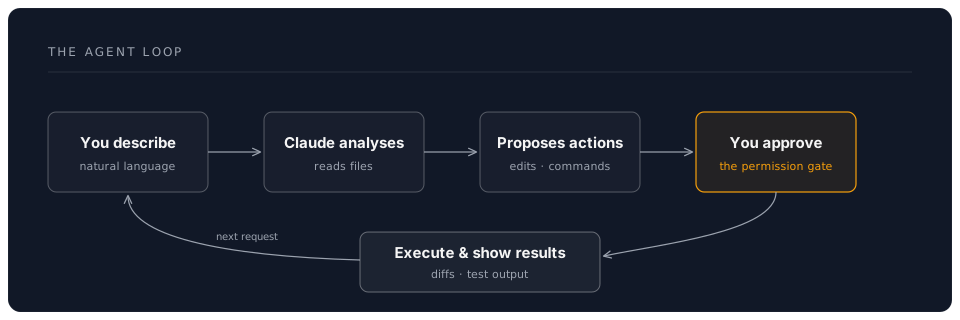
This approval step is crucial. Claude Code is designed around a permission model — it will never silently modify your files or run destructive commands without your say-so.
Available Everywhere
Claude Code started as a terminal CLI, but it now runs in multiple environments:
| Surface | Install | Best For |
|---|---|---|
| CLI | npm install -g @anthropic-ai/claude-code | Terminal-native developers, automation, CI/CD |
| Desktop App | Download from anthropic.com | Mac and Windows users who prefer a standalone app |
| Web App | claude.ai/code | Browser-based access, no installation required |
| VS Code Extension | VS Code Marketplace | Developers who live in VS Code |
| JetBrains Extension | JetBrains Marketplace | IntelliJ, PyCharm, WebStorm users |
All surfaces connect to the same Claude models and share the same core capabilities. The CLI remains the most powerful surface — it has full access to hooks, MCP servers, and subagents — but the IDE extensions are excellent for day-to-day coding.
What Claude Code Is Not
It is worth being clear about boundaries. Claude Code is not an inline autocomplete tool — it does not predict what you are about to type in your editor. It is not a background process that watches your keystrokes. It is a conversational agent that you invoke when you have a task, a question, or a problem. You talk to it, it works with your files, and you review and approve the results.
How Claude Code Differs from Other Tools
The AI coding tool landscape in 2026 is rich. Here is where Claude Code fits:
Claude Code vs GitHub Copilot
Copilot excels at inline autocomplete — it predicts what you are about to type and fills it in. Claude Code is not an autocomplete tool. It is an agent that takes on entire tasks: "add pagination to this API endpoint", "debug why this test is failing", "refactor this module to use the new database schema".
Think of Copilot as a fast typist sitting next to you, and Claude Code as a colleague who can take a task off your plate entirely.
Copilot is available from $10/month (free for students and open-source contributors). Claude Code requires an Anthropic account — check console.anthropic.com for current plans and pricing.
Claude Code vs Cursor
Cursor is a VS Code fork with AI deeply integrated into the IDE experience. It is excellent for developers who want AI woven into their editor. Claude Code is terminal-native and IDE-agnostic. It works with any editor, any language, any project structure. Its power comes from direct access to your filesystem and shell, not from IDE integration.
If you prefer to work primarily in an IDE, Cursor is a strong choice. If you prefer the terminal, work across multiple editors, or need advanced features like MCP servers and hooks, Claude Code is the better fit.
Claude Code vs ChatGPT / GPT-4o
ChatGPT is a general-purpose AI assistant. It can write code, but it cannot see your project, edit your files, or run your tests. Every interaction starts from scratch. Claude Code is project-aware — it reads your CLAUDE.md configuration, understands your directory structure, and maintains context across your conversation.
Claude Code vs OpenAI Codex CLI
Codex CLI is OpenAI's open-source terminal-based coding agent. Both tools share the same philosophy — agentic, terminal-native, permission-gated. The key differences are the underlying models (Claude vs GPT), the configuration system (CLAUDE.md vs AGENTS.MD), and the extension ecosystem (MCP servers vs custom tools). Claude Code's MCP server support gives it a significant advantage for integrating with external services.
Claude Code vs Aider and Continue.dev
Aider is a free, open-source terminal agent that works with multiple LLM providers. Continue.dev is a free, open-source IDE extension with multi-model support. Both are strong choices for developers who want flexibility across providers. Claude Code is tightly integrated with Claude's models, which gives it advantages in reasoning quality and agentic capability at the cost of being Anthropic-only.
The Tools Claude Code Uses
Under the hood, Claude Code has a set of tools it can invoke during a conversation:
| Tool | What It Does |
|---|---|
| Read | Reads files from your project |
| Write | Creates new files |
| Edit | Makes targeted edits to existing files |
| Bash | Runs shell commands (with your approval) |
| WebSearch | Searches the web for information |
| WebFetch | Fetches content from specific URLs |
| Agent | Spawns a subagent for a specialised task |
| Workflow | Runs a scripted multi-step pipeline |
Each tool use is visible to you. When Claude wants to read a file, you see which file. When it wants to run a command, you see the exact command. When it wants to edit code, you see the diff. You are always in control.
The Current Models (June 2026)
Claude Code can use any of Anthropic's current models:
| Model | ID | Strengths |
|---|---|---|
| Fable 5 | claude-fable-5 | Most powerful model available; new tier above Opus |
| Opus 4.8 | claude-opus-4-8 | State-of-the-art agentic work, coding, knowledge tasks |
| Sonnet 4.6 | claude-sonnet-4-6 | Best speed/intelligence balance for daily work |
| Haiku 4.5 | claude-haiku-4-5-20251001 | Fastest and most cost-effective for simple tasks |
Claude Code defaults to Opus. The /fast slash command switches to faster output. For most development work, Opus is the right choice — it reasons deeply, handles complex multi-file changes, and excels at long-running agentic tasks.
For current pricing, check console.anthropic.com. Anthropic offers both pay-as-you-go API pricing and subscription plans that include Claude Code usage.
The Agent SDK
Beyond using Claude Code interactively, Anthropic provides an Agent SDK for building custom agents. If you need to embed Claude's agentic capabilities into your own tools, CI pipelines, or internal platforms, the Agent SDK gives you programmatic control over the same tool-use loop that powers Claude Code.
This is an advanced topic that goes beyond the scope of this workshop, but it is worth knowing that the same capabilities you learn here can be embedded into custom software.
What You Will Learn in This Workshop
This workshop is structured as a progressive journey:
- Getting Started — Install Claude Code, authenticate, run your first commands
- Core Features — Master file operations, bash commands, slash commands, and permission modes
- CLAUDE.md — Write project configuration files that make Claude an expert on your codebase
- MCP Servers — Connect Claude to databases, GitHub, Slack, and other external services
- Hooks & Automation — Set up event-driven workflows that run on every edit or commit
- Subagents & Workflows — Orchestrate multiple agents working in parallel
- Practical Patterns — Apply everything to real-world scenarios: onboarding, debugging, refactoring, documentation, and code review
By the end, you will have a working Claude Code setup tailored to your projects, with CLAUDE.md files, MCP connections, and automation hooks in place.
A Note on This Workshop
This material is written for professionals who want to get things done. Every chapter includes real commands you can run, real configuration you can copy, and real patterns you can apply to your work today. We have kept the theory concise and the practice extensive.
The exercises in Chapter 8 are designed to be completed with your own projects. The best way to learn Claude Code is to use it on real work.
Next: Chapter 1: Getting Started — Installation and First Run
DreamLab AI Self-Guided Workshop | June 2026