Practical Exercises
Overview
These four exercises bring together everything you've learnt. Each one is self-contained and builds on the skills from the previous sections. Work through them at your own pace -- there's no time pressure.
For each exercise, you'll find:
- Objective -- what you're building
- Steps -- guided instructions
- Hints -- if you get stuck
- Success criteria -- how to verify your solution works
Exercise 1: Containerise a Python AI Script (20 minutes)
Difficulty: Beginner
Objective
Take a Python script that performs sentiment analysis and package it into a Docker container.
Setup
Create a directory called sentiment-exercise/ and add this file:
analyse.py:
"""Simple keyword-based sentiment analyser."""

import sys
import json

POSITIVE_WORDS = {
    "good", "great", "excellent", "wonderful", "fantastic", "amazing",
    "love", "happy", "brilliant", "superb", "outstanding", "delightful",
    "pleased", "enjoy", "perfect", "beautiful", "best", "favourite"
}

NEGATIVE_WORDS = {
    "bad", "terrible", "awful", "horrible", "hate", "poor", "worst",
    "disappointing", "dreadful", "rubbish", "annoying", "ugly",
    "boring", "useless", "broken", "fail", "wrong", "sad"
}


def analyse_sentiment(text: str) -> dict:
    """Analyse the sentiment of input text."""
    words = text.lower().split()
    positive_count = sum(1 for w in words if w.strip(".,!?") in POSITIVE_WORDS)
    negative_count = sum(1 for w in words if w.strip(".,!?") in NEGATIVE_WORDS)
    total = positive_count + negative_count

    if total == 0:
        sentiment = "neutral"
        confidence = 0.0
    elif positive_count > negative_count:
        sentiment = "positive"
        confidence = positive_count / total
    else:
        sentiment = "negative"
        confidence = negative_count / total

    return {
        "text": text,
        "sentiment": sentiment,
        "confidence": round(confidence, 2),
        "positive_words": positive_count,
        "negative_words": negative_count
    }


if __name__ == "__main__":
    if len(sys.argv) > 1:
        input_text = " ".join(sys.argv[1:])
    else:
        print("Usage: python analyse.py <text>")
        sys.exit(1)

    result = analyse_sentiment(input_text)
    print(json.dumps(result, indent=2))
Your Task
-
Write a
Dockerfilethat:- Uses
python:3.11-slimas the base image - Sets up a working directory
- Copies the script into the image
- Runs as a non-root user
- Uses
ENTRYPOINTso you can pass text as arguments
- Uses
-
Build the image with the tag
sentiment:1.0 -
Run the container with sample text and verify the output
Hints
Click to reveal hints
- The Dockerfile should be about 10-15 lines
- Use
ENTRYPOINT ["python", "analyse.py"]so arguments are passed through - Don't forget to create a non-root user with
RUN useradd --create-home appuser - The script has no external dependencies, so you don't need a
requirements.txt
Success Criteria
Running the following command should produce JSON output with sentiment analysis:
docker run sentiment:1.0 "This workshop is absolutely brilliant and I love learning about Docker"
Expected output (approximately):
{
  "text": "This workshop is absolutely brilliant and I love learning about Docker",
  "sentiment": "positive",
  "confidence": 1.0,
  "positive_words": 2,
  "negative_words": 0
}
Exercise 2: Create a Dev Container for a Project (25 minutes)
Difficulty: Intermediate
Objective
Set up a complete Dev Container configuration for a data science project that uses Python, Jupyter, and pandas.
Setup
Create a project directory called data-analysis/ with this file:
analysis.py:
"""Sample data analysis script."""

import pandas as pd
import numpy as np

# Create sample data
np.random.seed(42)
data = pd.DataFrame({
    "date": pd.date_range("2026-01-01", periods=100, freq="D"),
    "sales": np.random.normal(1000, 200, 100).astype(int),
    "category": np.random.choice(["Electronics", "Books", "Clothing"], 100),
    "region": np.random.choice(["North", "South", "East", "West"], 100)
})

# Analysis
print("=== Sales Summary ===")
print(f"Total records: {len(data)}")
print(f"Date range: {data['date'].min()} to {data['date'].max()}")
print(f"\nSales by category:")
print(data.groupby("category")["sales"].agg(["mean", "sum", "count"]).round(0))
print(f"\nSales by region:")
print(data.groupby("region")["sales"].agg(["mean", "sum", "count"]).round(0))
requirements.txt:
pandas>=2.2.0
numpy>=1.26.0
jupyter>=1.0.0
matplotlib>=3.9.0
seaborn>=0.13.0
Your Task
-
Create a
.devcontainer/devcontainer.jsonthat:- Uses a Python 3.11 Dev Container base image
- Adds the Node.js feature (version 20)
- Installs Python, Pylance, Ruff, and Jupyter VS Code extensions
- Runs
pip install -r requirements.txtafter creation - Forwards port 8888 (for Jupyter)
- Sets
editor.formatOnSavetotrue
-
Open the project in VS Code and reopen in the Dev Container
-
Run
analysis.pyin the container's terminal -
Start Jupyter with
jupyter notebook --ip 0.0.0.0 --port 8888and open it in your browser
Hints
Click to reveal hints
- Base image:
mcr.microsoft.com/devcontainers/python:3.11 - Extension IDs:
ms-python.python,ms-python.vscode-pylance,charliermarsh.ruff,ms-toolsai.jupyter - Use
postCreateCommandfor pip install - Features go in the
featuresobject with the format"ghcr.io/devcontainers/features/node:1": {"version": "20"}
Success Criteria
- VS Code reopens in the container without errors
-
python analysis.pyproduces a sales summary table -
jupyter notebookstarts and is accessible atlocalhost:8888 - The Python and Jupyter extensions are available in VS Code
Exercise 3: Set Up Remote Docker Development (20 minutes)
Difficulty: Intermediate
Objective
Configure Docker Context to run containers on a remote machine (or simulate it locally if you don't have a remote server).
If You Have a Remote Server
- Create a Docker Context pointing to your remote server:
docker context create my-remote --docker "host=ssh://user@your-server-ip"
- Switch to the remote context:
docker context use my-remote
- Run a container on the remote machine:
docker run -d --name remote-test -p 8080:80 nginx
- Verify it's running on the remote machine:
docker ps
curl http://your-server-ip:8080
- Clean up and switch back:
docker rm -f remote-test
docker context use default
If You Don't Have a Remote Server
Simulate the workflow locally by creating contexts:
- Create a "remote" context that just points to your local Docker:
docker context create simulated-remote --docker "host=unix:///var/run/docker.sock"
- Practice switching contexts:
# Check current context
docker context ls

# Switch to "remote"
docker context use simulated-remote
docker ps

# Switch back
docker context use default
- Run a container under the "remote" context:
docker --context simulated-remote run -d --name context-test nginx
docker --context simulated-remote ps
docker --context simulated-remote rm -f context-test
Success Criteria
- You can create and list Docker contexts
- You can switch between contexts
- You can run containers targeting a specific context
- You understand the workflow for remote container management
Exercise 4: Build a Multi-Container AI Pipeline (25 minutes)
Difficulty: Advanced
Objective
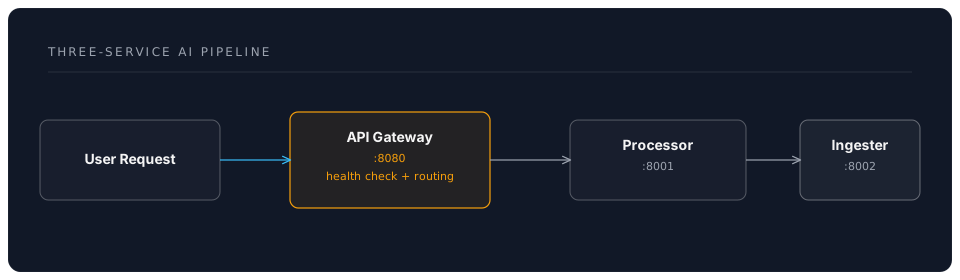
Build a three-service Docker Compose stack that simulates an AI processing pipeline: an ingestion service, a processing service, and an API gateway.
Architecture
Your Task
Create a directory called ai-pipeline-exercise/ with the following structure:
ai-pipeline-exercise/
  compose.yaml
  gateway/
    Dockerfile
    gateway.py
  processor/
    Dockerfile
    processor.py
  ingester/
    Dockerfile
    ingester.py
ingester/ingester.py -- accepts text, returns it cleaned and tokenised:
"""Ingestion service: cleans and tokenises text."""

from http.server import HTTPServer, BaseHTTPRequestHandler
import json
import re


class IngestHandler(BaseHTTPRequestHandler):
    def do_POST(self):
        content_length = int(self.headers.get("Content-Length", 0))
        body = self.rfile.read(content_length)
        data = json.loads(body)

        text = data.get("text", "")

        # Clean the text
        cleaned = re.sub(r"[^\w\s]", "", text.lower())
        tokens = cleaned.split()

        response = json.dumps({
            "original": text,
            "cleaned": cleaned,
            "tokens": tokens,
            "token_count": len(tokens)
        })

        self.send_response(200)
        self.send_header("Content-Type", "application/json")
        self.end_headers()
        self.wfile.write(response.encode())

    def do_GET(self):
        self.send_response(200)
        self.end_headers()
        self.wfile.write(b'{"service": "ingester", "status": "healthy"}')


if __name__ == "__main__":
    server = HTTPServer(("0.0.0.0", 8000), IngestHandler)
    print("Ingester running on port 8000")
    server.serve_forever()
What You Need to Write
- processor.py -- receives ingested data, adds word frequency analysis, returns enriched results
- gateway.py -- accepts user requests, calls ingester, then processor, returns combined results
- Dockerfile for each service (they're all simple Python scripts)
- compose.yaml that wires everything together with:
- A shared network
- Health checks on each service
- Only the gateway port (8080) exposed to the host
depends_onto control startup order
Hints
Click to reveal hints
- All three Dockerfiles are nearly identical:
FROM python:3.11-slim, copy the script, run it - The processor can count word frequencies with
collections.Counter - The gateway uses
urllib.requestto call the other services - Service names in compose.yaml become hostnames:
http://ingester:8000,http://processor:8000 - Use an internal network for the backend services
Success Criteria
Test the complete pipeline:
# Start the stack
docker compose up -d --build

# Send a request through the gateway
curl -X POST http://localhost:8080 \
  -H "Content-Type: application/json" \
  -d '{"text": "Docker makes AI development much easier and more reproducible"}'
Expected response should include:
- Original text
- Cleaned and tokenised text
- Token count
- Word frequency analysis
- Confirmation that all three services participated
# Check all services are healthy
docker compose ps

# View logs
docker compose logs

# Clean up
docker compose down
Going Further
If you've completed all four exercises and want more practice:
- Add logging to the multi-container pipeline (try a shared logging volume)
- Add a web frontend to the sentiment analyser using Flask or FastAPI
- Create a Dev Container that includes Docker-in-Docker, so you can build containers inside your Dev Container
- Set up a monitoring stack by adding Prometheus and Grafana containers to any of the exercises
Next: Resources & Next Steps