Introduction: Why Containers Matter for AI
The Problem Everyone Faces
Picture this. You've spent three days getting an AI model running on your laptop. You've installed Python 3.11, a specific version of PyTorch, a handful of obscure libraries, tweaked some system settings, and finally -- it works. You share the code with a colleague. They try to run it. It doesn't work.
"It works on my machine," you say, helplessly.
This is perhaps the most common frustration in software development, and it's especially painful in AI work. AI tools have complex dependency chains: specific Python versions, CUDA toolkit versions, GPU drivers, system libraries, and configuration files that all need to align perfectly. Change one thing and the whole stack can collapse.
Containers solve this problem completely.
What Is a Container?
A container is a lightweight, self-contained package that includes everything an application needs to run: the code, the runtime, the libraries, the system tools, and the configuration. When you run a container, it behaves the same way on every machine, regardless of what's installed on the host system.
Think of it like a shipping container. Before standardised shipping containers existed, moving goods between ships, trains, and lorries was a nightmare -- every load was a different shape and size. The standardised container changed everything. Goods are packed once, and the container fits on any ship, train, or lorry in the world.
Software containers work the same way. You pack your application once, and it runs anywhere.
Containers vs Virtual Machines
You might have heard of virtual machines (VMs). Both VMs and containers provide isolation, but they work very differently:
| Feature | Virtual Machine | Container |
|---|---|---|
| Boot time | Minutes | Seconds |
| Size | Gigabytes (full OS) | Megabytes to low gigabytes |
| Performance | Near-native with overhead | Near-native, minimal overhead |
| Isolation | Full OS-level | Process-level |
| Resource usage | Heavy (runs entire OS) | Light (shares host kernel) |
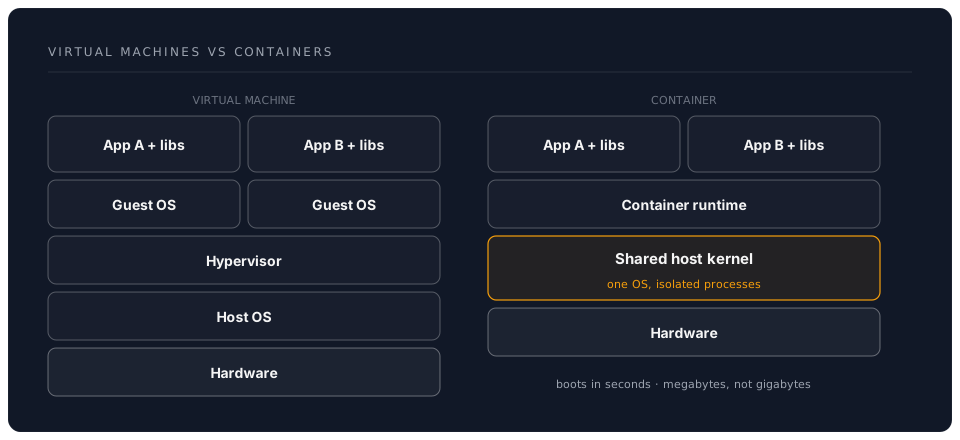
A VM runs an entire operating system inside your operating system. A container shares the host's operating system kernel and only packages the application layer. This makes containers dramatically lighter and faster.
Why AI Work Especially Needs Containers
1. Dependency Hell Is Real
A typical AI project might require:
- Python 3.11 (not 3.10, not 3.12 -- specifically 3.11)
- PyTorch 2.3 with CUDA 12.1 support
- A particular version of
transformersfrom Hugging Face ffmpegfor audio processing- System-level libraries like
libsndfileorlibgl - Specific versions of
numpythat don't conflict with other packages
Install all of this manually on five different machines and you'll get five different results. Put it in a container and you get the same result every time.
2. GPU Driver Isolation
AI models often need GPU acceleration, which means NVIDIA drivers and CUDA toolkits. Different models may need different CUDA versions. On a bare machine, you can only have one CUDA installation active at a time. With containers, you can run different CUDA versions side by side, each in its own container.
3. Reproducible Research
If you publish a research paper, your results should be reproducible. Sharing a container image alongside your paper means anyone can recreate your exact computing environment -- not just the code, but the entire stack it runs on. No more "we couldn't reproduce the results" reviews.
4. Safe Experimentation
Containers are disposable. Want to try a new AI framework? Run it in a container. If it breaks things, delete the container. Your host machine is untouched. This is especially valuable when experimenting with tools that require system-level changes or unusual dependencies.
5. Multi-Tool Isolation
Modern AI workflows often involve multiple tools that conflict with each other. Perhaps your embedding model needs one version of a library while your language model needs another. Containers let each tool live in its own isolated environment, communicating over a network, without any dependency conflicts.
What Is Docker?
Docker is the most widely used container platform. When people say "containers," they usually mean Docker containers. Docker provides:
- Docker Engine -- the runtime that actually runs containers
- Docker CLI -- the command-line tool you use to manage containers
- Docker Desktop -- a graphical application for Windows and macOS that bundles the engine, CLI, and a lightweight Linux VM (since containers are Linux-native)
- Docker Hub -- a public registry where people share container images (like GitHub, but for containers)
- Docker Compose -- a tool for defining multi-container applications
A Brief History
Docker was released in 2013 and quickly became the industry standard for containerisation. Before Docker, container technology existed (Linux had LXC containers), but Docker made it accessible to ordinary developers. Today, Docker containers are used everywhere: from local development to massive cloud deployments running thousands of services.
Docker and the AI Ecosystem
The AI community has embraced Docker enthusiastically. Most major AI tools provide official Docker images:
- Ollama -- local LLM runner (we use this in the Phase 3 Local AI workshop)
- Open WebUI -- chat interface for local models
- Hugging Face Text Generation Inference -- production-grade model serving
- ChromaDB, Qdrant, Weaviate -- vector databases for RAG systems
- Jupyter -- notebook environments with pre-installed AI libraries
- NVIDIA Container Toolkit -- GPU-accelerated containers
This means you can have a complete AI development stack running in minutes, without installing anything directly on your machine beyond Docker itself.
What You'll Build in This Workshop
Over the next six hours, you'll go from zero Docker knowledge to being able to:
- Run pre-built AI containers -- Ollama, Open WebUI, and other tools
- Build custom container images -- packaging your own AI scripts and tools
- Use Docker Compose -- orchestrating multi-service AI stacks
- Set up VS Code Dev Containers -- one-click reproducible development environments
- Work with remote Docker hosts -- editing locally, running on powerful machines
- Containerise AI pipelines -- packaging agents, RAG systems, and multi-model workflows
By the end, containers will feel like second nature, and you'll wonder how you ever managed without them.
Containers and the AI Agent Era
The rise of AI coding agents -- tools like Claude Code, OpenAI Codex CLI, and Aider -- has made containers more relevant than ever. These agents edit files, run shell commands, and install packages. Giving them access to your host machine directly carries risk: an agent might install conflicting packages, modify system files, or leave behind artefacts that are hard to clean up.
Running agents inside containers solves this cleanly. The agent has full access to a self-contained environment where it can install whatever it needs, run any commands, and make any changes -- and if anything goes wrong, you delete the container and start fresh. Your host machine remains untouched.
This pattern -- agents in containers -- is one of the practical workflows we'll build in this workshop.
The Landscape: Docker Is Not the Only Option
While Docker is the dominant container platform (and the one we'll use throughout this workshop), it's worth knowing that alternatives exist:
- Podman -- a daemonless, rootless container engine that's compatible with Docker commands
- OrbStack -- a fast, lightweight Docker alternative specifically for macOS
- Rancher Desktop -- an open-source alternative that works on all platforms
- containerd / nerdctl -- lower-level tools used by Kubernetes and cloud platforms
All of these run the same OCI-standard container images. Skills you learn with Docker transfer directly to any of these tools. We cover the alternatives briefly in the Core Concepts section.
Before We Begin
Make sure you have:
- A computer with at least 8 GB of RAM and 20 GB of free disk space
- VS Code installed
- An internet connection (for downloading Docker and container images)
- About 30 minutes for this introduction section
You don't need any prior Docker experience. We'll explain every concept from first principles.