Workshop 06: Mastering AI-Powered Coding Agents (2026 Edition)
Last Updated: June 2026 — Comprehensive coverage of Claude Code, OpenAI Codex CLI, GitHub Copilot, Cursor AI, and the complete AI coding agent landscape.
Executive Summary
The AI-assisted software development landscape has undergone a generational shift. What began with single-line autocomplete in 2021 has matured into fully agentic coding systems that autonomously navigate codebases, execute multi-file refactors, run tests, and submit pull requests. By mid-2026, two categories of tool define the frontier: terminal-based coding agents (Claude Code and OpenAI Codex CLI) that operate with full repository context and shell access, and IDE-integrated assistants (Cursor, GitHub Copilot, Windsurf) that embed AI directly into the editor workflow. This workshop provides a practitioner's guide to the entire ecosystem.
Key Learning Outcomes
By completing this workshop, you will:
- Master Terminal-Based AI Agents — Work fluently with Claude Code and OpenAI Codex CLI for agentic software engineering
- Compare Tools Strategically — Make informed decisions between Claude Code, Codex CLI, Cursor, Copilot, and open-source alternatives
- Implement Best Practices — Apply proven patterns for project configuration (CLAUDE.md, AGENTS.MD), prompt engineering, and task management
- Navigate Challenges — Address security, privacy, ethics, and technical limitations
- Future-Proof Skills — Understand emerging trends and prepare for the next generation of AI coding tools
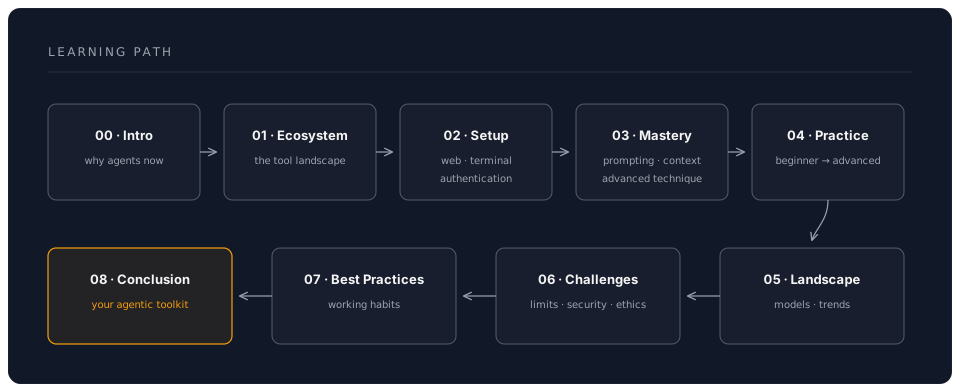
Workshop Structure
Target Audience
- Software Engineers seeking to multiply productivity with AI assistance
- Tech Leads evaluating AI coding tools for team adoption
- Individual Developers wanting to stay current with AI coding practices
- CTOs/Engineering Managers making strategic tooling decisions
Technology Coverage (June 2026)
| Category | Tools Covered | Focus Level |
|---|---|---|
| Anthropic Claude | Claude Code (CLI, desktop, web, IDE extensions), Fable 5, Opus 4.8, Sonnet 4.6, Haiku 4.5 | Deep Dive |
| OpenAI Ecosystem | Codex CLI (open-source), ChatGPT (GPT-4o, o3), Canvas Mode | Deep Dive |
| IDE-Integrated | Cursor AI, GitHub Copilot (+ Workspace), Windsurf | Comprehensive |
| Open Source | Continue.dev, Aider, OpenAI Codex CLI | Comprehensive |
| Historical | Original Codex API (deprecated 2023) | Historical Context |
Prerequisites
- Basic programming knowledge (any language)
- Familiarity with Git and command-line tools
- An Anthropic account and/or OpenAI account
- Optional: Experience with VS Code or JetBrains IDEs
Estimated Time Investment
- Quick Start: 2-3 hours (Chapters 0-2)
- Core Mastery: 8-10 hours (Chapters 0-4)
- Complete Workshop: 15-20 hours (All chapters + exercises)
What Makes This Workshop Unique
- Battle-Tested Insights — Based on real-world usage patterns across multiple tools and teams
- Multi-Tool Perspective — Head-to-head comparison across the entire landscape
- Practical Examples — 50+ real-world scenarios from simple fixes to complex architectures
- Security-First — Enterprise-grade security and privacy considerations
- Future-Looking — Trends, emerging patterns, and what to watch for next
Key Metrics & Benchmarks (2026)
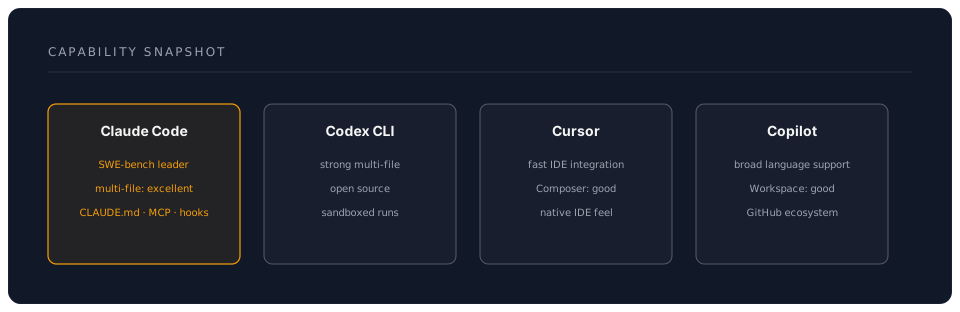
Note on benchmarks: AI coding benchmarks evolve rapidly and published numbers can vary by evaluation methodology. Rather than citing specific percentages that date quickly, we recommend consulting each vendor's latest benchmark disclosures and running your own evaluations on tasks representative of your codebase.
Quick Reference Card
Claude Code (Anthropic):
- Install:
npm install -g @anthropic-ai/claude-code - Also available as: Desktop app (Mac/Windows/Linux), web app (claude.ai/code), VS Code & JetBrains extensions
- Models: Opus 4.8 (default), Sonnet 4.6 via
/fastmode, Fable 5 and Haiku 4.5 also available — check console.anthropic.com for current rates - Key features: CLAUDE.md, MCP servers, hooks, subagents, workflows,
/fastmode, Agent SDK
OpenAI Codex CLI:
- Install:
npm install -g @openai/codex - Open source: github.com/openai/codex
- Models: Configurable (codex-mini, o4-mini, GPT-4o, o3, etc.) — check platform.openai.com for current rates
- Key features: AGENTS.MD, sandboxed execution, multi-provider support
IDE-Integrated Tools:
- Cursor: cursor.sh (VS Code fork, from $20/mo)
- GitHub Copilot: VS Code/JetBrains extensions ($10-39/mo, free for students/OSS)
- Windsurf: windsurf.com (from $10-15/mo)
- Continue.dev: marketplace extension (free, open-source)
Workshop Navigation
Start Here: Chapter 0: Introduction
Complete Chapter List:
- Introduction to AI-Powered Software Engineering
- Understanding the AI Coding Ecosystem
- Claude Code, OpenAI Codex CLI, IDE tools, and how they compare
- Getting Started
- Mastering AI Coding Agents
- Practical Applications
- The Broader Landscape
- Navigating Challenges
- Best Practices for Using AI Agents
- Conclusion and Next Steps
Community & Support
- Anthropic Community: docs.anthropic.com, Claude Code GitHub discussions
- OpenAI Community: community.openai.com
- GitHub Discussions: Share your projects and patterns
- Twitter/X: #ClaudeCode #AICode #CodingAgents
Credits
This workshop is based on insights from real-world usage patterns across thousands of developers, competitive landscape analysis, and hands-on experience with every major AI coding tool as of June 2026.
Ready to transform your coding workflow? Start with Chapter 0: Introduction
Last Updated: June 2026 | Covers Claude Code (Fable 5, Opus 4.8, Sonnet 4.6, Haiku 4.5), OpenAI Codex CLI, Cursor, Copilot, and the full AI coding ecosystem