5.a: Agentic Tools vs. Chat Models for Coding
While both agentic coding tools (Claude Code, Codex CLI) and chat-based models (ChatGPT, Claude.ai) can generate, explain, and refactor code, they operate with fundamentally different paradigms. Understanding this distinction is key to choosing the right tool for each task.
Agentic Tools: Active Agents in Your Environment
Agentic tools like Claude Code and Codex CLI act as active agents within your development environment. They:
- Read your codebase: Navigate directory structures, read file contents, understand project architecture
- Write files: Create new files and modify existing ones directly on disk
- Execute commands: Run tests, linters, build tools, and shell commands
- Manage Git: Create commits, branches, and pull requests
- Iterate autonomously: If tests fail, they can analyse the failure and try a different approach
- Follow project configuration: Read CLAUDE.md or AGENTS.MD for context
When to Use Agentic Tools
- Tasks that require changes across multiple files
- Implementing features that need to integrate with existing code
- Refactoring that must maintain test coverage
- Bug fixing where the agent needs to reproduce and verify the fix
- Any task where you would otherwise need to explain your entire codebase
Chat Models: Powerful but Passive
Chat-based interfaces (ChatGPT, Claude.ai web) function as powerful but passive brains. They:
- Generate text-based code output in response to prompts
- Cannot access your local filesystem
- Cannot execute code on your machine (with limited exceptions like ChatGPT's Code Interpreter for Python)
- Cannot create Git commits or pull requests
- Require you to copy-paste code context into the conversation
When to Use Chat Models
- Learning and exploring new concepts
- Brainstorming architecture and design decisions
- Getting explanations of complex algorithms
- Generating isolated code snippets
- Quick debugging with a pasted error message
- Mobile coding (ChatGPT app)
The Spectrum of AI Assistance
| Level | Type | Example | Autonomy |
|---|---|---|---|
| 1 | Autocomplete | GitHub Copilot inline | Suggests as you type |
| 2 | Chat-based | ChatGPT, Claude.ai | Generates code on request |
| 3 | IDE-integrated agent | Cursor Composer, Copilot Workspace | Edits multiple files with approval |
| 4 | Terminal agent | Claude Code, Codex CLI | Full codebase access, command execution |
| 5 | Autonomous agent | Claude Code with hooks + MCP | Continuous operation with tool integration |
Most developers benefit from using tools at multiple levels simultaneously: Copilot for inline suggestions (Level 1), Claude Code for complex tasks (Level 4-5), and ChatGPT for quick questions (Level 2).
Feature Comparison
| Feature | Claude Code | Codex CLI | ChatGPT | Claude.ai | Cursor |
|---|---|---|---|---|---|
| Paradigm | Active agent | Active agent | Passive chat | Passive chat | IDE agent |
| Codebase access | Full (local) | Full (local) | None (paste only) | None (paste only) | Full (local) |
| File editing | Direct on disk | Direct on disk | Copy-paste output | Copy-paste output | Direct in IDE |
| Command execution | Yes (shell) | Yes (sandboxed) | Python only | No | Yes (local) |
| Git operations | Yes | Yes | No | No | Yes |
| Project config | CLAUDE.md | AGENTS.MD | Custom instructions | Projects | .cursorrules |
| Tool integration | MCP servers | Limited | Plugins | Limited | Built-in |
| Context window | 200K tokens | 128K tokens | 128K tokens | 200K tokens | Model-dependent |
| Offline capable | No | Limited | No | No | No |
| Open source | No | Yes | No | No | No |
The Hybrid Approach
The most productive developers use a combination of tools:
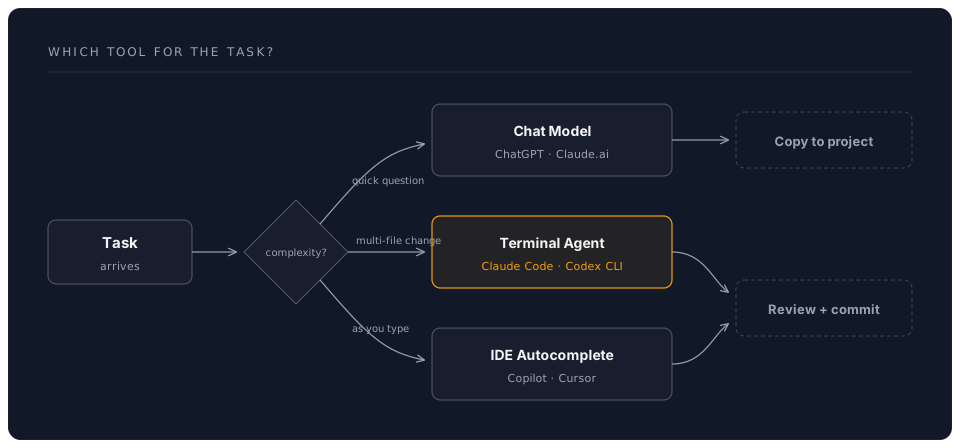
Practical Example
Morning workflow using multiple tools:
- Quick question (Claude.ai): "What's the best approach for implementing rate limiting in Express.js?"
- Implementation (Claude Code): "Add rate limiting to all API endpoints following the approach we discussed. Use express-rate-limit with Redis store."
- Inline refinement (Copilot): Tab-complete as you review and adjust the generated code
- Documentation (Claude Code): "Update the API documentation to reflect the new rate limiting behaviour"
- Review (Claude Code): "Run all tests and show me the diff summary"
Choosing Between Claude Code and Codex CLI
For teams deciding between the two terminal agents:
| Consideration | Claude Code | Codex CLI |
|---|---|---|
| Feature depth | More features (MCP, hooks, subagents, SDK) | Simpler, focused |
| Open source | No | Yes (audit, fork, contribute) |
| Sandboxing | OS-level | Docker/Seatbelt (network-disabled) |
| Model flexibility | Anthropic models | Multi-provider (OpenAI, Anthropic, Azure, Ollama) |
| Desktop/web access | Yes (desktop app, web app, IDE extensions) | Terminal only |
| Configuration | CLAUDE.md (hierarchical, deep integration) | AGENTS.MD |
| Best for | Teams invested in Anthropic ecosystem | Teams wanting OSS or multi-provider |
Many developers maintain both and choose based on the task:
- Claude Code for complex, multi-step work requiring MCP and hooks
- Codex CLI for quick tasks or when they want sandboxed execution