Core Concepts: Modern Deployment & Publishing
Section Duration: 60 minutes Difficulty: 🟡 Intermediate
Understanding the Deployment Landscape (2026)
The deployment ecosystem has evolved dramatically. Let's understand the core concepts that power modern application delivery.
1. Deployment Platform Types
Frontend-First Platforms
Perfect for React, Vue, and Next.js applications with automatic optimizations.
Vercel (Recommended for React/Next.js)
Key Features:
  - Zero-config deployments
  - Automatic HTTPS & CDN
  - Edge functions at 300+ locations
  - Preview deployments per PR
  - Web Analytics built-in

Best For:
  - Next.js applications (built by Vercel)
  - React SPAs with API routes
  - Static sites with dynamic capabilities

Pricing:
  - Free: Hobby projects, unlimited deployments
  - Pro: $20/month per user, team features
Example Deployment Flow:
# Install Vercel CLI
npm i -g vercel

# Deploy from any directory
vercel

# Production deployment
vercel --prod
Netlify (Best for JAMstack)
Key Features:
  - Instant rollbacks
  - Split testing (A/B)
  - Form handling without backend
  - Serverless functions
  - Build plugins ecosystem

Best For:
  - Static site generators (Hugo, Jekyll)
  - JAMstack architectures
  - Sites with form submissions

Pricing:
  - Free: 100GB bandwidth/month
  - Pro: $19/month, 1TB bandwidth
Cloudflare Pages (Edge-First)
Key Features:
  - Global edge network (330+ cities)
  - Unlimited bandwidth (Free tier)
  - Workers for edge computing
  - R2 object storage integration
  - D1 serverless SQL database

Best For:
  - High-traffic static sites
  - Edge-computed applications
  - Cost-sensitive projects
  - Full-stack apps with Workers

Pricing:
  - Free: Unlimited requests & bandwidth
  - Workers Paid: $5/month for advanced features
NOTE: Check each platform's pricing page for current rates -- free tiers and limits change periodically.
Backend & Fullstack Platforms
For APIs, databases, and complete applications.
Railway (Modern PaaS)
Key Features:
  - One-click database provisioning
  - Auto-scaling based on load
  - GitHub integration
  - Environment variables UI
  - Cron jobs support
  - Private networking between services

Best For:
  - Node.js APIs
  - Python backends (FastAPI, Django)
  - Full-stack applications
  - Scheduled tasks

Pricing:
  - Hobby: $5/month (includes usage credits)
  - Pro: $20/month per seat
  - Check railway.app for current pricing
Railway Deployment Example:
# Install Railway CLI
npm i -g @railway/cli

# Login and initialize
railway login
railway init

# Deploy
railway up
Render (All-in-One)
Key Features:
  - Free PostgreSQL databases
  - Auto-deploy from Git
  - Private services (no public access)
  - Background workers
  - Redis support

Best For:
  - Production APIs
  - Services needing databases
  - Background job processing

Pricing:
  - Free: Static sites, limited services
  - Starter: $7/month per service
2. Continuous Integration/Deployment (CI/CD)
GitHub Actions Architecture
GitHub Actions is the modern standard for CI/CD, integrated directly into your repositories.
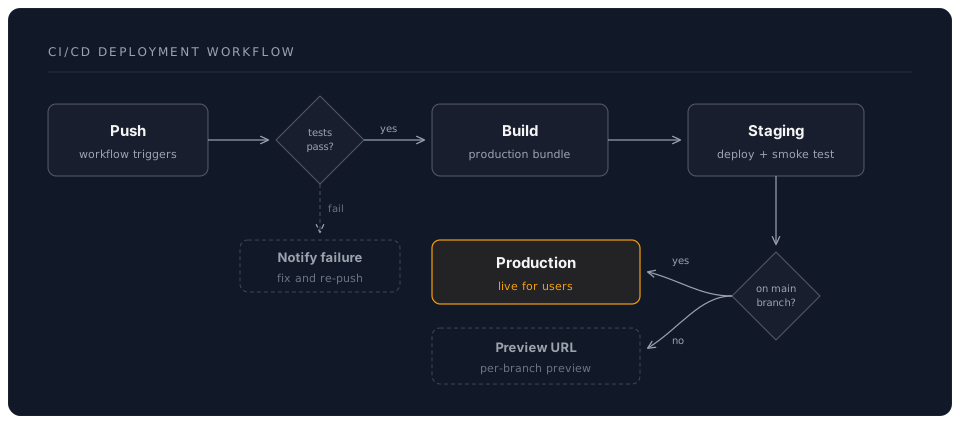
Core GitHub Actions Concepts
Workflows
YAML files in .github/workflows/ that define automation.
# .github/workflows/deploy.yml
name: Deploy to Production

on:
  push:
    branches: [main]
  pull_request:
    branches: [main]

jobs:
  deploy:
    runs-on: ubuntu-latest
    steps:
      - uses: actions/checkout@v4
      - uses: actions/setup-node@v4
        with:
          node-version: '20'
      - run: npm ci
      - run: npm test
      - run: npm run build
Events (Workflow Triggers)
# Common triggers
on:
  push:                    # Any push
    branches: [main]       # Only main branch
  pull_request:            # PRs opened/updated
  schedule:                # Cron jobs
    - cron: '0 0 * * *'   # Daily at midnight
  workflow_dispatch:       # Manual trigger
  release:                 # New releases
    types: [published]
Jobs & Steps
jobs:
  test:
    runs-on: ubuntu-latest
    steps:
      - name: Checkout code
        uses: actions/checkout@v4

      - name: Run tests
        run: npm test

  deploy:
    needs: test              # Run after test job
    runs-on: ubuntu-latest
    steps:
      - name: Deploy to Vercel
        run: vercel --prod --token=${{ secrets.VERCEL_TOKEN }}
3. Environment Management
The Three-Environment Strategy
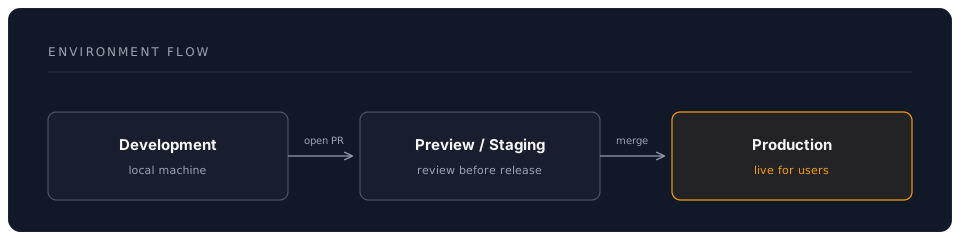
Development
- Location: Your local machine
- Purpose: Rapid iteration and debugging
- Database: Local SQLite or Docker containers
- API Keys: Development/sandbox keys
Preview/Staging
- Location: Auto-deployed from PRs
- Purpose: Test changes before production
- Database: Staging database (copy of prod structure)
- API Keys: Test mode keys
- URL: Unique per PR (e.g.,
pr-123.vercel.app)
Production
- Location: Main branch deployment
- Purpose: Live application for users
- Database: Production database with backups
- API Keys: Live mode keys
- URL: Your custom domain
Managing Environment Variables
Never commit secrets to Git. Use platform-specific variable management.
Vercel Environment Variables
# Via CLI
vercel env add DATABASE_URL production

# Via Dashboard
# Project Settings > Environment Variables
# Separate values for Production, Preview, Development
Railway Environment Variables
# Via CLI
railway variables set DATABASE_URL="postgresql://..."

# Via Dashboard
# Service > Variables tab
# Variables are encrypted at rest
GitHub Actions Secrets
# .github/workflows/deploy.yml
jobs:
  deploy:
    steps:
      - name: Deploy
        env:
          API_KEY: ${{ secrets.API_KEY }}
          DATABASE_URL: ${{ secrets.DATABASE_URL }}
        run: npm run deploy
Add secrets: Repository Settings > Secrets and variables > Actions
4. Documentation Publishing Strategies
Component Documentation (Storybook)
Visual documentation for UI components with interactive examples.
// Button.stories.js
import Button from './Button';

export default {
  title: 'Components/Button',
  component: Button,
  parameters: {
    docs: {
      description: {
        component: 'A versatile button component with multiple variants.'
      }
    }
  }
};

export const Primary = {
  args: {
    variant: 'primary',
    children: 'Click me'
  }
};

export const Secondary = {
  args: {
    variant: 'secondary',
    children: 'Click me'
  }
};
Deployment Options:
- Chromatic: Automated visual testing + hosting
- Netlify/Vercel: Static Storybook build
- GitHub Pages: Free hosting for docs
API Documentation (OpenAPI/Swagger)
Interactive API documentation with try-it-out capabilities.
# openapi.yaml
openapi: 3.0.0
info:
  title: Task Manager API
  version: 1.0.0
  description: REST API for task management

paths:
  /api/tasks:
    get:
      summary: List all tasks
      responses:
        '200':
          description: Successful response
          content:
            application/json:
              schema:
                type: array
                items:
                  $ref: '#/components/schemas/Task'

components:
  schemas:
    Task:
      type: object
      properties:
        id:
          type: string
        title:
          type: string
        completed:
          type: boolean
Tools:
- Swagger UI: Interactive API explorer
- Redoc: Beautiful API documentation
- Stoplight: API design and docs platform
User Documentation (MkDocs Material)
Comprehensive guides, tutorials, and references.
# mkdocs.yml
site_name: My Application Docs
theme:
  name: material
  features:
    - navigation.tabs
    - navigation.sections
    - search.suggest
    - content.code.copy
  palette:
    scheme: slate
    primary: indigo

plugins:
  - search
  - awesome-pages

markdown_extensions:
  - pymdownx.highlight:
      anchor_linenums: true
  - pymdownx.superfences:
      custom_fences:
        - name: mermaid
          class: mermaid
Deployment:
# Build and deploy to GitHub Pages
mkdocs gh-deploy

# Or deploy to Vercel/Netlify
mkdocs build
vercel deploy
5. Deployment Best Practices (2026)
✅ Always Do
- Use Preview Deployments: Test every PR before merging
- Automate Testing: Run tests in CI before deployment
- Environment Parity: Keep staging similar to production
- Monitor Deployments: Set up error tracking (Sentry, LogRocket)
- Version Your APIs: Use
/v1/,/v2/in API paths - Enable Rollbacks: Keep previous deployments accessible
❌ Never Do
- Commit Secrets: Use environment variables instead
- Skip Testing: Always run tests before production
- Manual Deployments: Automate with CI/CD
- Ignore Build Warnings: They often indicate future problems
- Deploy on Fridays: Leave time to fix issues before weekends
- Use Default Secrets: Rotate and customize all keys
6. Deployment Checklist
Before deploying to production:
### Pre-Deployment
- [ ] All tests passing locally
- [ ] Environment variables configured
- [ ] Database migrations tested
- [ ] Build completes without errors
- [ ] Static assets optimized
- [ ] API rate limits configured

### Post-Deployment
- [ ] Health check endpoint responding
- [ ] Critical user flows tested
- [ ] Error tracking configured
- [ ] Analytics/monitoring active
- [ ] DNS configured correctly
- [ ] HTTPS certificate valid
- [ ] Performance metrics acceptable
Platform Comparison Matrix
Choose the right platform for your project:
| Feature | Vercel | Netlify | Cloudflare Pages | Railway | Render | GitHub Pages |
|---|---|---|---|---|---|---|
| Best For | Next.js/React | JAMstack | Edge apps | APIs | Full-stack | Static/docs |
| Free Tier | ✅ Generous | ✅ Good | ✅ Unlimited | ⚠️ Hobby | ⚠️ Limited | ✅ Public repos |
| Bandwidth | 100GB | 100GB | Unlimited | Usage-based | 100GB | 100GB |
| Edge Locations | 300+ | Limited | 330+ | N/A | N/A | CDN |
| Database | ✅ (Postgres) | ❌ | ✅ (D1 SQL) | ✅ | ✅ | ❌ |
| Serverless | ✅ | ✅ | ✅ Workers | ✅ | ✅ | ❌ |
| Preview Deploys | ✅ | ✅ | ✅ | ✅ | ✅ | ❌ |
| Custom Domains | ✅ Free | ✅ Free | ✅ Free | ✅ Free | ✅ Free | ✅ Free |
NOTE: Free tiers and build limits change frequently. Check each platform's pricing page for current details.
Key Takeaways
- Choose the Right Platform: Match platform strengths to your project needs
- Automate Everything: Use CI/CD for consistent, reliable deployments
- Environment Separation: Development → Preview → Production
- Documentation Matters: Good docs reduce support burden
- Monitor Continuously: Know when things break before users complain
Next: 02_hands_on.md - Deploying Your First Application