Core Concepts: Running AI Models Locally
Overview
Running Large Language Models (LLMs) locally gives you privacy, control, and cost-effectiveness. This session explores the modern landscape of local AI in 2026.
Why Local AI?
Key Benefits
🔒 Privacy & Security
- No data leaves your machine
- Compliance-friendly for sensitive data
- Complete control over model inputs/outputs
💰 Cost-Effective
- No API usage fees
- One-time hardware investment
- Unlimited inference after setup
⚡ Low Latency
- No network round-trips
- Sub-second responses
- Offline capability
🎯 Customization
- Fine-tune models for your use case
- Control model parameters
- Experiment freely
NOTE: Local AI requires appropriate hardware. GPU recommended for larger models.
Understanding Model Formats
GGUF Format (GPT-Generated Unified Format)
The standard for local LLMs in 2026:
model-name-Q4_K_M.gguf
           │  │ │
           │  │ └─ Method (Matrix)
           │  └─ Variant (Keep)
           └─ Quantization (4-bit)
Common Quantization Levels:
- Q2_K: 2-bit, smallest, lowest quality
- Q4_K_M: 4-bit, balanced (recommended)
- Q5_K_M: 5-bit, better quality
- Q8_0: 8-bit, near-original quality
TIP: Start with Q4_K_M quantization for best balance of size/quality.
Hardware Requirements
GPU Inference (Recommended)
Minimum:
- NVIDIA GPU with 6GB+ VRAM
- 16GB system RAM
- For 7B parameter models
Ideal:
- NVIDIA GPU with 12GB+ VRAM (RTX 3080/4070+)
- 32GB system RAM
- For 13B-34B parameter models
High-End:
- NVIDIA GPU with 24GB+ VRAM (RTX 4090/A6000)
- 64GB+ system RAM
- For 70B+ parameter models
CPU Inference (Slower but Accessible)
Minimum:
- Modern CPU (8+ cores)
- 16GB+ RAM
- Works with smaller models (7B parameters)
Performance:
- ~2-5 tokens/second for 7B models
- 10-50x slower than GPU
- Suitable for experimentation
PERFORMANCE TIP: GPU acceleration provides 10-50x speedup over CPU.
Model Selection Guide 2026
General Purpose Models
Llama 3.3 (Meta)
- Sizes: 8B, 70B
- Strengths: Excellent reasoning, multilingual
- Use Case: General chat, analysis
- VRAM: 6GB (8B), 48GB (70B)
# Download with Ollama
ollama pull llama3.3:8b
ollama pull llama3.3:70b
Mistral/Mixtral (Mistral AI)
- Sizes: 7B (v0.3), 8x7B (Mixtral), Mistral Large
- Strengths: Fast, efficient, good reasoning
- Use Case: Balanced performance
- VRAM: 6GB (7B), 24GB (Mixtral)
ollama pull mistral
ollama pull mixtral
Qwen 2.5 (Alibaba)
- Sizes: 7B, 14B, 32B, 72B
- Strengths: Strong multilingual, coding
- Use Case: International applications
- VRAM: 6GB (7B), 48GB (72B)
ollama pull qwen2.5:7b
ollama pull qwen2.5:32b
DeepSeek-R1 (DeepSeek)
- Sizes: 7B, 14B, 32B, 70B (distilled)
- Strengths: Strong reasoning and mathematics
- Use Case: Complex problem solving, research
- VRAM: 6GB (7B), 48GB (70B)
ollama pull deepseek-r1:7b
ollama pull deepseek-r1:14b
Specialised Models
Qwen 2.5 Coder (Alibaba)
- Sizes: 7B, 14B, 32B
- Strengths: Code generation, debugging, refactoring
- Use Case: Programming assistance
- VRAM: 6GB (7B), 24GB (32B)
ollama pull qwen2.5-coder:7b
ollama pull qwen2.5-coder:14b
Phi-4 (Microsoft)
- Sizes: 14B
- Strengths: Small but highly capable, strong reasoning
- Use Case: Resource-constrained environments
- VRAM: 10GB (14B)
ollama pull phi4
Phi-3 (Microsoft)
- Sizes: 3.8B
- Strengths: Extremely lightweight
- Use Case: Edge devices, quick responses
- VRAM: 4GB (3.8B)
ollama pull phi3
Local Inference Tools
Ollama (Recommended for Beginners)
Features:
- One-command model downloads
- OpenAI-compatible API
- Automatic quantization
- Cross-platform (Mac, Linux, Windows)
Quick Start:
# Install Ollama
curl -fsSL https://ollama.com/install.sh | sh

# Run a model
ollama run llama3.3:8b

# List installed models
ollama list

# Start API server (runs on :11434)
ollama serve
API Usage:
import requests

response = requests.post('http://localhost:11434/api/generate', json={
    "model": "llama3.3:8b",
    "prompt": "Explain quantum computing"
})
LM Studio (GUI-Based)
Features:
- Beautiful graphical interface
- Model discovery and download
- Chat playground
- API server with OpenAI compatibility
Workflow:
- Download from lmstudio.ai
- Browse model library
- Download models (automatic quantization)
- Chat or run local API server
BEGINNER TIP: LM Studio is perfect if you prefer GUI over command line.
LocalAI (OpenAI Drop-in Replacement)
Features:
- Full OpenAI API compatibility
- Supports multiple model backends
- Docker-based deployment
- Production-ready
Quick Start:
# Run with Docker
docker run -p 8080:8080 \
  -v $PWD/models:/models \
  quay.io/go-skynet/local-ai:latest

# Use with OpenAI SDK
from openai import OpenAI
client = OpenAI(base_url="http://localhost:8080/v1", api_key="not-needed")
llama.cpp (Advanced)
Features:
- C++ implementation for maximum performance
- Extensive quantization options
- Metal/CUDA/ROCm support
- Command-line focused
Build & Run:
git clone https://github.com/ggerganov/llama.cpp
cd llama.cpp
make

# Run inference
./main -m models/llama-3.3-8b-q4.gguf -p "Your prompt here"
Architecture Comparison
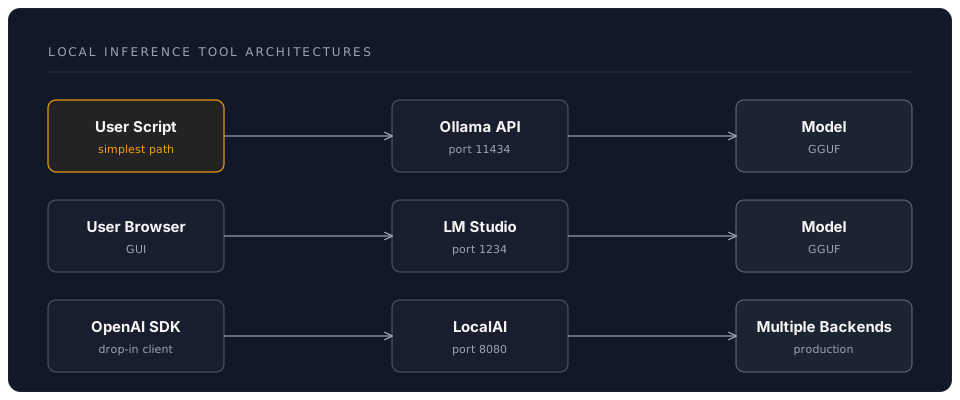
Integration Patterns
OpenAI-Compatible Endpoints
Most local AI tools provide OpenAI-compatible APIs:
from openai import OpenAI

# Point to local server
client = OpenAI(
    base_url="http://localhost:11434/v1",
    api_key="ollama"  # Not used but required
)

response = client.chat.completions.create(
    model="llama3.3:8b",
    messages=[
        {"role": "user", "content": "Explain RAG systems"}
    ]
)
print(response.choices[0].message.content)
LangChain Integration
from langchain_community.llms import Ollama
from langchain.prompts import PromptTemplate
from langchain.chains import LLMChain

# Initialize local model
llm = Ollama(model="llama3.3:8b")

# Create chain
prompt = PromptTemplate(
    input_variables=["topic"],
    template="Explain {topic} in simple terms."
)
chain = LLMChain(llm=llm, prompt=prompt)

# Run
result = chain.run("transformer architecture")
VS Code Extensions
Continue.dev (Recommended)
// config.json
{
  "models": [{
    "title": "Llama 3.3 Local",
    "provider": "ollama",
    "model": "llama3.3:8b"
  }]
}
Features:
- Tab autocomplete
- Chat interface
- Code explanations
- Refactoring assistance
Performance Optimization
GPU Acceleration
NVIDIA CUDA:
# Verify CUDA
nvidia-smi

# Ollama uses GPU automatically if available
ollama run llama3.3:8b
Apple Metal (M-series):
# Ollama automatically uses Metal
# Excellent performance on M1/M2/M3/M4 Pro/Max/Ultra
Apple MLX (Native):
# For maximum performance on Apple Silicon
pip install mlx-lm
mlx_lm.generate --model mlx-community/Meta-Llama-3.3-8B-Instruct-4bit
Context Length vs Performance
| Context | Speed | Use Case |
|---|---|---|
| 2K | Fastest | Simple Q&A |
| 4K | Fast | Short documents |
| 8K | Moderate | Standard conversations |
| 16K+ | Slow | Long document analysis |
PERFORMANCE: Longer context = slower inference. Use only what you need.
Batching Requests
# Inefficient: Sequential
for prompt in prompts:
    response = ollama.generate(model="llama3.3", prompt=prompt)

# Efficient: Batch processing
responses = ollama.batch_generate(
    model="llama3.3",
    prompts=prompts,
    batch_size=4
)
Comparison Matrix
| Tool | Difficulty | Speed | Features | Best For |
|---|---|---|---|---|
| Ollama | ⭐ | ⚡⚡⚡ | CLI, API | Beginners |
| LM Studio | ⭐ | ⚡⚡ | GUI, Chat | Non-technical |
| LocalAI | ⭐⭐ | ⚡⚡⚡ | Production | Developers |
| llama.cpp | ⭐⭐⭐ | ⚡⚡⚡⚡ | Performance | Advanced users |
Common Use Cases
1. Privacy-Focused Development
# Analyze sensitive code locally
code_analysis = ollama.generate(
    model="qwen2.5-coder:7b",
    prompt=f"Review this code for security:\n{sensitive_code}"
)
2. Offline AI Assistant
# Works without internet
assistant = Ollama(model="llama3.3:8b")
response = assistant("Help me debug this error")
3. Cost-Free Prototyping
# Unlimited testing without API costs
for experiment in experiments:
    result = test_with_local_model(experiment)
Key Takeaways
✅ Local AI provides privacy, cost savings, and low latency ✅ GGUF format is the standard for quantized models ✅ Ollama is the easiest entry point for beginners ✅ GPU acceleration provides 10-50x performance improvement ✅ Choose model size based on your hardware capabilities
Next Steps
In the hands-on session, you'll:
- Install Ollama and download models
- Run local inference and measure performance
- Integrate local models with Python applications
- Compare different models for various tasks
Navigation
- Previous: Introduction
- Next: Hands-On Practice
- Back to Workshop Overview