Introduction to Local AI Models
Why Run AI Locally?
Running AI models on your own hardware represents a fundamental shift in how we interact with artificial intelligence. Instead of depending on cloud APIs and external services, you gain complete control over your AI infrastructure.
The Privacy Imperative
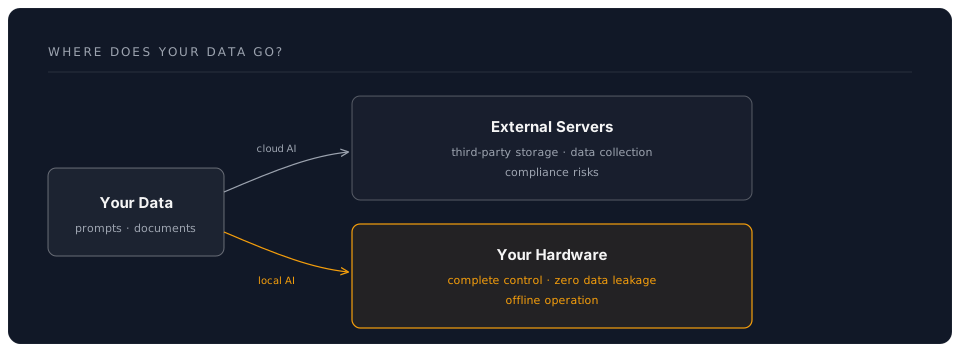
When you send data to cloud-based AI services, you're trusting third parties with potentially sensitive information:
- Medical records processed through AI diagnostics
- Financial data analyzed for insights
- Proprietary code sent to AI assistants
- Personal conversations stored on external servers
Local AI keeps your data on your machines. No network transmission, no third-party storage, no data collection.
Cost Economics
Cloud AI services charge per token or request. At scale, costs accumulate rapidly:
| Usage Pattern | Cloud Cost (Monthly) | Local Cost |
|---|---|---|
| Personal assistant (10K tokens/day) | $60-150 | $0* |
| Development team (100K tokens/day) | $600-1,500 | $0* |
| Enterprise (1M tokens/day) | $6,000-15,000 | $0* |
*After initial hardware investment
Real-World Example: A development team using cloud AI for code reviews might spend hundreds of pounds per month. A one-time investment of around 1,500 GBP in a good GPU pays for itself within a few months.
Offline Operation
Local AI works without internet connectivity:
- Remote locations without reliable internet
- Air-gapped environments for security
- Disaster scenarios when cloud services fail
- Network-restricted regions with censorship
Customization and Control
With local models, you have unprecedented flexibility:
- Fine-tune models on your specific domain
- Merge multiple models for specialized capabilities
- Quantize for optimal performance on your hardware
- Modify prompts and system instructions without restrictions
The Technology Landscape
Model Families
Llama Family (Meta)
- Llama 3.3 (8B, 70B) -- current recommended general-purpose
- Llama 3.2 (1B, 3B) -- lightweight on-device models
- Open weights, permissive licence
- Best overall performance for open models
Mistral Family
- Mistral 7B v0.3, Mixtral 8x7B, Mistral Large
- Excellent instruction following
- Strong coding capabilities
Qwen Family (Alibaba)
- Qwen 2.5 (0.5B to 72B), Qwen 3 (emerging)
- Multilingual excellence
- Strong reasoning abilities
Phi Family (Microsoft)
- Phi-4 (14B), Phi-3 (3.8B)
- Extremely efficient
- Surprising capability for size
DeepSeek Family
- DeepSeek-R1 (distilled 7B, 14B, 32B, 70B)
- Strong reasoning and mathematics
- Open weights with permissive licence
Model Formats Explained
GGUF (GPT-Generated Unified Format)
llama-3.1-8b-instruct-q4_k_m.gguf
├── llama-3.1-8b-instruct ← Model name and variant
├── q4 ← 4-bit quantization
├── k_m ← K-quant, medium
└── .gguf ← File format
Common quantization levels:
- Q4_K_M: 4-bit, best balance of size/quality (recommended)
- Q5_K_M: 5-bit, higher quality, larger file
- Q8_0: 8-bit, near-original quality, much larger
Performance Impact:
| Quantization | Size (8B model) | Quality Loss | Speed |
|---|---|---|---|
| FP16 (original) | ~16 GB | 0% | Baseline |
| Q8_0 | ~8 GB | ~1% | 1.2x faster |
| Q5_K_M | ~5.5 GB | ~3% | 1.5x faster |
| Q4_K_M | ~4.4 GB | ~5% | 1.8x faster |
Hardware Requirements
Minimum (CPU-only):
- 16 GB RAM
- Modern CPU (Intel i5/AMD Ryzen 5 or better)
- Can run: 3B-7B models at Q4
Recommended (GPU-accelerated):
- NVIDIA GPU with 8+ GB VRAM
- 16-32 GB system RAM
- Can run: 7B-13B models at Q4/Q5
Enthusiast (High-performance):
- NVIDIA RTX 4090 (24 GB) or A6000 (48 GB)
- 64 GB+ system RAM
- Can run: 70B models at Q4, 30B at Q8
Apple Silicon Performance:
Model: Llama 3.3 8B Q4_K_M

M1 Pro (16 GB):     ~15 tokens/sec
M2 Max (32 GB):     ~25 tokens/sec
M3 Max (64 GB):     ~35 tokens/sec
M4 Max (128 GB):    ~55 tokens/sec
M4 Ultra (192 GB):  ~65 tokens/sec
Apple's unified memory architecture allows running larger models than NVIDIA GPUs with equivalent VRAM.
Tools and Platforms
Ollama (Our Primary Focus)
Ollama is the Docker of AI models - simple, powerful, and developer-friendly.
Why Ollama?
- One-line installation on any platform
- Automatic GPU detection and optimization
- Built-in model library with one-command downloads
- REST API for easy integration
- Active development and community
Quick Start:
# Install
curl -fsSL https://ollama.com/install.sh | sh

# Run a model
ollama run llama3.3:8b

# Use in code
curl http://localhost:11434/api/generate -d '{
  "model": "llama3.3:8b",
  "prompt": "Why is local AI important?"
}'
LM Studio (GUI Alternative)
Best for users who prefer graphical interfaces:
- Beautiful UI for model management
- Built-in model browser and downloader
- Chat interface with conversation history
- Server mode for API access
- Cross-platform (Windows, macOS, Linux)
llama.cpp (The Engine)
The underlying C++ engine that powers Ollama and LM Studio:
- Extremely optimised for CPU inference
- Support for GPU acceleration (CUDA, Metal, Vulkan)
- Quantisation tools
- For advanced users and integration scenarios
MLX (Apple Silicon Native)
Apple's machine learning framework for M-series Macs:
- Optimised for unified memory architecture
- Excellent performance on M1/M2/M3/M4 chips
- Growing model ecosystem via
mlx-communityon Hugging Face - Python-first API with easy model conversion
GPT4All (All-in-One)
User-friendly desktop application:
- Pre-configured models
- Privacy-focused (no telemetry)
- Chat interface
- Plugin system
LocalAI (Self-Hosted Server)
OpenAI API-compatible local server:
- Drop-in replacement for OpenAI API
- Compatible with existing OpenAI client libraries
- Multi-modal support (text, images, audio)
- Docker-based deployment
What You'll Learn Today
By the end of this morning session, you will:
- Understand the architecture of modern LLMs
- Install and configure Ollama on your system
- Run different models and understand their trade-offs
- Integrate local AI into Python applications
- Optimize performance for your hardware
- Build a practical local AI assistant
Workshop Structure
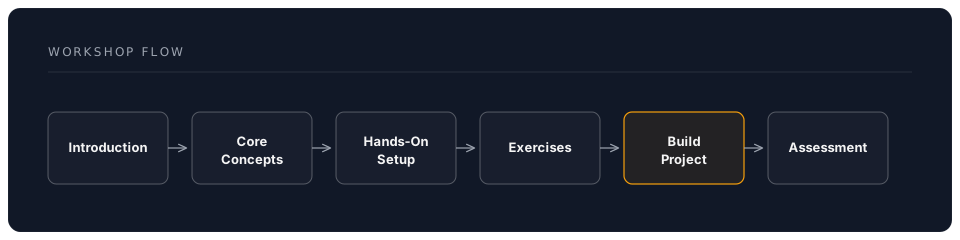
Morning Schedule (3 hours):
- 9:00-9:30: Introduction and concepts
- 9:30-10:30: Hands-on installation and first models
- 10:30-11:00: Coffee break + model exploration
- 11:00-12:00: Build local AI assistant project
Pre-Workshop Checklist
Before we begin hands-on work, ensure you have:
- Computer with 16+ GB RAM
- 50 GB free disk space (for models)
- Python 3.8+ installed
- Basic command line familiarity
- Text editor or IDE
- (Optional) NVIDIA GPU with updated drivers
Hardware Check:
# Check RAM
free -h  # Linux
system_profiler SPHardwareDataType | grep Memory  # macOS

# Check disk space
df -h

# Check GPU (NVIDIA)
nvidia-smi

# Check Python
python3 --version
Success Metrics
You'll know you've succeeded when you can:
✅ Explain the benefits of local AI vs cloud APIs ✅ Install and run models using Ollama ✅ Choose appropriate model sizes for your hardware ✅ Integrate local AI into a Python application ✅ Understand quantization and performance trade-offs ✅ Deploy a working AI assistant
Real-World Applications
Local AI enables unique use cases:
Healthcare: Run diagnostic AI on patient data without HIPAA concerns Legal: Analyze contracts and documents with full confidentiality Development: AI code assistant that never sees your proprietary code Education: AI tutors that work offline in rural schools Creative: Generate content without usage restrictions or content filters Research: Reproducible AI experiments with exact model versions
The Future is Local
The trend toward local AI is accelerating:
- Model efficiency improvements (same capability, smaller models)
- Hardware acceleration (NPUs in consumer devices)
- Quantization advances (better quality at lower bit depths)
- Edge deployment (AI on phones, IoT devices)
By mastering local AI today, you're preparing for a future where intelligence is distributed, private, and under your control.