Hands-On Practice: Building Your RAG System
Overview
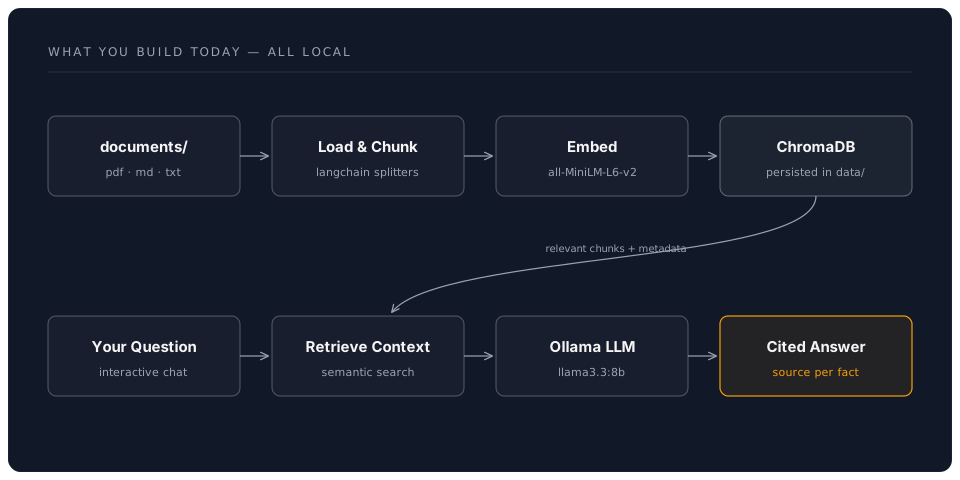
This is the main practical session of the afternoon. Over the next 90 minutes, you will build a complete Retrieval-Augmented Generation system from scratch -- starting with a Python environment, progressing through document indexing and embedding, and finishing with a fully working question-answering pipeline that cites its sources.
What you will build:
- A document ingestion pipeline that processes PDFs, markdown, and text files
- A ChromaDB vector store with embedded document chunks
- A query pipeline that retrieves relevant context and generates grounded answers
- Citation tracking that tells you exactly where each answer came from
Part 1: Environment Setup (15 minutes)
Difficulty: Beginner
Objective
Create a clean Python environment with all the libraries needed for RAG development.
Step 1: Create Your Project Folder
# Create a dedicated workspace
mkdir -p ~/rag-workshop
cd ~/rag-workshop

# Create sub-folders for organisation
mkdir -p documents    # Your source documents go here
mkdir -p scripts      # Python scripts
mkdir -p data         # ChromaDB will store its data here
Step 2: Set Up a Virtual Environment
# Create virtual environment
python3 -m venv venv

# Activate it
# Linux/macOS:
source venv/bin/activate

# Windows:
# venv\Scripts\activate

# Verify Python version (3.10+ required)
python --version
Step 3: Install Core Dependencies
# Core RAG libraries
pip install chromadb langchain langchain-community langchain-text-splitters

# Document loaders
pip install pypdf python-docx unstructured

# Embedding models (local, free)
pip install sentence-transformers

# Ollama Python client (for local LLM)
pip install ollama

# OpenAI client (optional, for cloud embeddings)
pip install openai

# Utilities
pip install python-dotenv rich tqdm
Note: The full install takes 2-5 minutes depending on your connection. The
sentence-transformerspackage downloads a model on first use (~90 MB).
Step 4: Verify Your Installation
Create scripts/verify_setup.py:
# scripts/verify_setup.py
"""Verify all RAG dependencies are installed correctly."""

def check_imports():
    checks = []

    try:
        import chromadb
        checks.append(("ChromaDB", chromadb.__version__, True))
    except ImportError:
        checks.append(("ChromaDB", "Not installed", False))

    try:
        import langchain
        checks.append(("LangChain", langchain.__version__, True))
    except ImportError:
        checks.append(("LangChain", "Not installed", False))

    try:
        from sentence_transformers import SentenceTransformer
        checks.append(("Sentence Transformers", "OK", True))
    except ImportError:
        checks.append(("Sentence Transformers", "Not installed", False))

    try:
        import ollama
        # Test connection to Ollama server
        ollama.list()
        checks.append(("Ollama", "Connected", True))
    except Exception as e:
        checks.append(("Ollama", f"Not running: {e}", False))

    try:
        import pypdf
        checks.append(("PyPDF", "OK", True))
    except ImportError:
        checks.append(("PyPDF", "Not installed", False))

    # Print results
    print("\n=== RAG Workshop Setup Check ===\n")
    all_ok = True
    for name, version, ok in checks:
        status = "PASS" if ok else "FAIL"
        print(f"  [{status}] {name}: {version}")
        if not ok:
            all_ok = False

    print()
    if all_ok:
        print("All checks passed. You are ready to build your RAG system!")
    else:
        print("Some checks failed. Review the errors above.")
        print("Ollama not running? Start it with: ollama serve")

if __name__ == "__main__":
    check_imports()
Run it:
python scripts/verify_setup.py
Expected Output
=== RAG Workshop Setup Check ===

  [PASS] ChromaDB: 0.5.x
  [PASS] LangChain: 0.3.x
  [PASS] Sentence Transformers: OK
  [PASS] Ollama: Connected
  [PASS] PyPDF: OK

All checks passed. You are ready to build your RAG system!
Troubleshooting
Ollama not connected:
# Start Ollama in a separate terminal
ollama serve

# Pull a model if you haven't already
ollama pull llama3.3:8b

# Pull the embedding model
ollama pull nomic-embed-text
pip install fails:
# Ensure pip is up to date
pip install --upgrade pip

# If chromadb fails on older systems
pip install chromadb --no-cache-dir
Part 2: Prepare Your Documents (10 minutes)
Difficulty: Beginner
Objective
Gather and organise the documents that will form your personal knowledge base.
Step 1: Add Sample Documents
For the workshop, we will create a small collection of documents. In production, these would be your real files -- reports, policies, research papers, meeting notes.
Create documents/company_policy.md:
# Remote Working Policy

## Overview
All employees may work remotely up to 3 days per week, subject to
manager approval. Core collaboration hours are 10:00-15:00 GMT.

## Equipment
The company provides a laptop, monitor, and ergonomic chair for home
offices. Employees must complete a home workspace assessment within
30 days of starting remote work.

## Security
All remote workers must use the company VPN when accessing internal
systems. Two-factor authentication is mandatory for all accounts.
Personal devices may not be used to access customer data.

## Expenses
Monthly broadband allowance: up to 50 GBP (receipts required).
Co-working space day passes: up to 4 per month, pre-approved by manager.

## Review
This policy is reviewed quarterly. Last updated: January 2026.
Create documents/project_handbook.md:
# Project Management Handbook

## Project Lifecycle

### 1. Initiation
Every project begins with a Project Brief document. The brief must
include: objectives, stakeholders, estimated budget, and timeline.
The Steering Committee reviews briefs on the first Monday of each month.

### 2. Planning
The project manager creates a detailed plan using our standard template.
Key milestones must be agreed with stakeholders within 2 weeks of
approval. Risk registers are mandatory for projects over 50,000 GBP.

### 3. Execution
Weekly status reports are submitted every Friday by 16:00. The project
dashboard is updated in real time. Change requests follow the CR-001
process and require sponsor sign-off.

### 4. Closure
Projects conclude with a formal lessons-learned session. The final
report includes budget variance, timeline adherence, and stakeholder
satisfaction scores. All documentation is archived in the project vault.

## Escalation Process
- Level 1: Project Manager resolves within 2 business days
- Level 2: Programme Director resolves within 5 business days
- Level 3: Steering Committee reviews at next scheduled meeting
Create documents/annual_report.md:
# Annual Report 2025

## Financial Highlights
- Revenue: 12.4 million GBP (up 18% year-on-year)
- Operating profit: 2.1 million GBP (up 22%)
- New customers: 340 (up 15%)
- Customer retention rate: 94%

## Key Achievements
- Launched three new product lines in Q2
- Expanded into European markets (Germany, France, Netherlands)
- Achieved ISO 27001 certification in September
- Employee satisfaction score: 8.2/10 (industry average: 7.1)

## Strategic Priorities for 2026
1. AI integration across all product lines
2. Carbon neutrality by December 2026
3. Launch North American operations
4. Increase recurring revenue to 60% of total

## Team Growth
- Headcount: 185 (up from 142)
- New hires in engineering: 28
- Graduate programme intake: 12
- Voluntary turnover: 8% (industry average: 14%)
Step 2: Add a PDF (Optional)
If you have a PDF document you would like to use, copy it into the documents/ folder:
# Copy your own PDF
cp ~/Downloads/my-report.pdf documents/

# Or download a sample
curl -o documents/sample.pdf \
  "https://www.w3.org/WAI/ER/tests/xhtml/testfiles/resources/pdf/dummy.pdf"
Step 3: Check Your Document Collection
ls -la documents/
You should see at least 3 markdown files. The more documents you add, the more interesting your RAG system becomes.
Part 3: Document Chunking and Embedding (20 minutes)
Difficulty: Intermediate
Objective
Split your documents into chunks, convert them to embeddings, and store them in ChromaDB.
Step 1: Build the Document Loader
Create scripts/load_documents.py:
# scripts/load_documents.py
"""Load documents from the documents/ folder and split into chunks."""

import os
import glob
from langchain_text_splitters import RecursiveCharacterTextSplitter
from langchain.docstore.document import Document


def load_markdown_file(filepath):
    """Load a single markdown file as a Document."""
    with open(filepath, "r", encoding="utf-8") as f:
        content = f.read()

    return Document(
        page_content=content,
        metadata={
            "source": os.path.basename(filepath),
            "full_path": filepath,
            "file_type": "markdown",
        }
    )


def load_pdf_file(filepath):
    """Load a PDF file, returning one Document per page."""
    from pypdf import PdfReader

    reader = PdfReader(filepath)
    documents = []

    for i, page in enumerate(reader.pages):
        text = page.extract_text()
        if text.strip():
            documents.append(Document(
                page_content=text,
                metadata={
                    "source": os.path.basename(filepath),
                    "full_path": filepath,
                    "file_type": "pdf",
                    "page_number": i + 1,
                }
            ))

    return documents


def load_all_documents(docs_dir="documents"):
    """Load all supported documents from a directory."""
    all_docs = []

    # Load markdown files
    for filepath in glob.glob(os.path.join(docs_dir, "*.md")):
        doc = load_markdown_file(filepath)
        all_docs.append(doc)
        print(f"  Loaded: {os.path.basename(filepath)} "
              f"({len(doc.page_content)} chars)")

    # Load text files
    for filepath in glob.glob(os.path.join(docs_dir, "*.txt")):
        doc = load_markdown_file(filepath)  # Same loader works for .txt
        doc.metadata["file_type"] = "text"
        all_docs.append(doc)
        print(f"  Loaded: {os.path.basename(filepath)} "
              f"({len(doc.page_content)} chars)")

    # Load PDF files
    for filepath in glob.glob(os.path.join(docs_dir, "*.pdf")):
        pdf_docs = load_pdf_file(filepath)
        all_docs.extend(pdf_docs)
        print(f"  Loaded: {os.path.basename(filepath)} "
              f"({len(pdf_docs)} pages)")

    return all_docs


def chunk_documents(documents, chunk_size=500, chunk_overlap=100):
    """Split documents into smaller chunks for embedding."""
    splitter = RecursiveCharacterTextSplitter(
        chunk_size=chunk_size,
        chunk_overlap=chunk_overlap,
        separators=["\n\n", "\n", ". ", " ", ""],
        length_function=len,
    )

    all_chunks = []
    for doc in documents:
        chunks = splitter.split_documents([doc])
        # Add chunk index to metadata
        for i, chunk in enumerate(chunks):
            chunk.metadata["chunk_index"] = i
            chunk.metadata["total_chunks"] = len(chunks)
        all_chunks.extend(chunks)

    return all_chunks


if __name__ == "__main__":
    print("Loading documents...\n")
    docs = load_all_documents()
    print(f"\nLoaded {len(docs)} documents total.\n")

    print("Chunking documents...")
    chunks = chunk_documents(docs)
    print(f"Created {len(chunks)} chunks.\n")

    # Preview first 3 chunks
    for i, chunk in enumerate(chunks[:3]):
        print(f"--- Chunk {i + 1} ---")
        print(f"Source: {chunk.metadata['source']}")
        print(f"Content: {chunk.page_content[:150]}...")
        print()
Run it:
cd ~/rag-workshop
python scripts/load_documents.py
Expected Output
Loading documents...

  Loaded: company_policy.md (687 chars)
  Loaded: project_handbook.md (1042 chars)
  Loaded: annual_report.md (823 chars)

Loaded 3 documents total.

Chunking documents...
Created 8 chunks.

--- Chunk 1 ---
Source: company_policy.md
Content: # Remote Working Policy

## Overview
All employees may work remotely up to 3 days per week...
Step 2: Create the Vector Store
Create scripts/build_index.py:
# scripts/build_index.py
"""Embed document chunks and store in ChromaDB."""

import chromadb
from chromadb.utils import embedding_functions
from load_documents import load_all_documents, chunk_documents


def create_vector_store(chunks, collection_name="workshop_docs",
                        db_path="data/chromadb"):
    """Create a ChromaDB collection and add document chunks."""

    # Initialise ChromaDB with persistent storage
    client = chromadb.PersistentClient(path=db_path)

    # Use a local embedding model (free, no API key needed)
    # all-MiniLM-L6-v2 produces 384-dimensional vectors
    embedding_fn = embedding_functions.SentenceTransformerEmbeddingFunction(
        model_name="all-MiniLM-L6-v2"
    )

    # Delete existing collection if re-running
    try:
        client.delete_collection(collection_name)
    except ValueError:
        pass

    # Create collection
    collection = client.create_collection(
        name=collection_name,
        embedding_function=embedding_fn,
        metadata={"hnsw:space": "cosine"}  # Use cosine similarity
    )

    # Prepare data for insertion
    ids = []
    documents = []
    metadatas = []

    for i, chunk in enumerate(chunks):
        ids.append(f"chunk_{i}")
        documents.append(chunk.page_content)
        metadatas.append({
            "source": chunk.metadata.get("source", "unknown"),
            "file_type": chunk.metadata.get("file_type", "unknown"),
            "chunk_index": chunk.metadata.get("chunk_index", 0),
        })

    # Add to collection (ChromaDB handles embedding automatically)
    print(f"Embedding and storing {len(documents)} chunks...")
    collection.add(
        ids=ids,
        documents=documents,
        metadatas=metadatas,
    )

    print(f"Vector store created with {collection.count()} entries.")
    return collection


def test_search(collection, query, n_results=3):
    """Run a test search against the collection."""
    results = collection.query(
        query_texts=[query],
        n_results=n_results,
    )

    print(f"\nQuery: '{query}'")
    print(f"Top {n_results} results:\n")

    for i in range(len(results["documents"][0])):
        doc = results["documents"][0][i]
        meta = results["metadatas"][0][i]
        distance = results["distances"][0][i]

        print(f"  Result {i + 1} (distance: {distance:.4f}):")
        print(f"  Source: {meta['source']}")
        print(f"  Content: {doc[:120]}...")
        print()


if __name__ == "__main__":
    # Load and chunk documents
    print("Step 1: Loading documents...")
    docs = load_all_documents()

    print("\nStep 2: Chunking documents...")
    chunks = chunk_documents(docs, chunk_size=500, chunk_overlap=100)
    print(f"  Created {len(chunks)} chunks.")

    # Build vector store
    print("\nStep 3: Building vector store...")
    collection = create_vector_store(chunks)

    # Test with sample queries
    print("\n" + "=" * 60)
    print("Testing search...")
    print("=" * 60)

    test_search(collection, "How many days can I work from home?")
    test_search(collection, "What was the revenue last year?")
    test_search(collection, "How do I escalate a project issue?")
Run it:
python scripts/build_index.py
Expected Output
Step 1: Loading documents...
  Loaded: company_policy.md (687 chars)
  Loaded: project_handbook.md (1042 chars)
  Loaded: annual_report.md (823 chars)

Step 2: Chunking documents...
  Created 8 chunks.

Step 3: Building vector store...
Embedding and storing 8 chunks...
Vector store created with 8 entries.

============================================================
Testing search...
============================================================

Query: 'How many days can I work from home?'
Top 3 results:

  Result 1 (distance: 0.3142):
  Source: company_policy.md
  Content: # Remote Working Policy

## Overview
All employees may work remotely up to 3 days per week...

  Result 2 (distance: 0.6891):
  Source: company_policy.md
  Content: ## Security
All remote workers must use the company VPN when accessing internal...

  Result 3 (distance: 0.8234):
  Source: annual_report.md
  Content: ## Team Growth
- Headcount: 185 (up from 142)...
Key Insight: Notice how the search correctly returns the remote working policy as the most relevant result, even though the query uses different words ("work from home" vs "work remotely"). This is the power of semantic search -- it understands meaning, not just keywords.
Part 4: Build the RAG Query Pipeline (20 minutes)
Difficulty: Intermediate
Objective
Connect the vector store to a language model to create a complete question-answering system with source citations.
Step 1: Basic RAG Pipeline
Create scripts/rag_pipeline.py:
# scripts/rag_pipeline.py
"""Complete RAG pipeline: retrieve context, generate answer, cite sources."""

import chromadb
from chromadb.utils import embedding_functions
import ollama


def get_collection(db_path="data/chromadb",
                   collection_name="workshop_docs"):
    """Connect to the existing ChromaDB collection."""
    client = chromadb.PersistentClient(path=db_path)
    embedding_fn = embedding_functions.SentenceTransformerEmbeddingFunction(
        model_name="all-MiniLM-L6-v2"
    )
    return client.get_collection(
        name=collection_name,
        embedding_function=embedding_fn,
    )


def retrieve(collection, query, n_results=3):
    """Retrieve the most relevant document chunks for a query."""
    results = collection.query(
        query_texts=[query],
        n_results=n_results,
    )
    return results


def build_prompt(query, results):
    """Build a prompt that includes retrieved context with source markers."""
    context_parts = []

    for i in range(len(results["documents"][0])):
        doc = results["documents"][0][i]
        source = results["metadatas"][0][i]["source"]
        context_parts.append(f"[Source {i + 1}: {source}]\n{doc}")

    context = "\n\n---\n\n".join(context_parts)

    prompt = f"""You are a helpful assistant that answers questions based on
the provided context. Use ONLY the information in the context below.
If the context does not contain enough information to answer fully,
say so clearly.

When you use information from the context, cite your sources using
the format [Source N] at the end of the relevant sentence.

CONTEXT:
{context}

QUESTION: {query}

ANSWER:"""

    return prompt


def generate_answer(prompt, model="llama3.3:8b"):
    """Generate an answer using the local LLM via Ollama."""
    response = ollama.chat(
        model=model,
        messages=[
            {"role": "user", "content": prompt}
        ],
    )
    return response["message"]["content"]


def ask(query, collection=None, n_results=3, model="llama3.3:8b"):
    """Full RAG pipeline: retrieve, build prompt, generate answer."""
    if collection is None:
        collection = get_collection()

    # Step 1: Retrieve relevant chunks
    results = retrieve(collection, query, n_results=n_results)

    # Step 2: Build the augmented prompt
    prompt = build_prompt(query, results)

    # Step 3: Generate the answer
    answer = generate_answer(prompt, model=model)

    # Step 4: Collect source information
    sources = []
    for i in range(len(results["documents"][0])):
        sources.append({
            "index": i + 1,
            "source": results["metadatas"][0][i]["source"],
            "distance": results["distances"][0][i],
            "excerpt": results["documents"][0][i][:100] + "...",
        })

    return {
        "query": query,
        "answer": answer,
        "sources": sources,
    }


def print_result(result):
    """Pretty-print a RAG result with sources."""
    print(f"\n{'=' * 60}")
    print(f"Question: {result['query']}")
    print(f"{'=' * 60}")
    print(f"\n{result['answer']}")
    print(f"\n{'- ' * 30}")
    print("Sources used:")
    for src in result["sources"]:
        relevance = 1 - src["distance"]  # Convert distance to similarity
        print(f"  [{src['index']}] {src['source']} "
              f"(relevance: {relevance:.0%})")
    print()


if __name__ == "__main__":
    collection = get_collection()

    # Test questions
    questions = [
        "How many days per week can employees work remotely?",
        "What was the company's revenue in 2025?",
        "What is the escalation process for project issues?",
        "What equipment does the company provide for remote workers?",
        "How many new customers did the company gain last year?",
    ]

    for q in questions:
        result = ask(q, collection=collection)
        print_result(result)
Run it:
python scripts/rag_pipeline.py
Expected Output
============================================================
Question: How many days per week can employees work remotely?
============================================================

Employees may work remotely up to 3 days per week, subject to manager
approval. Core collaboration hours are 10:00-15:00 GMT [Source 1].

- - - - - - - - - - - - - - - - - -
Sources used:
  [1] company_policy.md (relevance: 69%)
  [2] company_policy.md (relevance: 42%)
  [3] annual_report.md (relevance: 18%)
Congratulations! You now have a working RAG system. The model answers questions using your actual documents and tells you exactly where the information came from.
Step 2: Add an Interactive Chat Mode
Extend scripts/rag_pipeline.py by adding an interactive function at the end:
def interactive_chat():
    """Run an interactive Q&A session."""
    collection = get_collection()

    print("\n=== RAG Document Q&A ===")
    print("Ask questions about your documents.")
    print("Type 'quit' to exit, 'sources' to toggle source display.\n")

    show_sources = True

    while True:
        query = input("You: ").strip()

        if not query:
            continue
        if query.lower() == "quit":
            print("Goodbye!")
            break
        if query.lower() == "sources":
            show_sources = not show_sources
            print(f"Source display: {'ON' if show_sources else 'OFF'}")
            continue

        result = ask(query, collection=collection)
        print(f"\nAssistant: {result['answer']}")

        if show_sources:
            print("\n  Sources:")
            for src in result["sources"]:
                relevance = 1 - src["distance"]
                print(f"    [{src['index']}] {src['source']} "
                      f"({relevance:.0%} relevant)")
        print()


# Add this to the bottom of the file, replacing the existing __main__ block:
if __name__ == "__main__":
    import sys

    if len(sys.argv) > 1 and sys.argv[1] == "--chat":
        interactive_chat()
    else:
        # Run test questions
        collection = get_collection()
        questions = [
            "How many days per week can employees work remotely?",
            "What was the company's revenue in 2025?",
            "What is the escalation process for project issues?",
        ]
        for q in questions:
            result = ask(q, collection=collection)
            print_result(result)
Start the interactive chat:
python scripts/rag_pipeline.py --chat
Try asking questions in natural language:
- "What's the remote working policy?"
- "Tell me about last year's financial performance"
- "How do I raise an issue with a project?"
- "What are the strategic priorities?"
Part 5: Using Cloud Embedding Models (10 minutes)
Difficulty: Intermediate
Objective
Swap in a cloud embedding model (OpenAI or Ollama) for potentially higher-quality embeddings.
Option A: Ollama Embeddings (Free, Local)
# scripts/ollama_embeddings.py
"""Use Ollama's nomic-embed-text for embeddings."""

import chromadb
from chromadb.utils import embedding_functions

# Make sure you have pulled the model:
#   ollama pull nomic-embed-text

client = chromadb.PersistentClient(path="data/chromadb")

# Ollama embedding function
ollama_ef = embedding_functions.OllamaEmbeddingFunction(
    url="http://localhost:11434/api/embeddings",
    model_name="nomic-embed-text",
)

# Create a new collection with Ollama embeddings
collection = client.get_or_create_collection(
    name="docs_ollama_embed",
    embedding_function=ollama_ef,
)

# Test it
collection.add(
    ids=["test_1"],
    documents=["This is a test document about remote working policies."],
)

results = collection.query(
    query_texts=["Can I work from home?"],
    n_results=1,
)

print("Query: 'Can I work from home?'")
print(f"Result: {results['documents'][0][0][:80]}...")
print(f"Distance: {results['distances'][0][0]:.4f}")
Option B: OpenAI Embeddings (Cloud, Paid)
# scripts/openai_embeddings.py
"""Use OpenAI text-embedding-3-small for embeddings."""

import os
import chromadb
from chromadb.utils import embedding_functions

# Set your API key (or use .env file)
# export OPENAI_API_KEY="sk-..."

client = chromadb.PersistentClient(path="data/chromadb")

openai_ef = embedding_functions.OpenAIEmbeddingFunction(
    api_key=os.getenv("OPENAI_API_KEY"),
    model_name="text-embedding-3-small",  # 1536 dimensions
)

collection = client.get_or_create_collection(
    name="docs_openai_embed",
    embedding_function=openai_ef,
)

# Add documents
collection.add(
    ids=["test_1"],
    documents=["This is a test document about remote working policies."],
)

results = collection.query(
    query_texts=["Can I work from home?"],
    n_results=1,
)

print("Query: 'Can I work from home?'")
print(f"Result: {results['documents'][0][0][:80]}...")
print(f"Distance: {results['distances'][0][0]:.4f}")
Comparing Embedding Models
| Feature | all-MiniLM-L6-v2 | nomic-embed-text | text-embedding-3-small |
|---|---|---|---|
| Provider | Local (HuggingFace) | Local (Ollama) | Cloud (OpenAI) |
| Dimensions | 384 | 768 | 1536 |
| Cost | Free | Free | ~0.02 USD/1M tokens |
| Speed | Fast | Fast (GPU) | Network dependent |
| Quality | Good | Very Good | Excellent |
| Privacy | Full | Full | Data sent to API |
| Best for | Learning, prototyping | Production (local) | Production (cloud) |
Workshop recommendation: Start with
all-MiniLM-L6-v2(it is already installed). Switch tonomic-embed-textvia Ollama once you are comfortable -- it gives better results at no extra cost.
Part 6: Citation Tracking (15 minutes)
Difficulty: Intermediate
Objective
Build a proper citation system that tracks exactly which document and section each piece of information comes from.
Step 1: Enhanced Citation Pipeline
Create scripts/rag_with_citations.py:
# scripts/rag_with_citations.py
"""RAG pipeline with detailed citation tracking."""

import chromadb
from chromadb.utils import embedding_functions
import ollama
import json


def get_collection():
    client = chromadb.PersistentClient(path="data/chromadb")
    embedding_fn = embedding_functions.SentenceTransformerEmbeddingFunction(
        model_name="all-MiniLM-L6-v2"
    )
    return client.get_collection(
        name="workshop_docs",
        embedding_function=embedding_fn,
    )


def ask_with_citations(query, n_results=4):
    """Ask a question and get an answer with detailed citations."""
    collection = get_collection()

    # Retrieve relevant chunks
    results = collection.query(
        query_texts=[query],
        n_results=n_results,
    )

    # Build numbered context with clear source markers
    context_parts = []
    source_map = {}

    for i in range(len(results["documents"][0])):
        doc_text = results["documents"][0][i]
        source_file = results["metadatas"][0][i]["source"]
        distance = results["distances"][0][i]
        ref_num = i + 1

        context_parts.append(
            f"[Reference {ref_num}] (from: {source_file})\n{doc_text}"
        )
        source_map[ref_num] = {
            "file": source_file,
            "relevance_score": round(1 - distance, 3),
            "excerpt": doc_text[:200],
        }

    context = "\n\n---\n\n".join(context_parts)

    prompt = f"""You are a precise research assistant. Answer the question
using ONLY the provided references. Follow these rules:

1. Cite every claim using [Reference N] notation
2. If multiple references support a point, cite all of them
3. If the references do not contain the answer, say "I could not find
   this information in the provided documents."
4. Quote key figures and facts exactly as they appear

REFERENCES:
{context}

QUESTION: {query}

ANSWER (with citations):"""

    response = ollama.chat(
        model="llama3.3:8b",
        messages=[{"role": "user", "content": prompt}],
    )

    return {
        "query": query,
        "answer": response["message"]["content"],
        "references": source_map,
    }


def display_cited_answer(result):
    """Display an answer with a formatted reference list."""
    print(f"\nQuestion: {result['query']}")
    print(f"\n{result['answer']}")
    print(f"\n{'- ' * 30}")
    print("Reference List:")
    for ref_num, ref_info in result["references"].items():
        print(f"  [Reference {ref_num}]")
        print(f"    File: {ref_info['file']}")
        print(f"    Relevance: {ref_info['relevance_score']:.0%}")
        print(f"    Excerpt: {ref_info['excerpt'][:80]}...")
        print()


if __name__ == "__main__":
    queries = [
        "What is the budget threshold for mandatory risk registers?",
        "How did employee satisfaction compare to the industry average?",
        "What security measures are required for remote workers?",
    ]

    for q in queries:
        result = ask_with_citations(q)
        display_cited_answer(result)
Run it:
python scripts/rag_with_citations.py
Expected Output
Question: What is the budget threshold for mandatory risk registers?

Risk registers are mandatory for projects over 50,000 GBP [Reference 1].
This requirement is part of the planning phase of the project lifecycle,
where the project manager creates a detailed plan using the standard
template [Reference 1].

- - - - - - - - - - - - - - - - - -
Reference List:
  [Reference 1]
    File: project_handbook.md
    Relevance: 72%
    Excerpt: ### 2. Planning
The project manager creates a detailed plan using our standard template...
Step 2: Export Citations as JSON
Add a function to save results for downstream use:
def save_result(result, output_path="data/last_query.json"):
    """Save the query result with citations to a JSON file."""
    with open(output_path, "w", encoding="utf-8") as f:
        json.dump(result, f, indent=2, ensure_ascii=False)
    print(f"Result saved to {output_path}")
This is useful when you want to integrate your RAG system into other applications -- a web interface, a Slack bot, or an automated report generator.
Part 7: Adding New Documents (10 minutes)
Difficulty: Beginner
Objective
Learn how to incrementally add new documents to your existing knowledge base without rebuilding everything.
Step 1: Create an Incremental Indexer
Create scripts/add_document.py:
# scripts/add_document.py
"""Add a new document to the existing vector store."""

import sys
import os
import chromadb
from chromadb.utils import embedding_functions
from load_documents import load_markdown_file, load_pdf_file, chunk_documents


def add_to_store(filepath, collection_name="workshop_docs",
                 db_path="data/chromadb"):
    """Add a single document to the existing collection."""

    # Connect to existing store
    client = chromadb.PersistentClient(path=db_path)
    embedding_fn = embedding_functions.SentenceTransformerEmbeddingFunction(
        model_name="all-MiniLM-L6-v2"
    )
    collection = client.get_collection(
        name=collection_name,
        embedding_function=embedding_fn,
    )

    # Load the document
    if filepath.endswith(".pdf"):
        docs = load_pdf_file(filepath)
    else:
        docs = [load_markdown_file(filepath)]

    # Chunk it
    chunks = chunk_documents(docs)

    # Generate unique IDs based on filename + chunk index
    base_name = os.path.basename(filepath).replace(".", "_")
    existing_count = collection.count()

    ids = [f"{base_name}_chunk_{i + existing_count}" for i in range(len(chunks))]
    documents = [c.page_content for c in chunks]
    metadatas = [
        {
            "source": c.metadata.get("source", "unknown"),
            "file_type": c.metadata.get("file_type", "unknown"),
            "chunk_index": c.metadata.get("chunk_index", 0),
        }
        for c in chunks
    ]

    # Add to collection
    collection.add(ids=ids, documents=documents, metadatas=metadatas)

    print(f"Added {len(chunks)} chunks from '{os.path.basename(filepath)}'")
    print(f"Collection now has {collection.count()} total entries.")


if __name__ == "__main__":
    if len(sys.argv) < 2:
        print("Usage: python add_document.py <path-to-document>")
        sys.exit(1)

    filepath = sys.argv[1]
    if not os.path.exists(filepath):
        print(f"File not found: {filepath}")
        sys.exit(1)

    add_to_store(filepath)
Step 2: Try It
Create a new document and add it:
# Create a new document
cat > documents/meeting_notes.md << 'EOF'
# Board Meeting Notes - March 2026

## Attendees
CEO, CTO, CFO, Head of Product, Head of Engineering

## Key Decisions
1. Approved budget of 500,000 GBP for AI platform development
2. Hired new VP of Engineering starting April 2026
3. Postponed North American launch to Q3 (was Q2)
4. Approved partnership with University of Edinburgh for research

## Action Items
- CTO to present AI roadmap by 15 April
- CFO to finalise Q1 accounts by end of March
- Head of Product to complete user research by 1 April
EOF

# Add it to the vector store
python scripts/add_document.py documents/meeting_notes.md
Step 3: Query the Updated Knowledge Base
python scripts/rag_pipeline.py --chat
Try: "What was the approved budget for AI development?"
The system should now find and cite the newly added meeting notes.
Part 8: Quality Check -- Testing Your RAG System (10 minutes)
Difficulty: Intermediate
Objective
Verify that your RAG system returns accurate, relevant answers.
Quick Evaluation Script
Create scripts/evaluate_rag.py:
# scripts/evaluate_rag.py
"""Simple evaluation: test known questions against expected answers."""

from rag_pipeline import ask, get_collection


def evaluate():
    """Run test queries and check if key facts appear in answers."""
    collection = get_collection()

    test_cases = [
        {
            "query": "How many days can employees work remotely?",
            "expected_facts": ["3 days", "manager approval"],
            "expected_source": "company_policy.md",
        },
        {
            "query": "What was the revenue in 2025?",
            "expected_facts": ["12.4 million", "18%"],
            "expected_source": "annual_report.md",
        },
        {
            "query": "What is the escalation process?",
            "expected_facts": ["Level 1", "Level 2", "Level 3"],
            "expected_source": "project_handbook.md",
        },
    ]

    results = []
    for test in test_cases:
        result = ask(test["query"], collection=collection)

        # Check if expected facts appear in the answer
        facts_found = []
        for fact in test["expected_facts"]:
            found = fact.lower() in result["answer"].lower()
            facts_found.append((fact, found))

        # Check if the right source was retrieved first
        top_source = result["sources"][0]["source"]
        source_correct = top_source == test["expected_source"]

        passed = all(f[1] for f in facts_found) and source_correct

        results.append({
            "query": test["query"],
            "passed": passed,
            "facts": facts_found,
            "source_correct": source_correct,
            "top_source": top_source,
        })

        status = "PASS" if passed else "FAIL"
        print(f"[{status}] {test['query']}")
        for fact, found in facts_found:
            print(f"  {'found' if found else 'MISSING'}: '{fact}'")
        print(f"  Source: {top_source} "
              f"({'correct' if source_correct else 'WRONG'})")
        print()

    passed = sum(1 for r in results if r["passed"])
    total = len(results)
    print(f"\nResults: {passed}/{total} tests passed "
          f"({passed / total * 100:.0f}%)")


if __name__ == "__main__":
    evaluate()
Run it:
python scripts/evaluate_rag.py
Expected Output
[PASS] How many days can employees work remotely?
  found: '3 days'
  found: 'manager approval'
  Source: company_policy.md (correct)

[PASS] What was the revenue in 2025?
  found: '12.4 million'
  found: '18%'
  Source: annual_report.md (correct)

[PASS] What is the escalation process?
  found: 'Level 1'
  found: 'Level 2'
  found: 'Level 3'
  Source: project_handbook.md (correct)

Results: 3/3 tests passed (100%)
Summary of What You Built
~/rag-workshop/
├── documents/                    # Your source documents
│   ├── company_policy.md
│   ├── project_handbook.md
│   ├── annual_report.md
│   └── meeting_notes.md
├── scripts/
│   ├── verify_setup.py           # Installation checker
│   ├── load_documents.py         # Document loading + chunking
│   ├── build_index.py            # Vector store creation
│   ├── rag_pipeline.py           # Core RAG Q&A pipeline
│   ├── rag_with_citations.py     # Citation-enhanced pipeline
│   ├── add_document.py           # Incremental document addition
│   ├── evaluate_rag.py           # Quality evaluation
│   ├── ollama_embeddings.py      # Alternative: Ollama embeddings
│   └── openai_embeddings.py      # Alternative: OpenAI embeddings
├── data/
│   └── chromadb/                 # Persistent vector store
└── venv/                         # Python virtual environment
Key Skills Acquired
- Setting up a Python RAG environment from scratch
- Loading and chunking documents (markdown, text, PDF)
- Creating and querying a ChromaDB vector store
- Building a complete retrieve-then-generate pipeline
- Adding citation tracking to LLM-generated answers
- Incrementally updating a knowledge base
- Evaluating RAG system quality
Troubleshooting Guide
Issue: ChromaDB "collection not found"
Cause: The vector store was not built yet, or the path is wrong. Solution:
# Rebuild the index
python scripts/build_index.py
Issue: Ollama connection refused
Cause: Ollama server is not running. Solution:
ollama serve   # Start in a separate terminal
ollama list    # Verify models are available
Issue: Out of memory during embedding
Cause: Too many documents being embedded at once. Solution: Reduce batch size or use a smaller embedding model:
# Process in batches of 50
for i in range(0, len(documents), 50):
    batch = documents[i:i+50]
    collection.add(ids=ids[i:i+50], documents=batch, metadatas=metadatas[i:i+50])
Issue: Poor retrieval quality
Cause: Chunks are too large or too small, or overlap is insufficient. Solution: Experiment with chunk parameters:
# Smaller chunks with more overlap for precise retrieval
chunks = chunk_documents(docs, chunk_size=300, chunk_overlap=75)

# Larger chunks for more context per result
chunks = chunk_documents(docs, chunk_size=800, chunk_overlap=200)
Issue: LLM ignores the retrieved context
Cause: Prompt is not strong enough, or the model is relying on its own knowledge. Solution: Strengthen the system prompt:
prompt = """You MUST answer using ONLY the provided context.
Do NOT use any external knowledge.
If the answer is not in the context, say 'Not found in documents.'
..."""
Navigation
- Previous: Core Concepts
- Next: Exercises
- Back to Workshop Overview