Core Concepts: RAG Systems
Overview
Retrieval-Augmented Generation (RAG) enhances LLMs by combining them with external knowledge retrieval. Learn modern RAG architecture patterns and best practices for 2026.
What is RAG?
The Problem
LLMs have limitations:
- Static knowledge (training cutoff date)
- Hallucinations (generating false information)
- No access to private data
- Limited context window
The Solution: RAG
In production the pipeline splits into two paths: an offline indexing path that prepares your documents, and an online query path that runs on every question.
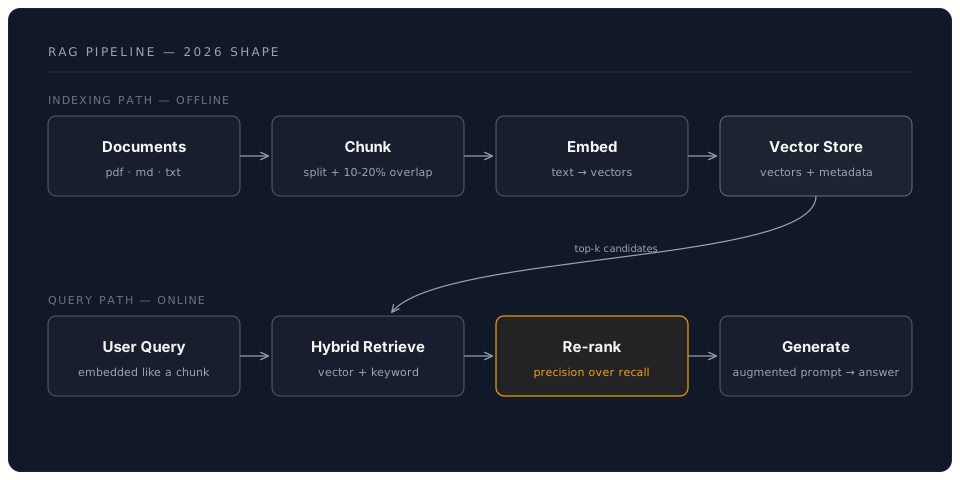
Key Insight: Retrieve relevant information BEFORE generating response.
Core Components
1. Vector Databases
Store and search embeddings efficiently.
Popular Options 2026:
Chroma (Local, Easy)
- Perfect for prototyping
- Local-first design
- Simple API
- Great for learning
import chromadb
client = chromadb.Client()
collection = client.create_collection("docs")
Qdrant (Production-Ready)
- High performance
- Advanced filtering
- Hosted or self-hosted
- RESTful API
from qdrant_client import QdrantClient
client = QdrantClient(url="http://localhost:6333")
Pinecone (Managed Cloud)
- Fully managed, serverless
- Scales automatically
- Pay-as-you-go
- Enterprise features
from pinecone import Pinecone
pc = Pinecone(api_key="your-key")
index = pc.Index("my-index")
Weaviate (Hybrid Search)
- Built-in hybrid search (vector + BM25)
- GraphQL interface
- Native multi-tenancy
- Strong typing with schema enforcement
pgvector (PostgreSQL Extension)
- Use existing PostgreSQL
- SQL-native
- ACID compliance
- Familiar tooling
CREATE EXTENSION vector;
CREATE TABLE embeddings (
  id SERIAL PRIMARY KEY,
  content TEXT,
  embedding vector(1536)
);
2. Embedding Models
Convert text to vector representations.
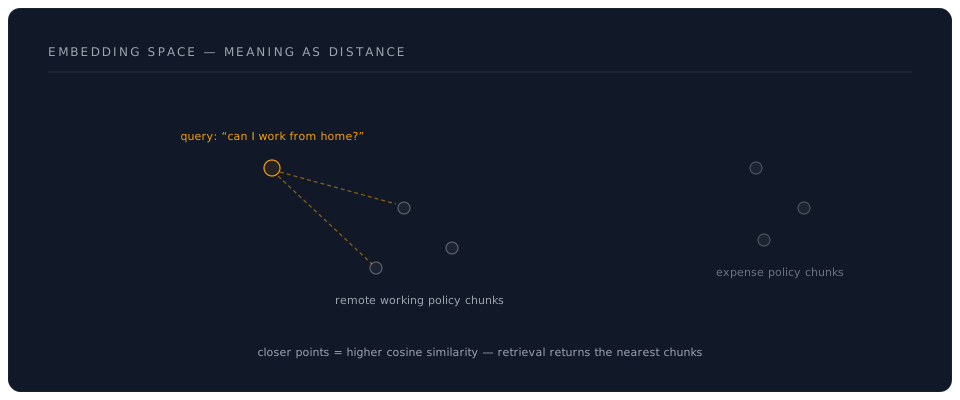
OpenAI Embeddings
from openai import OpenAI
client = OpenAI()

response = client.embeddings.create(
    model="text-embedding-3-small",  # 1536 dimensions
    input="Your text here"
)
embedding = response.data[0].embedding
Models Comparison:
| Model | Dimensions | Cost | Quality |
|---|---|---|---|
| text-embedding-3-small | 1536 | Low | Good |
| text-embedding-3-large | 3072 | Medium | Better |
| Voyage AI v3 | 1024 | Medium | Best |
| Cohere embed-v4 | 1024 | Medium | Excellent |
| sentence-transformers | 384-768 | Free | Good |
| nomic-embed-text | 768 | Free | Very Good |
TIP: Check the provider's console for current embedding pricing -- rates change frequently.
Local Embeddings (Free)
from sentence_transformers import SentenceTransformer

# General purpose -- good balance of quality and speed
model = SentenceTransformer('all-MiniLM-L6-v2')
embeddings = model.encode(["Text 1", "Text 2"])

# Higher quality -- slower but more accurate
model = SentenceTransformer('BAAI/bge-base-en-v1.5')
embeddings = model.encode(["Text 1", "Text 2"])
Ollama Embeddings (Local, GPU-accelerated)
import ollama

# Use Ollama for local embeddings with GPU support
response = ollama.embeddings(
    model='nomic-embed-text',
    prompt='Your text here'
)
embedding = response['embedding']
3. Document Chunking
Split documents into searchable pieces.
Strategies:
Fixed-Size Chunking
def chunk_text(text, chunk_size=1000, overlap=200):
    chunks = []
    for i in range(0, len(text), chunk_size - overlap):
        chunks.append(text[i:i + chunk_size])
    return chunks
Recursive Character Splitting
from langchain.text_splitter import RecursiveCharacterTextSplitter

splitter = RecursiveCharacterTextSplitter(
    chunk_size=1000,
    chunk_overlap=200,
    separators=["\n\n", "\n", ".", " ", ""]
)
chunks = splitter.split_text(document)
Semantic Chunking (context-aware, splits at meaning boundaries)
from langchain_experimental.text_splitter import SemanticChunker
from langchain_community.embeddings import OllamaEmbeddings

embeddings = OllamaEmbeddings(model="nomic-embed-text")
chunker = SemanticChunker(embeddings, breakpoint_threshold_type="percentile")
chunks = chunker.split_text(document)
Best Practices:
- Chunk size: 500-1000 tokens for most use cases
- Overlap: 10-20% of chunk size to preserve context at boundaries
- Preserve context: Don't split mid-sentence or mid-paragraph
- Include metadata: Source, page number, timestamp, section heading
- Experiment: The optimal chunking strategy depends on your documents -- always test with real queries
RAG Architecture Patterns
Pattern 1: Basic RAG
# Simple RAG pipeline
def basic_rag(query):
    # 1. Embed query
    query_embedding = embed(query)

    # 2. Search vector DB
    results = vector_db.search(query_embedding, top_k=5)

    # 3. Build context
    context = "\n\n".join([r.text for r in results])

    # 4. Generate response
    prompt = f"Context:\n{context}\n\nQuestion: {query}"
    response = llm.generate(prompt)

    return response
Pattern 2: Hybrid Search
Combine vector and keyword search for better results.
def hybrid_rag(query):
    # Vector search
    vector_results = vector_db.search(embed(query), top_k=10)

    # Keyword search (BM25)
    keyword_results = bm25_search(query, top_k=10)

    # Merge and re-rank
    combined = merge_results(vector_results, keyword_results)
    top_results = rerank(combined, query, top_k=5)

    # Generate
    context = build_context(top_results)
    return llm.generate(context + query)
Pattern 3: Multi-Document RAG
Handle multiple document types.
def multi_doc_rag(query, doc_types=['pdf', 'web', 'code']):
    results = {}

    # Search each document type
    for doc_type in doc_types:
        collection = get_collection(doc_type)
        results[doc_type] = collection.search(query)

    # Weight by relevance and type
    weighted_results = apply_weights(results)

    # Generate with source attribution
    return generate_with_sources(weighted_results, query)
Pattern 4: Re-ranking for Relevance
Improve result quality with re-ranking.
from sentence_transformers import CrossEncoder

def rerank_results(query, candidates, top_k=5):
    # Use cross-encoder for accurate relevance
    reranker = CrossEncoder('cross-encoder/ms-marco-MiniLM-L-6-v2')

    # Score each candidate
    pairs = [[query, c.text] for c in candidates]
    scores = reranker.predict(pairs)

    # Sort and return top-k
    ranked = sorted(zip(candidates, scores),
                   key=lambda x: x[1], reverse=True)
    return [c for c, s in ranked[:top_k]]
Advanced Techniques
Query Expansion
Improve retrieval with query reformulation.
def expand_query(original_query):
    # Generate related queries
    expansion_prompt = f"""
    Generate 3 alternative phrasings of this query:
    {original_query}
    """

    alternatives = llm.generate(expansion_prompt)

    # Search with all variants
    all_results = []
    for query in [original_query] + alternatives:
        all_results.extend(vector_db.search(query))

    # Deduplicate and rank
    return deduplicate_and_rank(all_results)
Contextual Compression
Remove irrelevant parts of retrieved documents.
from langchain.retrievers import ContextualCompressionRetriever
from langchain.retrievers.document_compressors import LLMChainExtractor

compressor = LLMChainExtractor.from_llm(llm)
compression_retriever = ContextualCompressionRetriever(
    base_compressor=compressor,
    base_retriever=vector_retriever
)

# Only relevant parts are kept
compressed_docs = compression_retriever.get_relevant_documents(query)
Citation & Source Tracking
Provide verifiable sources.
def rag_with_citations(query):
    results = vector_db.search(query, top_k=5)

    # Build context with markers
    context_parts = []
    for i, result in enumerate(results, 1):
        context_parts.append(f"[{i}] {result.text}")

    prompt = f"""
    Context:
    {chr(10).join(context_parts)}

    Question: {query}

    Provide answer with citations using [1], [2], etc.
    """

    response = llm.generate(prompt)

    # Return answer + sources
    return {
        'answer': response,
        'sources': [r.metadata for r in results]
    }
Evaluation Metrics
Retrieval Quality
def evaluate_retrieval(queries, ground_truth):
    metrics = {
        'precision': [],
        'recall': [],
        'mrr': []  # Mean Reciprocal Rank
    }

    for query, truth in zip(queries, ground_truth):
        results = retrieve(query, top_k=10)

        # Calculate metrics
        relevant = set(results) & set(truth)
        metrics['precision'].append(len(relevant) / len(results))
        metrics['recall'].append(len(relevant) / len(truth))

        # MRR
        for i, r in enumerate(results, 1):
            if r in truth:
                metrics['mrr'].append(1 / i)
                break

    return {k: np.mean(v) for k, v in metrics.items()}
Generation Quality
# Use RAGAS framework
from ragas import evaluate
from ragas.metrics import faithfulness, answer_relevancy

results = evaluate(
    dataset=test_dataset,
    metrics=[faithfulness, answer_relevancy]
)

print(results)
# {'faithfulness': 0.89, 'answer_relevancy': 0.92}
Common Challenges
Challenge 1: Cold Start
Problem: Empty vector database Solution: Pre-populate with FAQs, documentation
Challenge 2: Stale Data
Problem: Outdated information Solution: Implement update pipelines, versioning
Challenge 3: Large Documents
Problem: Documents exceed context limits Solution: Hierarchical retrieval, summarization
Challenge 4: Multi-lingual
Problem: Queries and docs in different languages Solution: Multilingual embeddings, translation layer
Challenge 5: Hallucinations
Problem: LLM ignores retrieved context Solution: Stricter prompts, fact-checking, citations
Best Practices 2026
✅ Use hybrid search (vector + keyword) for better recall ✅ Implement re-ranking to improve precision ✅ Chunk thoughtfully - preserve semantic meaning ✅ Track sources - always provide citations ✅ Monitor quality - log failures, evaluate regularly ✅ Cache embeddings - don't re-embed same content ✅ Version your data - track document updates ✅ Test with real queries - use actual user questions
Architecture Decision Guide
Choose Chroma if:
- Learning RAG
- Local development
- Small datasets (<100K docs)
Choose Qdrant if:
- Production deployment
- Need filtering
- Medium datasets (100K-10M docs)
Choose Pinecone if:
- Want managed service
- Global distribution
- Large scale (10M+ docs)
Choose pgvector if:
- Already using PostgreSQL
- Need ACID transactions
- Familiar with SQL
Key Takeaways
✅ RAG combines retrieval with generation for better answers ✅ Vector databases enable semantic search ✅ Chunking strategy significantly impacts quality ✅ Hybrid search outperforms pure vector search ✅ Re-ranking improves relevance ✅ Always provide source citations
Next Steps
In the hands-on session, you'll:
- Set up a vector database (Chroma)
- Implement document chunking and embedding
- Build a complete RAG pipeline
- Add hybrid search and re-ranking
- Create a Q&A system over your own documents
Navigation
- Previous: Introduction
- Next: Hands-On Practice
- Back to Workshop Overview