Introduction to RAG Systems
Why RAG Matters in 2026
Large Language Models are powerful, but they have fundamental limitations: their knowledge is frozen at training time, they cannot access your private data, and they sometimes generate plausible-sounding but incorrect information (hallucinations). Retrieval-Augmented Generation (RAG) addresses all three problems.
The Core Idea
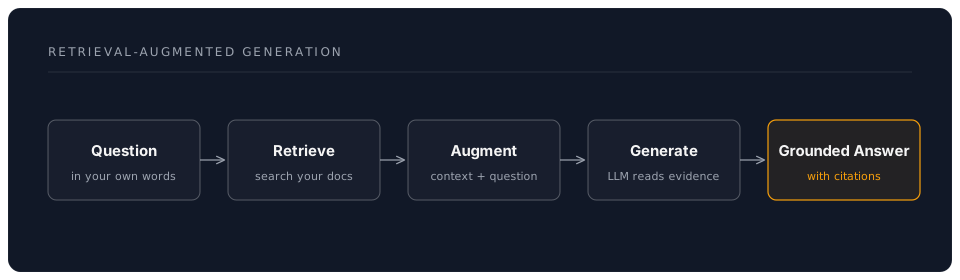
Instead of relying solely on what a model "knows" from training, RAG retrieves relevant information from your own documents and feeds it to the model as context. The model then generates an answer grounded in your actual data.
The Problem Without RAG
Imagine asking a language model about your organisation's remote working policy. Without RAG:
- The model has no knowledge of your specific policies -- it was trained on public data
- It might invent plausible-sounding rules that do not match your actual policy
- It cannot cite sources -- you have no way to verify the answer
- If your policy changed last month, the model has no way to know
With RAG, the same question triggers a search of your policy documents. The relevant sections are retrieved, fed to the model as context, and the answer cites exactly where the information came from. The model becomes a skilled reader of your documents, not a guesser.
How RAG Works -- A Simple Analogy
Think of RAG like a research assistant with perfect recall. When you ask a question:
- The assistant searches your filing cabinet (the vector database) for relevant documents, using meaning rather than exact words. Asking "Can I work from home?" matches a document titled "Remote Working Policy" even though the words are different.
- The assistant reads the relevant pages and puts them on the desk in front of you (the context window).
- The assistant writes an answer based only on those pages, noting which page each fact came from (citations).
The "intelligence" of RAG comes from two sources: the embedding model (which understands meaning well enough to find the right documents) and the language model (which reads and synthesises the retrieved passages into a coherent answer).
Why Now?
Three developments make RAG practical for everyone in 2026:
- Local models are good enough. Ollama and similar tools run capable language models on a standard laptop. You do not need cloud APIs or expensive hardware.
- Vector databases are mature. ChromaDB, Qdrant, and pgvector make semantic search straightforward to set up and use.
- Embedding models are free. Open-source models like
all-MiniLM-L6-v2andnomic-embed-textproduce high-quality embeddings at zero cost, with full privacy.
Real-World Applications
RAG is not a toy -- it is the architecture behind many production AI systems:
-
Enterprise knowledge bases: Ask questions about internal policies, procedures, and documentation. HR teams use RAG to give employees instant, accurate answers about benefits, leave policies, and compliance requirements.
-
Customer support: Ground chatbot answers in your actual product documentation. Instead of generic responses, the bot cites specific pages from your help centre.
-
Legal research: Search and synthesise information across thousands of case documents. Lawyers use RAG to find relevant precedents and extract key arguments with proper citations.
-
Healthcare: Query medical literature while keeping patient data private. RAG systems help clinicians stay current with research without sending sensitive data to cloud services.
-
Education: Build tutoring systems that reference specific course materials. Students ask questions and receive answers grounded in their actual reading list, with page references.
-
Financial analysis: Query earnings reports, regulatory filings, and market research. Analysts use RAG to synthesise findings across hundreds of documents in seconds.
-
Technical documentation: Engineering teams index API docs, runbooks, and architecture decisions. New team members ask questions and receive cited answers from the team's collective knowledge.
RAG vs Other Approaches
| Approach | When to Use | Limitations |
|---|---|---|
| Prompt engineering | Small amounts of context that fit in one prompt | Limited to what fits in the context window |
| Fine-tuning | Teaching the model a new style or domain vocabulary | Expensive, requires training data, does not add facts reliably |
| RAG | Large document collections, frequently updated content, need for citations | Requires a retrieval pipeline and vector store |
| Web search + LLM | General questions about public information | No access to private/internal data |
RAG is the right choice when you need accurate answers from a specific collection of documents, especially when those documents change over time.
Key Terminology
Before we dive in, here are the terms you will encounter throughout the session:
- Embedding: A list of numbers (a vector) that represents the meaning of a piece of text. Similar texts produce similar embeddings, which is how semantic search works.
- Vector database: A specialised database that stores embeddings and can quickly find the most similar ones to a query. ChromaDB, Qdrant, and Pinecone are examples.
- Chunk: A smaller piece of a larger document. We split documents into chunks because embedding models work best on focused passages, and language models have limited context windows.
- Retrieval: The process of finding the most relevant chunks for a given question.
- Context window: The amount of text a language model can process in a single prompt. Retrieved chunks must fit within this limit.
- Cosine similarity / distance: A measure of how similar two embeddings are. Lower distance means higher similarity (more relevant).
- Hallucination: When a language model generates information that is not supported by the provided context. RAG reduces but does not eliminate this.
- Citation / source attribution: Tracking which document and section each piece of an answer comes from, so the user can verify it.
What You Will Learn Today
By the end of this afternoon session, you will:
- Understand the complete RAG pipeline -- from document ingestion to answer generation
- Set up a vector database (ChromaDB) for semantic search
- Implement document chunking and embedding strategies
- Build a working RAG system using local models via Ollama
- Evaluate retrieval quality and generation accuracy
- Apply advanced techniques: hybrid search, re-ranking, and citation tracking
The Skills You Will Gain
These are transferable skills, not tied to any single tool:
- Document engineering: How to prepare, chunk, and enrich documents for machine consumption. This applies whether you use ChromaDB, Qdrant, Pinecone, or any future vector store.
- Prompt design for grounded generation: How to write prompts that constrain a language model to answer from evidence rather than invention. This works with any LLM -- local or cloud.
- Evaluation thinking: How to verify that an AI system gives correct, well-sourced answers. This mindset transfers to any AI application you build.
What You Will Build
A complete, working system with these components:
- Document loader that reads markdown, text, and PDF files
- Chunking pipeline that splits documents into searchable pieces with metadata
- Vector store (ChromaDB) that indexes your document chunks as embeddings
- Query pipeline that retrieves relevant context and generates grounded answers
- Citation tracker that tells you exactly which document each fact comes from
- Evaluation harness that verifies your system returns correct answers
Everything runs locally on your machine. No cloud services required. Full privacy.
Session Structure
Afternoon Schedule (3 hours):
| Time | Activity | Duration |
|---|---|---|
| 13:00 - 13:10 | Introduction and setup check | 10 min |
| 13:10 - 13:40 | Core concepts: RAG architecture, embeddings, chunking | 30 min |
| 13:40 - 15:10 | Hands-on: Build your complete RAG pipeline | 90 min |
| 15:10 - 15:30 | Coffee break and experimentation | 20 min |
| 15:30 - 16:15 | Exercises: Advanced techniques | 45 min |
| 16:15 - 16:45 | Project: Build a knowledge base for your work | 30 min |
| 16:45 - 17:00 | Assessment and wrap-up | 15 min |
Pacing
The session is designed to be self-paced within each block. If you finish a section early, explore the bonus challenges. If you need more time, focus on the core steps -- the advanced exercises are optional extensions.
Prerequisites
- Completed the morning session on Local AI Models
- Ollama installed with at least one model (
llama3.3:8brecommended) - Python 3.10+ with pip
- Basic familiarity with Python (read and run scripts)
See prerequisites.md for detailed system requirements and setup verification.
Pre-Session Checklist
- Ollama running with a model loaded (
ollama listshows at least one model) - Python 3.10+ available (
python3 --version) - pip available (
pip --version) - 10 GB free disk space (for vector database and embedding models)
- A collection of documents to use (PDFs, markdown, or text files) -- or plan to use the workshop samples
- Terminal open and ready
A Word on Expectations
RAG systems are genuinely useful, but they are not magic. You will encounter moments where:
- The retrieval misses a relevant document (adjust chunk size or embedding model)
- The LLM ignores the context and makes something up (strengthen the prompt)
- The citations point to slightly wrong sections (refine your chunking strategy)
This is normal. RAG development is iterative. The workshop teaches you not just how to build a system, but how to diagnose and improve it.
Let us begin.