Chapter 6: Resources & Continued Learning
Introduction: Your AI API Reference Library
This resource collection supports your ongoing journey with direct AI API access. Bookmark this page — you'll return to it whenever you need a provider console link, a code snippet, a pricing update, or guidance on a new model.
Provider Consoles & Documentation
Anthropic (Claude Models)
Consoles & Dashboards:
- 🏠 Anthropic Console — API keys, billing, usage
- 📊 Usage Dashboard — Real-time spend tracking
- 🔑 API Keys — Create and manage keys
Documentation:
- 📖 API Reference — Complete endpoint documentation
- 📝 Messages API Guide — How to send requests
- 🧪 Model Overview — Current models, context windows, pricing
- 💡 Prompt Engineering Guide — Official best practices
- 🔒 API Key Security — Setup and security guidance
Tools:
- 🖥️ Claude Code — Terminal-based AI coding agent
- 🧰 Anthropic SDK (Python) — Official Python library
- 🧰 Anthropic SDK (TypeScript) — Official Node.js library
Current Models (mid-2026):
| Model | ID | Context | Best For |
|---|---|---|---|
| Fable 5 | claude-fable-5 | 200K | Latest and most capable |
| Opus 4.8 | claude-opus-4-8 | 200K | Top-tier reasoning |
| Sonnet 4.6 | claude-sonnet-4-6 | 200K | Best balance of quality/speed/cost |
| Haiku 4.5 | claude-haiku-4-5 | 200K | Speed champion, lowest cost |
Check console.anthropic.com for current pricing — it changes as new models launch.
OpenAI (GPT Models)
Consoles & Dashboards:
- 🏠 OpenAI Platform — Main dashboard
- 📊 Usage Dashboard — Cost tracking
- 🔑 API Keys — Key management
- 💳 Billing Settings — Limits and alerts
Documentation:
- 📖 API Reference — Complete endpoint docs
- 📝 Chat Completions Guide — Core API usage
- 🧪 Models Overview — Available models and pricing
- 💡 Best Practices — Prompt engineering
- 🔢 Tokenizer Tool — Count tokens interactively
Tools:
- 🧰 OpenAI SDK (Python) — Official Python library
- 🧰 OpenAI SDK (Node.js) — Official JavaScript library
- 🎮 Playground — Test prompts in the browser
Current Models (mid-2026):
| Model | ID | Context | Best For |
|---|---|---|---|
| GPT-4o | gpt-4o | 128K | Reliable general purpose |
| GPT-4o-mini | gpt-4o-mini | 128K | High volume, very cheap |
| o3 | o3 | 200K | Complex reasoning, maths |
Check platform.openai.com/docs/models for current pricing.
Google (Gemini Models)
Consoles & Dashboards:
- 🏠 Google AI Studio — API keys, playground, docs
- 🔑 API Keys — Create and manage keys
- 📊 Google Cloud Console — Billing (if using paid tier)
Documentation:
- 📖 Gemini API Reference — Complete docs
- 📝 Quickstart Guide — Get started fast
- 🧪 Models Overview — Available models
- 💡 Prompt Design Guide — Google's prompt engineering
Tools:
- 🧰 Google Generative AI SDK (Python) — Official Python library
- 🧰 Google Generative AI SDK (JavaScript) — Official JS library
- 🎮 AI Studio Playground — Test in browser with free tier
Current Models (mid-2026):
| Model | ID | Context | Best For |
|---|---|---|---|
| Gemini 2.5 Pro | gemini-2.5-pro | 2M | Massive context, code analysis |
| Gemini 2.5 Flash | gemini-2.5-flash | 1M | Fast, cheap, generous free tier |
Check aistudio.google.dev for current free-tier limits and pricing.
Groq (Open-Source Models, Free Tier)
Consoles & Dashboards:
- 🏠 Groq Console — Dashboard and API keys
- 🔑 API Keys — Key management
- 📊 Usage — Track free-tier usage
Documentation:
- 📖 Groq API Docs — API reference
- 📝 Quickstart — Get started
- 🧪 Supported Models — Available models
Key Advantage: Ultra-fast inference, free tier, no credit card required. Models available change frequently — check the console for the latest offerings including Llama 4 variants.
Quick Reference: API Calls
Anthropic Claude (curl)
curl https://api.anthropic.com/v1/messages \
  -H "Content-Type: application/json" \
  -H "x-api-key: $ANTHROPIC_API_KEY" \
  -H "anthropic-version: 2023-06-01" \
  -d '{
    "model": "claude-sonnet-4-6",
    "max_tokens": 1024,
    "messages": [
      {
        "role": "user",
        "content": "Explain API access in plain English, under 50 words."
      }
    ]
  }'
Anthropic Claude (Python)
from anthropic import Anthropic

client = Anthropic()  # reads ANTHROPIC_API_KEY from environment

message = client.messages.create(
    model="claude-sonnet-4-6",
    max_tokens=1024,
    messages=[
        {"role": "user", "content": "Explain API access in plain English, under 50 words."}
    ]
)

print(message.content[0].text)
print(f"Tokens used: {message.usage.input_tokens} in, {message.usage.output_tokens} out")
OpenAI GPT (curl)
curl https://api.openai.com/v1/chat/completions \
  -H "Content-Type: application/json" \
  -H "Authorization: Bearer $OPENAI_API_KEY" \
  -d '{
    "model": "gpt-4o",
    "messages": [
      {
        "role": "user",
        "content": "Explain API access in plain English, under 50 words."
      }
    ],
    "max_tokens": 200
  }'
OpenAI GPT (Python)
from openai import OpenAI

client = OpenAI()  # reads OPENAI_API_KEY from environment

response = client.chat.completions.create(
    model="gpt-4o",
    messages=[
        {"role": "user", "content": "Explain API access in plain English, under 50 words."}
    ],
    max_tokens=200
)

print(response.choices[0].message.content)
print(f"Tokens used: {response.usage.prompt_tokens} in, {response.usage.completion_tokens} out")
Google Gemini (curl)
curl "https://generativelanguage.googleapis.com/v1beta/models/gemini-2.5-flash:generateContent?key=$GEMINI_API_KEY" \
  -H "Content-Type: application/json" \
  -d '{
    "contents": [
      {
        "parts": [
          {"text": "Explain API access in plain English, under 50 words."}
        ]
      }
    ]
  }'
Google Gemini (Python)
import google.generativeai as genai
import os

genai.configure(api_key=os.getenv("GEMINI_API_KEY"))

model = genai.GenerativeModel("gemini-2.5-flash")
response = model.generate_content("Explain API access in plain English, under 50 words.")

print(response.text)
print(f"Tokens used: {response.usage_metadata.prompt_token_count} in, "
      f"{response.usage_metadata.candidates_token_count} out")
Environment Setup Reference
The .env File
# .env — NEVER commit this file to version control
ANTHROPIC_API_KEY=sk-ant-api03-your-key-here
OPENAI_API_KEY=sk-proj-your-key-here
GEMINI_API_KEY=AIzaSy-your-key-here
GROQ_API_KEY=gsk_your-key-here
The .gitignore Entry
# Add to .gitignore
.env
.env.local
.env.*.local
Loading Keys in Python
import os
from dotenv import load_dotenv

load_dotenv()  # reads .env file

anthropic_key = os.getenv("ANTHROPIC_API_KEY")
openai_key = os.getenv("OPENAI_API_KEY")
gemini_key = os.getenv("GEMINI_API_KEY")

# Verify keys are loaded
for name, key in [("Anthropic", anthropic_key), ("OpenAI", openai_key), ("Gemini", gemini_key)]:
    if key:
        print(f"{name}: configured ({key[:8]}...)")
    else:
        print(f"{name}: NOT CONFIGURED")
Installing Python SDKs
# Create a virtual environment (optional but recommended)
python3 -m venv ai-env
source ai-env/bin/activate  # Linux/Mac
# ai-env\Scripts\activate   # Windows

# Install all provider SDKs
pip install anthropic openai google-generativeai python-dotenv groq
Cost Calculators & Tracking
Quick Cost Estimation Formula
Cost = (input_tokens / 1,000,000) x input_price + (output_tokens / 1,000,000) x output_price
Token estimation rules of thumb:
- 1 token is roughly 4 characters or 0.75 words in English
- A typical A4 page of text is approximately 500-600 tokens
- A 1,500-word blog post is approximately 2,000 tokens
Monthly Cost Tracking Template
# AI API Cost Tracker — [Month] 2026

## Weekly Breakdown

| Week | Anthropic | OpenAI | Google | Groq | Total |
|------|-----------|--------|--------|------|-------|
| 1 | $ | $ | Free | Free | $ |
| 2 | $ | $ | Free | Free | $ |
| 3 | $ | $ | Free | Free | $ |
| 4 | $ | $ | Free | Free | $ |
| **Total** | **$** | **$** | **Free** | **Free** | **$** |

## vs Subscriptions
- ChatGPT Plus: £20/month
- Claude Pro: £18/month
- Gemini Advanced: £19/month
- **Subscription total: £57/month**
- **API total: £___/month**
- **Saving: £___/month (____%)**

## Model Usage Log
| Date | Task | Model | ~Tokens | ~Cost | Quality (1-5) |
|------|------|-------|---------|-------|---------------|
| | | | | | |
Provider Billing Pages (Bookmark These)
- Anthropic: https://console.anthropic.com/settings/billing
- OpenAI: https://platform.openai.com/usage
- Google Cloud: https://console.cloud.google.com/billing (if using paid tier)
- Groq: https://console.groq.com/settings/usage
Model Selection Decision Tree
Quick Reference Card
TASK: Quick email, summary, simple question
  --> GPT-4o-mini or Haiku 4.5 (cheapest, fastest)

TASK: Professional writing, blog post, creative content
  --> Claude Sonnet 4.6 (best prose, natural voice)

TASK: Long document analysis (50+ pages)
  --> Gemini 2.5 Pro (2M context) or Gemini 2.5 Flash (1M, cheaper)

TASK: Complex reasoning, strategy, maths
  --> o3, Claude Opus 4.8, or Claude Fable 5

TASK: Rapid experimentation, prototyping
  --> Llama 4 via Groq (free, ultra-fast)

TASK: Code generation and review
  --> Claude Sonnet 4.6 or GPT-4o

TASK: Proofreading, formatting, simple edits
  --> Haiku 4.5 or GPT-4o-mini (no need for premium)
Context Window Guide
Under 50 pages:    Any model works
50-300 pages:      Claude models (200K) or GPT-4o (128K)
300-2,500 pages:   Gemini 2.5 Flash (1M context)
2,500-5,000 pages: Gemini 2.5 Pro (2M context) — only option
Learning Paths
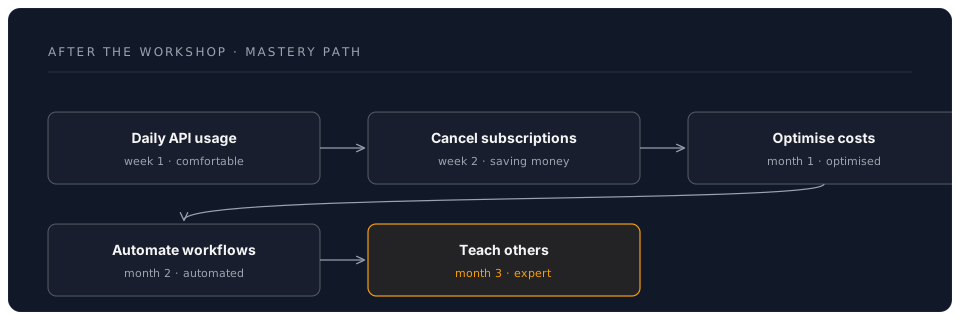
Week 1-2: Foundation
Focus: Daily API usage, model preference formation
- Use API access instead of web interfaces for all AI tasks
- Track costs daily (use the template above)
- Test each model on 3 different task types from your work
- Identify your go-to model for each task category
- Cancel or pause one AI subscription
Resources:
- 📖 Anthropic Prompt Engineering Guide
- 📖 OpenAI Prompt Engineering
- 📺 Prompt Engineering Basics (YouTube)
Week 3-4: Optimisation
Focus: Cost reduction, workflow automation
- Refine model routing based on 2 weeks of data
- Explore prompt caching (Anthropic, Google) for repeated tasks
- Build 5 reusable prompt templates for your common tasks
- Try the Python or TypeScript SDK for one provider
- Experiment with temperature and max_tokens settings
Resources:
Month 2+: Advanced Techniques
Focus: Automation, integration, teaching others
- Build a multi-model script that routes tasks automatically
- Explore structured output (JSON mode) for data extraction
- Investigate tool use / function calling for AI agents
- Set up automated batch processing for recurring tasks
- Help a colleague set up their own multi-model access
Resources:
Community & Support
Provider Communities
Anthropic:
OpenAI:
Google AI:
General AI Communities
- 🌐 Reddit r/ClaudeAI — Claude-specific discussions
- 🌐 Reddit r/OpenAI — GPT discussions
- 🌐 Reddit r/LocalLLaMA — Open-source models
- 🌐 Hacker News — AI industry news
- 💬 AI Discord Servers — Search for "AI" communities
DreamLab Workshop Support
- 📧 Email: workshop@dreamlab.ai
- 💬 Discord: Workshop Channel
- 📅 Office Hours: Fridays 2-3pm GMT
- 📖 Documentation: This workshop and all linked resources
Troubleshooting Reference
Common Errors and Solutions
401 Unauthorized / Invalid API Key
Cause: Key is wrong, expired, or has leading/trailing whitespace
Fix:
  1. Regenerate key from provider console
  2. Check for spaces when copying
  3. Verify key is in .env file (not hardcoded)
  4. Restart your editor after changing .env
429 Rate Limited
Cause: Too many requests in a short time window
Fix:
  1. Wait 60 seconds and retry
  2. Switch to a different provider temporarily
  3. Check your tier level — higher tiers have higher limits
  4. Implement exponential backoff in scripts
400 Bad Request / Context Length Exceeded
Cause: Input + expected output exceeds model's context window
Fix:
  1. Trim your input (remove unnecessary context)
  2. Reduce max_tokens in the request
  3. Switch to a model with a larger context window
  4. Split the task across multiple smaller requests
402 Payment Required / Insufficient Credits
Cause: Account balance is zero or card declined
Fix:
  1. Top up credits on the provider console
  2. Check payment method is valid
  3. Switch to a free-tier provider (Google, Groq) temporarily
500/503 Server Error
Cause: Provider is experiencing issues (rare but happens)
Fix:
  1. Wait 2-3 minutes and retry
  2. Check provider status page
  3. Switch to a different provider
  4. These are transient — don't change your setup
Provider Status Pages
Bookmark these to check during outages:
- Anthropic: https://status.anthropic.com
- OpenAI: https://status.openai.com
- Google Cloud: https://status.cloud.google.com
- Groq: https://status.groq.com
Security Checklist
Monthly Review
- Rotate API keys (every 90 days minimum)
- Review spending across all providers
- Check for any unusual usage patterns
- Verify
.envis still in.gitignore - Confirm MFA is enabled on all provider accounts
- Review which keys are active — revoke any unused ones
Key Rotation Procedure
- Log into the provider console
- Create a new API key
- Update your
.envfile with the new key - Restart your editor / Claude Code session
- Verify the new key works with a test prompt
- Revoke the old key from the provider console
Calendar Reminder: Set a recurring event every 90 days: "Rotate AI API keys"
Staying Current
What Changes Frequently
AI APIs evolve fast. Here is what to watch for:
- New models — Providers launch new models every few months. Check the model overview pages quarterly.
- Pricing changes — Competition drives prices down. Recheck pricing before budgeting.
- New features — Tool use, caching, structured outputs, and batch APIs emerge regularly.
- Rate limit changes — Tiers and limits adjust as providers scale.
- Context window increases — These tend to grow over time, expanding what's possible.
How to Stay Informed
- 📧 Subscribe to provider newsletters (Anthropic, OpenAI, Google AI)
- 🐦 Follow provider accounts on X
- 🌐 Check r/ClaudeAI and r/OpenAI weekly
- 📖 Read release notes when you see "new model available" in your console
- 📅 Set a monthly calendar reminder: "Check AI model updates"
Your Ongoing Journey
Conclusion
Direct AI API access is a professional skill that compounds over time. The setup effort is one morning. The savings, flexibility, and capability improvements last indefinitely.
What you've gained today:
- Access to the world's best AI models at wholesale prices
- The knowledge to choose the right model for any task
- Secure, professional API key management
- A multi-model workflow that outperforms any single subscription
- A foundation for automation and advanced AI integration
What to do next:
- Use API access for every AI task this week
- Track your costs and compare to your old subscriptions
- Refine your model preferences based on real work
- Share this knowledge with a colleague
- Return to this resource page whenever you need a reference
Welcome to professional AI access. The models are waiting.
Workshop Complete!
Back to Assessment | Back to Workshop Overview | Proceed to Next Phase -->