Chapter 3: Practical Exercises - Model Mastery
30 Minutes to Multi-Model Expertise
These exercises will help you understand each AI model's unique strengths and build muscle memory for choosing the right tool for each task.
Exercise 1: The Model Shootout (5 minutes)
Objective
Compare how different models handle the same creative task.
Setup
Create creative-test.md:
# Creative Writing Test

## Prompt
Write a 50-word description of a rainy day that evokes emotion without using the words: rain, wet, water, or drops.
Steps
- Select the prompt
- Test each model:
- GPT-4o
- Claude 4 Sonnet
- Gemini 2.0 Flash
- Llama 3.3
- Document responses below each other
- Compare for:
- Creativity
- Emotional impact
- Following constraints
- Writing style
Expected Insights
- Claude often excels at creative writing
- GPT-4o may be more technically precise
- Gemini might offer unique perspectives
- Llama provides solid free alternative
Exercise 2: Context Window Challenge (7 minutes)
Objective
Test how different models handle long documents.
Setup
- Create
long-doc-test.md - Paste a long document (3-5 pages)
- Add prompt at the end:
Summarise the key points from this document,
including specific details from the beginning,
middle, and end.
Test Sequence
- GPT-4o: Note any truncation warnings
- Claude 4 Sonnet: Should handle full document (200k context)
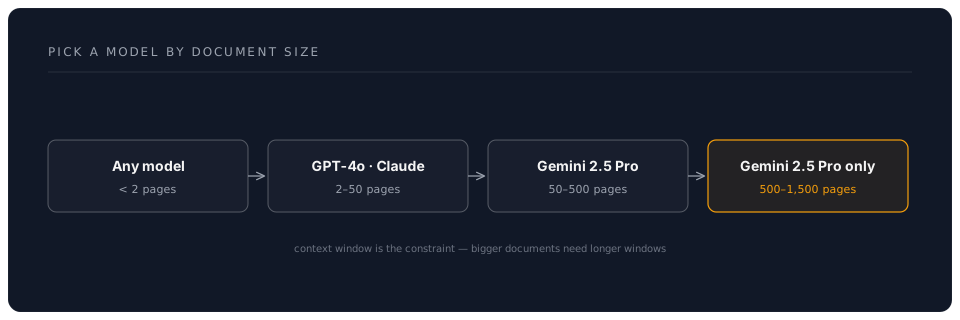
- Gemini 2.0 Pro: Best for very long content (2M context)
- Compare comprehensiveness of summaries
Learning Points
- When you need GPT-4o vs Gemini for long docs
- How context limits affect output quality
- Cost implications of long context
Exercise 3: Speed vs Quality Test (5 minutes)
Objective
Find the sweet spot between speed, quality, and cost.
Task Types
Create speed-test.md with three tasks:
# Speed vs Quality Comparison

## Task 1: Simple Email
Draft a professional email declining a meeting invitation.

## Task 2: Complex Analysis
Explain the pros and cons of remote work for businesses.

## Task 3: Code Generation
Write a Python function to calculate compound interest.
Testing Matrix
| Task | GPT-4o-mini | GPT-4o | Claude 4 Sonnet | Your Rating |
|---|---|---|---|---|
| [Test] | [Test] | [Test] | Speed/Quality/Cost | |
| Analysis | [Test] | [Test] | [Test] | Speed/Quality/Cost |
| Code | [Test] | [Test] | [Test] | Speed/Quality/Cost |
Key Findings
Document when to use:
- Fast models (mini versions)
- Premium models (GPT-4o/Claude)
- Balanced options
Exercise 4: Multi-Model Workflow (8 minutes)
Objective
Build a workflow using different models for their strengths.
Scenario: Research Report Creation
-
Research Phase (Gemini 2.0 Pro)
Prompt: Research and summarise current trends in [your industry] -
Outline Phase (GPT-4o)
Prompt: Create a detailed outline for a report on these trends -
Writing Phase (Claude 4 Sonnet)
Prompt: Write the introduction section based on this outline -
Review Phase (GPT-4o-mini)
Prompt: Proofread and suggest improvements
Document Your Workflow
# My Multi-Model Workflow

## Best Models for Each Stage:
- Research: [Your choice] because...
- Structure: [Your choice] because...
- Writing: [Your choice] because...
- Editing: [Your choice] because...
Exercise 5: Cost Optimisation Practice (5 minutes)
Objective
Learn to minimise costs while maintaining quality.
Create Cost Comparison
cost-analysis.md:
# Cost Analysis Exercise

## Task: Generate a 500-word blog post about productivity

### Approach 1: All Premium
- Model: GPT-4o
- Estimated tokens: 1,000 in + 700 out
- Cost: £[calculate]

### Approach 2: Smart Mix
- Outline: GPT-4o-mini (200 tokens)
- First draft: GPT-4o-mini (800 tokens)
- Polish: Claude 4 Sonnet (500 tokens)
- Total cost: £[calculate]

### Approach 3: Free Options
- Model: Llama 3.3 via Groq
- Cost: £0.00
- Quality comparison: [test and note]
Calculate Real Savings
- Premium only: £___
- Smart mix: £___
- Savings: ___%
Challenge Exercise: Your Custom Comparison
Create Your Test Suite
Based on your actual work needs:
- Identify 3 common tasks you do
- Create test prompts for each
- Test across all models
- Document which model wins for each task
- Calculate monthly cost savings
Template
# My Personal Model Preferences

## Task 1: [Your Task]
- Best Model: [...]
- Why: [...]
- Monthly savings: £[...]

## Task 2: [Your Task]
- Best Model: [...]
- Why: [...]
- Monthly savings: £[...]

## Task 3: [Your Task]
- Best Model: [...]
- Why: [...]
- Monthly savings: £[...]

## Total Monthly Savings: £[...]
Exercise Reflection
Quick Assessment
After completing exercises, you should know:
- Which model writes most naturally
- Which model handles long documents best
- When to use expensive vs cheap models
- How to combine models effectively
- Your potential monthly savings
Key Insights Template
# My AI Model Insights

## Writing Tasks
Best model: ___ because ___

## Analysis Tasks
Best model: ___ because ___

## Long Documents
Best model: ___ because ___

## Quick Tasks
Best model: ___ because ___

## My Monthly AI Budget
Old way (subscriptions): £___
New way (APIs): £___
Savings: £___ (___%)
Pro Tips from Exercises
- Claude 4 Sonnet often wins for natural writing and coding
- GPT-4o excels at logical analysis and balanced tasks
- Gemini 2.0 is unbeatable for long documents (2M context)
- Mini models are perfect for simple tasks
- Mixing models optimises cost/quality
- o1 provides best reasoning for complex problems
Common Patterns Discovered
The 80/20 Rule
- 80% of tasks need only cheap models
- 20% benefit from premium models
- Result: 70%+ cost savings
The Context Ladder
Your New Superpower
You can now:
- Choose the perfect model for any task
- Save 70-90% on AI costs
- Get better results than subscription users
- Work with documents of any size
- Optimise for speed or quality as needed