Chapter 1: Core Concepts - Understanding Vibe Coding
The Philosophy of Conversational Creation
Before we start building, let's understand the core concepts that make vibe coding possible. This knowledge will empower you to create anything you can imagine.
1.1 What Makes Vibe Coding Work?
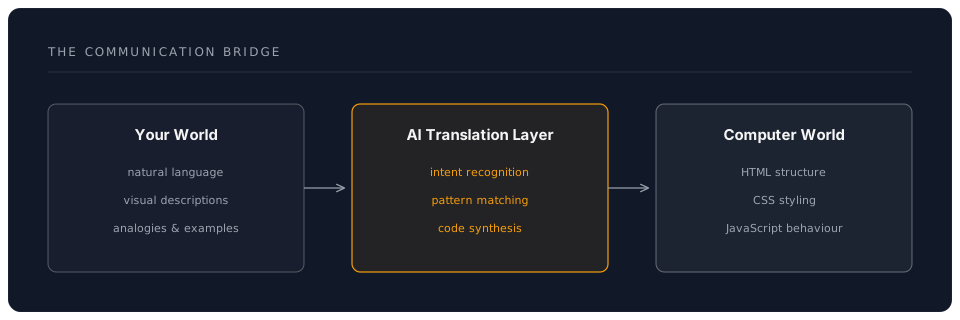
The Communication Bridge
Vibe coding works because modern AI has become fluent in translating human intent into computer instructions. You describe what you want in plain English — the AI writes the code.
The Three Pillars of Vibe Coding
-
Descriptive Clarity
- Be specific about what you want
- Use visual language
- Reference examples
-
Iterative Refinement
- Start simple
- Build incrementally
- Refine through dialogue
-
Creative Collaboration
- AI as creative partner
- You provide vision
- AI handles implementation
1.2 The Vibe Coding Tool Landscape (2026)
A year ago, vibe coding meant pasting prompts into ChatGPT and copying code back. Today there is a rich ecosystem of tools that let you describe what you want and watch it materialise.
AI Coding Agents (Full Autonomy)
These tools read your project, write files, run commands, and iterate — you direct, they build.
| Tool | What It Is | Cost |
|---|---|---|
| Claude Code | Anthropic's CLI coding agent. Describe what you want; it reads your codebase, writes code, runs tests, and iterates. Also available as a desktop app, web app (claude.ai/code), and VS Code/JetBrains extensions. | API usage (pay-per-token) |
| OpenAI Codex CLI | Open-source terminal agent from OpenAI. Similar concept — describe, it builds. | API usage |
| Cursor AI | VS Code fork with deep AI integration. Chat with your codebase, inline edits, multi-file changes. | From $20/month |
| Windsurf | AI-native editor (formerly Codeium). Flow mode for autonomous multi-step tasks. | From $10/month |
AI-Assisted Editors (Copilot Style)
These provide suggestions, completions, and chat — you remain in the driving seat.
| Tool | What It Is | Cost |
|---|---|---|
| GitHub Copilot | Inline suggestions + chat + workspace mode in VS Code/JetBrains. | From $10/month (free for students/OSS) |
| Continue.dev | Free, open-source, multi-model extension for VS Code. | Free |
| Aider | Free, terminal-based, open-source pair programmer. | Free (API costs only) |
Chat Interfaces (Copy-Paste Workflow)
For quick prototyping, you can still use chat interfaces and copy the generated code.
| Tool | What It Is |
|---|---|
| ChatGPT (GPT-4o, o3, canvas mode) | Conversational, good for single-file prototypes |
| Claude.ai | Excellent for longer code generation with artifacts |
| Google AI Studio | Gemini models, massive context for large codebases |
Why Claude Code Excels at Vibe Coding
Claude Code is particularly well-suited to vibe coding because:
- It understands your whole project — it reads your files, directory structure, and
CLAUDE.mdinstructions automatically - It executes iteratively — describe what you want, it builds it, you refine with natural language
- It runs your code — it can execute scripts, run tests, and fix errors without you touching the terminal
- It uses slash commands —
/fastfor quick iterations,/costto monitor spend - It works everywhere — terminal, desktop app, web app, or inside your IDE
# Example vibe coding session in Claude Code:
> Build me a landing page for a yoga studio. Modern, calming
  colours, hero section with a background image placeholder,
  class schedule, and a contact form. Use Tailwind CSS.

# Claude Code creates the files, then you refine:
> Make the hero text bigger and add a gradient overlay.
> The contact form needs a phone number field too.
> Add smooth scroll when clicking nav links.
1.3 The Language of Creation
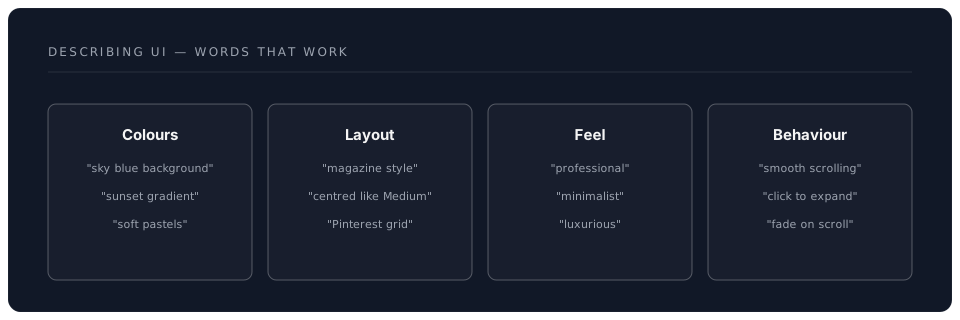
Effective Vibe Coding Vocabulary
Instead of technical terms, use descriptive language:
| Don't Say | Do Say |
|---|---|
| "div with flexbox" | "arrange items in a row" |
| "border-radius 10px" | "rounded corners" |
| "onClick handler" | "when someone clicks this" |
| "responsive grid" | "adapts to phone screens" |
| "CSS animation" | "make it fade in smoothly" |
Visual Descriptions That Work
1.4 The Anatomy of a Vibe Coding Session
Phase 1: Vision Setting
Start with the big picture:
"I want to create a personal portfolio website that feels
modern and professional, with a hero section, project
gallery, and contact form. Think minimal Apple-style design."
Phase 2: Structural Creation
AI generates the foundation:
- HTML structure
- Basic layout
- Core components
Phase 3: Visual Refinement
Iterate on aesthetics:
"Make the hero text larger and add a subtle gradient.
Can the project cards have a slight shadow on hover?"
Phase 4: Interactive Enhancement
Add behaviour:
"When someone scrolls, fade in each section.
Make the navigation stick to the top after scrolling past the hero."
Phase 5: Polish & Deploy
Final touches and going live:
"Ensure it works perfectly on mobile.
Add smooth transitions between all interactions."
1.5 Understanding What AI Creates
The Three Languages of the Web
When you vibe code, AI generates three types of code:
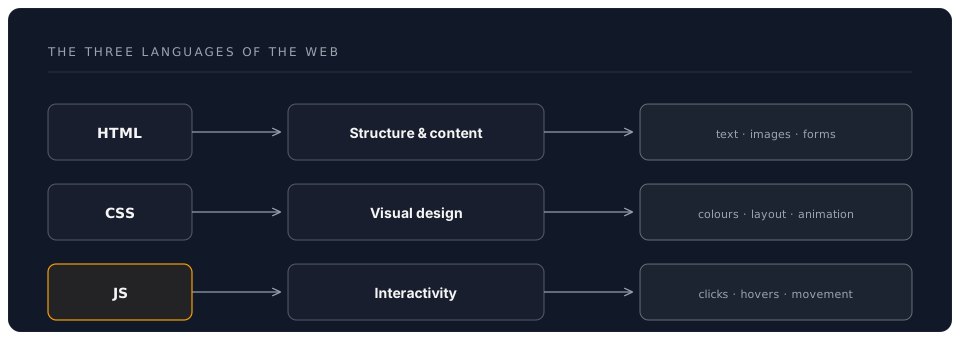
You don't need to understand this code—just know it exists and works together.
1.6 The Power of Examples
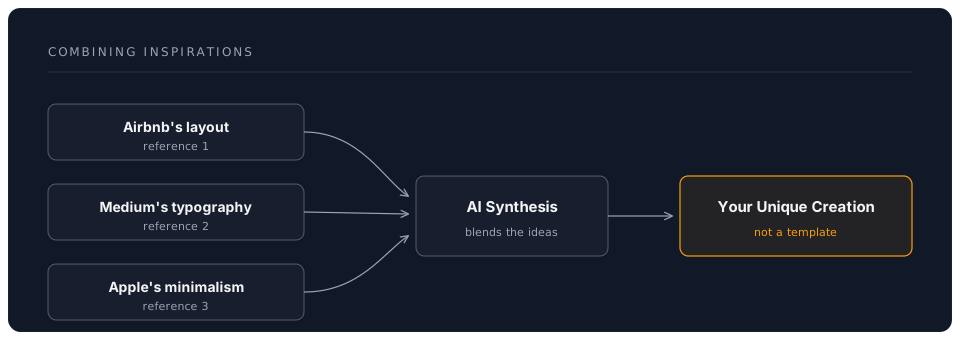
Reference-Based Creation
The most effective vibe coding uses references:
Weak Prompt:
"Make a nice website"
Strong Prompt:
"Create a landing page similar to Stripe's clean design,
but for a yoga studio. Use calming colours and imagery."
Combining Inspirations
1.7 Common Vibe Coding Patterns
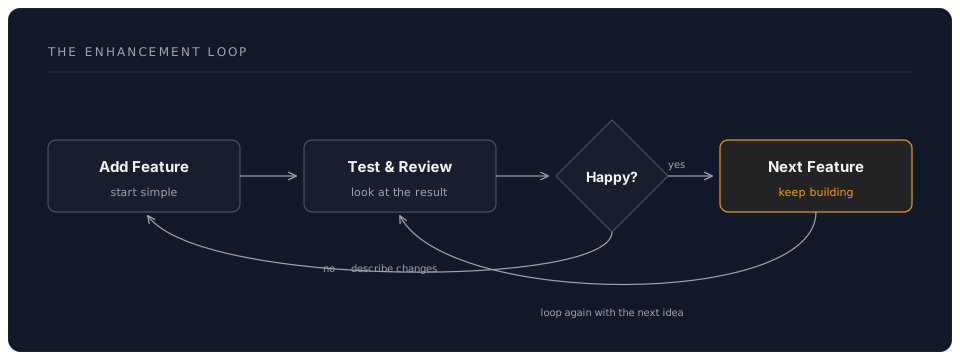
The Enhancement Loop
Progressive Enhancement Strategy
-
Start with Structure
- "Create a page with header, main content, footer"
-
Add Visual Design
- "Style it with modern, clean aesthetics"
-
Enhance Layout
- "Make it responsive with a mobile-first approach"
-
Add Interactions
- "Include smooth scrolling and hover effects"
-
Polish Details
- "Add subtle animations and loading transitions"
1.8 Debugging Through Conversation
When Things Don't Look Right
Instead of technical debugging, use natural language:
Issue: Button doesn't look right Don't say: "Fix the CSS padding and margin" Do say: "The button feels cramped, give it more breathing room"
Issue: Layout breaks on mobile Don't say: "Add media queries for responsive design" Do say: "This looks weird on phones, make it stack vertically"
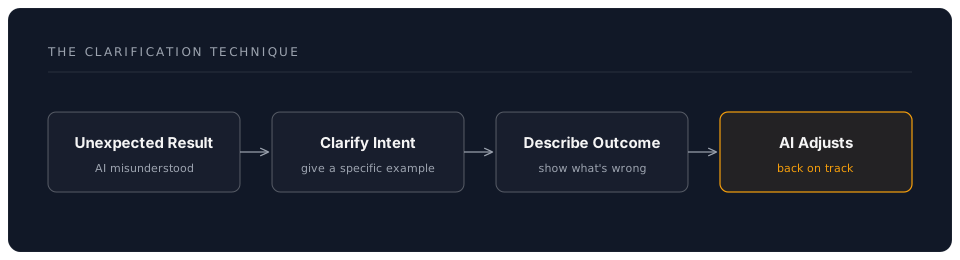
The Clarification Technique
When AI misunderstands:
1.9 Advanced Vibe Coding Concepts
Conditional Descriptions
"If the screen is small, stack everything vertically. On large screens, show three columns side by side."
State-Based Behaviour
"When the form is submitted successfully, show a thank you message and hide the form. If there's an error, highlight the problem fields."
Dynamic Content
"Load the project data from a list and create a card for each one. When clicked, expand to show more details."
1.10 The Mindset for Success
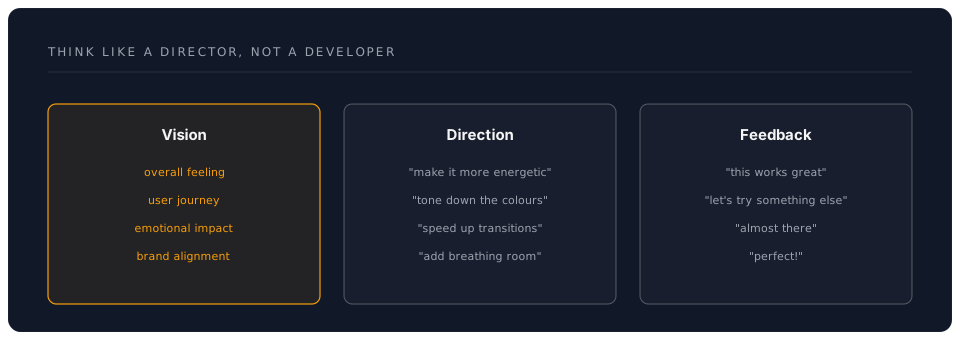
Think Like a Director, Not a Developer
Embrace Experimentation
- No change is permanent
- Try wild ideas
- Iterate quickly
- Trust the process
1.11 Real-World Applications
What People Build with Vibe Coding
-
Business Solutions
- Landing pages
- Product showcases
- Pricing calculators
- Contact forms
-
Personal Projects
- Portfolio sites
- Blogs
- Resume pages
- Side businesses
-
Tools & Utilities
- Converters
- Generators
- Dashboards
- Trackers
-
Creative Works
- Interactive stories
- Art galleries
- Music players
- Games
Key Takeaways
✅ Vibe coding translates natural language into working code
✅ Description beats prescription—say what you want, not how
✅ Iteration is the key—start simple, enhance gradually
✅ References help—point to examples you like
✅ Conversation replaces debugging—just explain the issue
✅ Anyone can do this—no technical knowledge required
Mental Preparation
Before we start building:
- Forget any coding fears
- Trust the process
- Embrace creative freedom
- Prepare to be amazed
- Think about what you want to create
Your Creative Canvas Awaits
You now understand the principles that make vibe coding possible. In the next chapter, we'll put these concepts into practice and build your first creation through pure conversation.
Remember: You're not learning to code—you're learning to direct AI to bring your visions to life.
Next: Chapter 2: Hands-On - Building Your First Vibe Creation