Chapter 6: Resources & Continued Learning
Introduction: Your Learning Library
This comprehensive resource collection supports your ongoing journey from AI consumer to AI commander. Organized by skill level and use case.
Official Documentation
VS Code Core
Essential Reading:
- 📚 VS Code Official Docs - Start here
- ⌨️ Keyboard Shortcuts Reference
- 🎨 Themes and Customization
- 🔧 Settings Sync Guide
Video Tutorials:
- VS Code in 100 Seconds - Quick overview
- VS Code Tips and Tricks - Official tutorial
- VS Code Power User Guide - Advanced features
AI Integration
Continue (Free AI)
- 📖 Continue Documentation
- 💬 Continue Discord Community
- 🎥 Continue Setup Tutorial
- 📝 Model Provider Comparison
GitHub Copilot
Codeium
Extension Recommendations
By Profession
For Academics & Researchers
{
  "essential": [
    "yzhang.markdown-all-in-one",
    "streetsidesoftware.code-spell-checker",
    "james-yu.latex-workshop",
    "notZaki.pandocciter"
  ],
  "recommended": [
    "znck.grammarly",
    "mushan.vscode-paste-image",
    "bierner.markdown-mermaid",
    "hediet.vscode-drawio"
  ],
  "advanced": [
    "tomoki1207.pdf",
    "genieai.chatgpt-vscode",
    "dotjoshjohnson.xml"
  ]
}
Installation Command:
code --install-extension yzhang.markdown-all-in-one \
     --install-extension james-yu.latex-workshop \
     --install-extension notZaki.pandocciter
For Business Professionals
{
  "essential": [
    "yzhang.markdown-all-in-one",
    "mechatroner.rainbow-csv",
    "hediet.vscode-drawio",
    "gruntfuggly.todo-tree"
  ],
  "recommended": [
    "marp-team.marp-vscode",
    "johnpapa.vscode-peacock",
    "eamodio.gitlens",
    "bierner.markdown-preview-github-styles"
  ],
  "advanced": [
    "RandomFractalsInc.vscode-data-preview",
    "GrapeCity.gc-excelviewer",
    "janisdd.vscode-edit-csv"
  ]
}
For Creative Professionals
{
  "essential": [
    "bierner.markdown-mermaid",
    "yzhang.markdown-all-in-one",
    "naumovs.color-highlight",
    "christian-kohler.path-intellisense"
  ],
  "recommended": [
    "marp-team.marp-vscode",
    "oderwat.indent-rainbow",
    "formulahendry.auto-rename-tag",
    "pranaygp.vscode-css-peek"
  ],
  "advanced": [
    "kisstkondoros.vscode-gutter-preview",
    "pnp.polacode",
    "pflannery.vscode-versionlens"
  ]
}
For Technical Writers
{
  "essential": [
    "yzhang.markdown-all-in-one",
    "streetsidesoftware.code-spell-checker",
    "davidanson.vscode-markdownlint",
    "bierner.markdown-mermaid"
  ],
  "recommended": [
    "yzane.markdown-pdf",
    "shd101wyy.markdown-preview-enhanced",
    "shuworks.vscode-table-formatter",
    "jebbs.plantuml"
  ],
  "advanced": [
    "redhat.vscode-yaml",
    "tamasfe.even-better-toml",
    "timonwong.shellcheck"
  ]
}
Learning Paths
Beginner Path (Weeks 1-2)
Week 1: Foundation
- Complete VS Code basics tutorial
- Install and configure essential extensions
- Create first AI-enhanced document
- Master 10 keyboard shortcuts
- Set up project structure template
Resources:
- 📺 VS Code Crash Course
- 📖 Markdown Guide
- 💻 Practice: Create daily standup notes template
Week 2: AI Integration
- Configure AI assistant (Continue/Copilot)
- Practice effective prompting
- Complete 5 real documents with AI
- Create 3 custom snippets
- Join VS Code community forum
Resources:
- 📺 Effective Prompting Guide
- 📖 Prompt Engineering Handbook
- 💻 Practice: Transform old document with AI
Intermediate Path (Weeks 3-4)
Week 3: Automation
- Build custom snippet library
- Set up workspace templates
- Learn regex for find/replace
- Configure task automation
- Master multi-cursor editing
Resources:
- 📺 VS Code Advanced Features
- 📖 Regex Tutorial
- 💻 Practice: Batch process 10 documents
Week 4: Version Control
- Git basics in VS Code
- GitLens mastery
- Branch management
- Collaboration workflows
- GitHub integration
Resources:
- 📺 Git & GitHub for Beginners
- 📖 Git Documentation
- 💻 Practice: Version control real project
Advanced Path (Month 2+)
Advanced Skills:
- Custom extension development
- Advanced AI integrations
- Workspace configuration mastery
- Build team templates
- Contribute to open source
Resources:
- 📺 Extension Development Tutorial
- 📖 TypeScript Documentation
- 💻 Project: Build custom workflow extension
Community Resources
Forums & Communities
Official:
Third-Party:
Newsletters & Blogs
Must-Follow:
Tools & Utilities
Productivity Enhancers
Essential Tools:
# Code formatter
npm install -g prettier

# Markdown processor
npm install -g markdown-cli

# PDF converter
npm install -g markdown-pdf

# Spell checker
npm install -g cspell
Diagram Tools:
- 🎨 Mermaid Live Editor - Test diagrams
- 📐 Draw.io - Complex diagrams
- 🔷 PlantUML - UML diagrams
Templates & Boilerplates
Document Templates:
VS Code Configurations:
Cheat Sheets
Essential Keyboard Shortcuts
Download/Print:
Quick Reference:
| Action | Shortcut |
|---|---|
| Command Palette | Ctrl+Shift+P |
| Quick Open | Ctrl+P |
| Find in Files | Ctrl+Shift+F |
| Terminal | Ctrl+` |
| AI Assistant | Ctrl+I |
| Save All | Ctrl+K S |
| Split Editor | Ctrl+\ |
| Close File | Ctrl+W |
| Format Document | Shift+Alt+F |
| Multi-Cursor | Alt+Click |
Markdown Reference
# Headings
## Subheading
**Bold** and *Italic*
- Bullet list
1. Numbered list
[Link](https://example.com)

`Inline code` and
Code blocks
> Blockquote

| Table | Header |
|-------|--------|
| Cell  | Data   |
Mermaid Diagram Quick Reference
# Flowchart
graph TD
    A --> B

# Sequence
sequenceDiagram
    Alice->>Bob: Hello

# Gantt
gantt
    title Project
    Task 1 :a1, 2024-01-01, 30d

# Pie Chart
pie
    "Cats" : 85
    "Dogs" : 15

# State Diagram
stateDiagram-v2
    [*] --> Active
Cost Management
AI API Pricing (2026)
Free Tiers:
| Provider | Free Tier | Best For |
|---|---|---|
| Groq | 14,400 req/day | Speed |
| Google Gemini | 60 req/minute | Context |
| Claude (Free) | Limited | Quality |
Paid Options:
| Provider | Cost | Pro/Con |
|---|---|---|
| OpenAI GPT-4 | $0.03/1K tokens | Expensive, high quality |
| Anthropic Claude | $0.01/1K tokens | Good value, smart |
| OpenAI GPT-3.5 | $0.002/1K tokens | Cheap, good enough |
Cost Optimization Tips:
- Use free tiers for experimentation
- GPT-3.5 for simple tasks
- GPT-4/Claude for complex work
- Local models (Ollama) for privacy
- Monitor usage with budgets
Troubleshooting Guide
Common Issues & Solutions
Issue: Extensions Won't Install
# Solution 1: Reset extension cache
rm -rf ~/.vscode/extensions
code --install-extension <extension-id>

# Solution 2: Install manually
# Download .vsix from marketplace
# Extensions panel → ... → Install from VSIX
Issue: AI Not Responding
# Check API key
# Open settings.json
# Verify key format: "api-key": "sk-..."

# Check internet connection
ping api.openai.com

# Restart VS Code
# Ctrl+Shift+P → "Reload Window"
Issue: Slow Performance
{
  "files.exclude": {
    "**/node_modules": true,
    "**/.git": true
  },
  "search.exclude": {
    "**/node_modules": true
  },
  "extensions.autoUpdate": false
}
Next Steps
Immediate Actions (Today)
- Bookmark this resource page
- Join VS Code Discord
- Install one new extension
- Create your templates folder
- Share with a colleague
This Week
- Complete beginner learning path
- Create 3 custom snippets
- Use VS Code exclusively for documents
- Track time savings
- Write reflection notes
This Month
- Master keyboard shortcuts
- Build template library
- Help colleague get started
- Contribute to community
- Explore advanced features
Getting Help
Workshop Support:
- 📧 Email: workshop@dreamlab.ai
- 💬 Discord: [Workshop Channel]
- 📅 Office Hours: Fridays 2-3pm GMT
Technical Issues:
Contributing Back
Share Your Knowledge
Ways to Contribute:
- Write a blog post about your workflow
- Create templates for your profession
- Answer questions in forums
- Report bugs and suggest features
- Build extensions for your use case
Template for Sharing:
# My VS Code Workflow for [Profession]

## Problem
[What challenge did you face?]

## Solution
[How did VS Code + AI solve it?]

## Implementation
[Step-by-step guide]

## Results
[Time saved, quality improved, etc.]

## Resources
[Links to your templates, configs]
Staying Current
Monthly Checklist:
- Read VS Code release notes
- Try one new extension
- Update AI models
- Review new features
- Optimize workflows
Annual Review:
- Reassess tool stack
- Calculate ROI
- Update templates
- Share success stories
- Plan advanced training
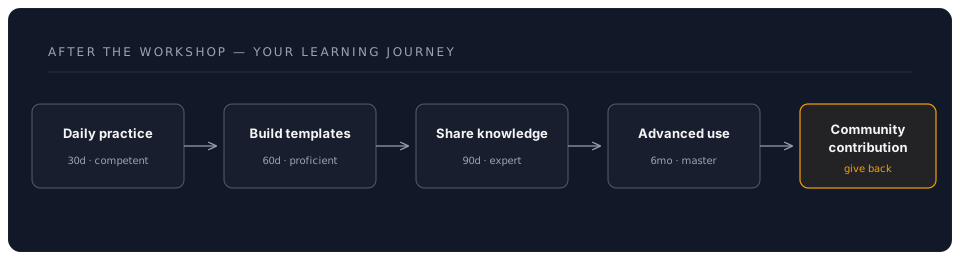
Your Learning Journey
Conclusion
Your transformation from AI consumer to AI commander doesn't end with this workshop—it's just beginning. These resources will support your continued growth.
Remember:
- Learning is continuous
- Community is valuable
- Sharing multiplies impact
- Excellence requires practice
Final Encouragement:
You now have tools that most professionals haven't discovered yet. Use them responsibly, share generously, and keep pushing the boundaries of what's possible with AI-enhanced productivity.
Workshop Complete!
Back to Assessment | Back to Workshop Overview | Proceed to Phase 2 (Version Control) →