Chapter 0: Introduction to Visual Tools & Version Control
From Chaos to Clarity: Your Professional Documentation System
Welcome to Phase 2! In this session, you'll discover how to create stunning visual documentation and implement a version control system that ensures you never lose work again. By combining Mermaid diagrams with Git, you'll build a professional documentation workflow that rivals any enterprise system.
The Power of Visual Communication
In today's information-rich world, the ability to communicate complex ideas visually is a superpower. Whether you're:
- Planning projects with Gantt charts
- Documenting processes with flowcharts
- Explaining systems with architecture diagrams
- Tracking decisions with mind maps
- Showing relationships with entity diagrams
Visual tools transform walls of text into instantly understandable insights.
Why Version Control Matters (Even for Non-Developers)
Imagine if you could:
What You'll Master in This Session
Visual Documentation Skills
-
Mermaid Mastery
- Create any diagram type from text
- Build interactive visualizations
- Export professional graphics
- Integrate with your documents
-
Project Visualization
- Gantt charts for timeline planning
- Flowcharts for process documentation
- Mind maps for brainstorming
- Sequence diagrams for workflows
Version Control Superpowers
-
Git Fundamentals
- Save work with meaningful checkpoints
- Track who changed what and when
- Recover any previous version
- Branch for experiments
-
GitHub Integration
- Free cloud backup
- Professional portfolio
- Collaboration tools
- Automatic website hosting
Real-World Transformations
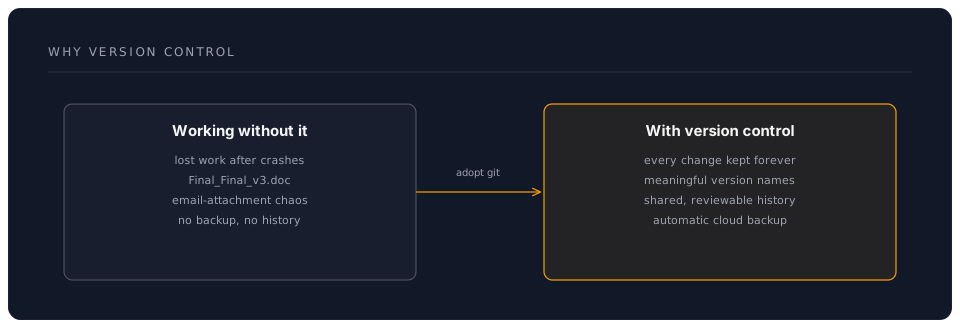
Before This Workshop
- Draw diagrams in PowerPoint (tedious)
- Save multiple file versions manually
- Email documents back and forth
- Lose work from crashes
- No clear change history
After This Workshop
- Generate diagrams from descriptions
- Automatic version tracking
- Professional collaboration platform
- Work backed up to cloud
- Complete audit trail
Success Stories from the Field
"I used to spend hours in Visio. Now I describe what I want and get beautiful diagrams instantly. Game changer for my consulting work." — David Park, Strategy Consultant
"Version control seemed like a developer thing. Now I can't imagine managing my research papers without it. It's like Track Changes on steroids." — Dr. Emma Thompson, Research Fellow
"My project Gantt charts update automatically as I type. What took hours in MS Project now takes minutes." — Sarah Mitchell, Project Manager
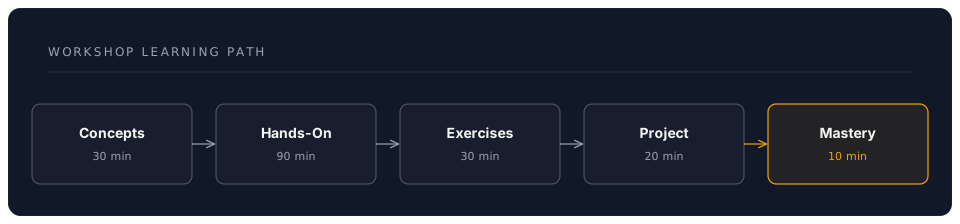
Workshop Learning Path
Your Instructor's Promise
By the end of this session, you will:
- Create professional diagrams faster than ever before
- Never lose work with automatic version control
- Build a portfolio showcasing your projects
- Collaborate professionally without email attachments
- Feel confident with tools used by millions of professionals
The Paradigm Shift
Traditional Approach
- Diagrams = Specialised software + manual drawing
- Versions = Save As... Final_Final_FINAL.doc
- Backup = Remember to copy to USB
- Sharing = Email attachments
Your New Approach
- Diagrams = Describe in text → Instant visuals
- Versions = Automatic tracking of every change
- Backup = Continuous cloud synchronisation
- Sharing = Professional collaboration platform
What Makes This Different
This isn't about becoming a "technical person." It's about:
- Efficiency: 10x faster diagram creation
- Professionalism: Enterprise-grade tools
- Security: Never lose work again
- Clarity: Communicate complex ideas simply
- Portfolio: Showcase your expertise
Prerequisites Check
Before we begin, ensure you have:
- Completed Phase 1 workshop (VS Code setup)
- VS Code running with AI configured
- Internet connection for GitHub
- A project in mind to visualise
- Enthusiasm for visual communication
Time Investment & Returns
This Session: 3 Hours
- 30 minutes: Understanding concepts
- 90 minutes: Hands-on implementation
- 30 minutes: Practice exercises
- 20 minutes: Real project application
- 10 minutes: Assessment & celebration
Your Return: Lifetime Value
- Save 5+ hours per week on documentation
- Never lose work to crashes again
- Create professional visuals in minutes
- Build an impressive portfolio
- Join the professional documentation elite
Let's Transform Your Documentation
This session will transform how you create, manage, and share professional documentation. You'll leave with:
- A complete visual documentation system
- Version control for all your work
- Professional diagrams in your projects
- Confidence with enterprise tools
- A foundation for collaboration
Ready to make your work visually stunning and professionally managed?
Next: Chapter 1: Core Concepts - Visual Thinking & Version Control