Chapter 10: Advanced Context Management & Multi-Session Strategies
⏱️ Time: 25 minutes | 🎯 Difficulty: 🟡 Intermediate
Chapter 9 introduced the fundamentals of context management — context windows, tokens, costs, and basic reset patterns. This chapter goes deeper. Here you will learn to think about context as a finite, valuable resource: how to budget it, how to structure multi-session work across days or weeks, and how to use Claude Code's built-in tools to stay effective as projects grow in complexity.
Prerequisite: Read Chapter 9 and Chapter 6, section 6.6 before starting this chapter.
10.1 Token Economics: Understanding What You Are Spending
Every interaction with an AI model has a cost measured in tokens. A token is roughly three-quarters of a word in English. Understanding the economics helps you work more efficiently.
How Tokens Accumulate
Each time you send a message to Claude Code, the model receives:
- System context — the CLAUDE.md file, tool definitions, and internal instructions.
- Conversation history — everything said so far in the current session.
- File contents — any files Claude Code has read during the session.
- Your new message — your latest prompt.
The total of all these is the input token count. The model's response adds output tokens. Both contribute to cost and to filling the context window.
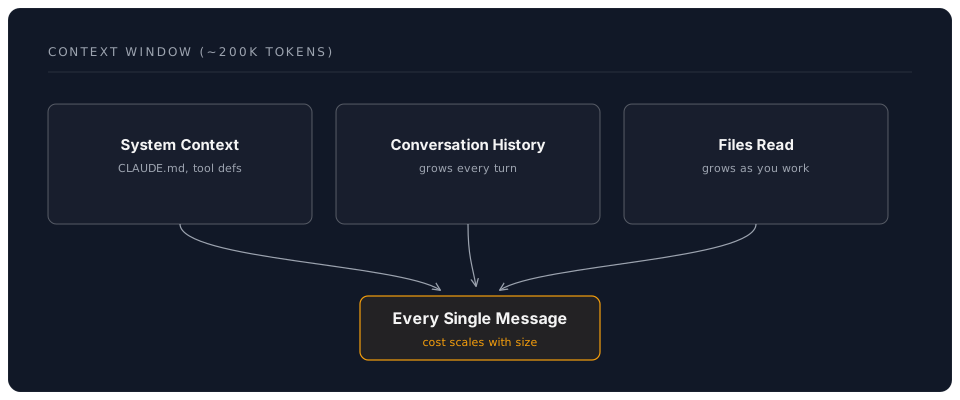
The key insight: context is not just your latest message. It is the entire accumulated session. A conversation that has been running for an hour may be sending 50,000+ tokens with every single message — even if your latest prompt is a single sentence.
The Cost Formula
For pay-as-you-go API usage:
Session Cost = Sum of (Input Tokens + Output Tokens) for each message exchange
Because earlier conversation history is re-sent with each new message, costs accelerate as conversations grow. A ten-message conversation does not cost ten times a single message — it costs significantly more, because later messages carry all the context of earlier ones.
Practical Implications
| Scenario | Context Size | Cost per Message | Strategy |
|---|---|---|---|
| Quick question, fresh session | Small (~5k tokens) | Low | Just ask |
| Mid-session, several files read | Medium (~30k tokens) | Moderate | Normal workflow |
| Long session, many files, long history | Large (~100k+ tokens) | High | Time to /compact or /clear |
💡 Tip: If you use Claude Code with a claude.ai subscription rather than API keys, you have usage limits rather than per-token billing. The same context management principles still apply — large contexts consume your quota faster and can degrade response quality.
10.2 The /compact Command in Depth
/compact is your most important context management tool. It asks Claude Code to summarise the current conversation, replacing the detailed history with a condensed version while preserving the essential information.
When to Use /compact
- After completing a sub-task. You have finished one piece of work and are moving to the next within the same project.
- When responses start to drift. If Claude Code begins repeating itself, forgetting earlier instructions, or producing less focused output, the context may be too large.
- Before a complex request. If you are about to ask Claude Code to do something that requires significant reasoning, compact first to free up context space for the task.
- Periodically during long sessions. As a rule of thumb, consider compacting every 15-20 exchanges or whenever you notice the conversation has been running for a while.
How /compact Works
- Claude Code reads the entire conversation history.
- It generates a summary that captures: the project context, decisions made, files modified, and the current state of work.
- The detailed history is replaced with this summary.
- You continue the conversation with a smaller, cleaner context.
What /compact Preserves and What It Loses
| Preserved | May Be Lost |
|---|---|
| Key decisions and conclusions | Exact wording of earlier prompts |
| Files that were modified and why | Intermediate reasoning steps |
| Current state of the task | Rejected alternatives and why |
| Project structure understanding | Nuanced back-and-forth discussion |
📝 Note: If specific details from earlier in the conversation are critical, restate them after compacting: "To confirm, we decided to use flexbox for the layout and the colour scheme from styles/tokens.css."
10.3 The /clear Command: Fresh Starts
/clear is more aggressive than /compact. It wipes the entire conversation history and starts a completely fresh session. The only persistent context is your CLAUDE.md file, which is reloaded automatically.
When to Use /clear
- Switching to a completely different task. If you were debugging CSS and now need to write Python, start fresh.
- When /compact is not enough. If the session has become very long or confused, a clean start is more effective than trying to salvage it.
- Starting a new day. Even if you are continuing the same project, a fresh session each day often produces better results than resuming a stale one.
The CLAUDE.md Bridge
Your CLAUDE.md file is the key to making /clear effective. Because it is loaded at the start of every session, it provides continuity across resets:
# My Project

## Current Status
Working on the contact form. The layout is complete.
Next: add form validation using Zod.

## Decisions
- Using Formspree for form submission (no backend needed)
- British English throughout
- Mobile-first responsive approach

## Key Files
- contact.html — the contact page
- styles/contact.css — form styling
- scripts/validate.js — form validation (in progress)
💡 Tip: Update your CLAUDE.md at the end of each work session with your current status and next steps. This is the single most effective habit for multi-session AI work.
10.4 Multi-Session Strategies
Real projects span days, weeks, or months. No single AI session can hold all of that context. Here are strategies for working effectively across multiple sessions.
The Session Journal Pattern
At the end of each session, update your CLAUDE.md (or a separate STATUS.md file) with:
- What was accomplished — bullet points of completed work.
- What is next — the immediate next steps.
- Key decisions — anything decided that affects future work.
- Known issues — bugs, blockers, or things to investigate.
At the start of the next session, Claude Code reads this file and is immediately up to speed.
The Task Decomposition Pattern
For large tasks, break the work into pieces that each fit comfortably within a single session:
Large task: "Redesign the portfolio website"

Session 1: Plan the new structure (pages, navigation, content)
Session 2: Build the header and navigation
Session 3: Build the home page
Session 4: Build the project gallery
Session 5: Build the contact page
Session 6: Responsive design and polish
Session 7: Testing and deployment
Each session gets a fresh context focused on one piece. The CLAUDE.md file carries the overall plan and progress from session to session.
The Specialist Session Pattern
Different tasks benefit from different AI "modes." Rather than doing everything in one sprawling session, use focused sessions:
| Session Type | Focus | Model Suggestion |
|---|---|---|
| Architecture | Planning, decisions, structure | Default (Opus) |
| Implementation | Writing code, creating files | Default or /fast for simple code |
| Review | Checking work, finding bugs | Default (Opus) |
| Documentation | Writing READMEs, comments, docs | /fast is often sufficient |
| Quick questions | One-off lookups, syntax help | /fast |
The Checkpoint Pattern
Combine Git and context management for maximum safety:
- Start session — CLAUDE.md provides context.
- Complete a unit of work — one feature, one fix, one file.
- Git commit — record the checkpoint.
/compactor/clear— manage the AI context.- Repeat.
If anything goes wrong — the AI produces bad code, or you go down a dead end — you can git checkout back to the last good commit and start a fresh session.
10.5 Context Quality vs. Context Quantity
More context is not always better. A focused, relevant context produces better results than a sprawling one that includes everything.
Signs of Context Overload
- The AI repeats information you did not ask for.
- Responses become generic rather than specific to your project.
- The AI "forgets" instructions from earlier in the conversation.
- Response times increase noticeably.
- The AI starts hallucinating file names or functions that do not exist.
Strategies for Keeping Context Focused
- Keep CLAUDE.md concise. It is loaded into every session. A 50-line CLAUDE.md is better than a 500-line one.
- Be specific in requests. "Update the
validateEmailfunction inscripts/validate.jsto also check for disposable email domains" is better than "improve the validation." - Avoid pasting large files unnecessarily. Claude Code can read files directly — let it read only what it needs rather than pasting entire files into the chat.
- Close completed topics. If you have finished discussing the navigation and moved on to the footer, you do not need the navigation discussion in context any more. Use
/compact.
10.6 Advanced: MCP Servers and Extended Context
Model Context Protocol (MCP) servers extend Claude Code's capabilities by connecting it to external tools and data sources. While this is an advanced topic, understanding the concept helps with context management.
How MCP Relates to Context
MCP servers let Claude Code access information on demand rather than loading everything into the context window upfront. For example:
- A GitHub MCP server lets Claude Code look up issues, pull requests, and repository information without you pasting them into the conversation.
- A file system MCP server can provide access to files outside the current project directory.
- A web search MCP server can look up documentation rather than relying on the AI's training data.
This is conceptually similar to how you use a search engine — you do not memorise the entire internet, you look things up when needed. MCP servers give the AI the same ability.
Getting Started with MCP
MCP configuration lives in a .mcp.json file in your project directory or in Claude Code's global settings. Detailed MCP setup is beyond the scope of this workshop, but the Claude Code documentation at docs.anthropic.com covers it thoroughly.
10.7 Cost Management Strategies
Whether you are on a subscription or pay-as-you-go, managing costs is a practical concern.
The /fast Toggle
Claude Code's /fast command switches to a faster, cheaper model (Sonnet instead of Opus). Use it strategically:
| Task | Model | Why |
|---|---|---|
| Complex architecture decisions | Opus (default) | Needs deep reasoning |
| Large refactoring across files | Opus (default) | Needs to hold many files in mind |
| Writing a simple function | Sonnet (/fast) | Straightforward generation |
| Explaining what code does | Sonnet (/fast) | Explanation, not creation |
| Generating boilerplate | Sonnet (/fast) | Pattern-following, not reasoning |
| Writing documentation | Sonnet (/fast) | Prose generation |
| Debugging a subtle bug | Opus (default) | Needs careful analysis |
Switch back to the default model by running /fast again (it toggles).
Setting Spending Limits
If using API keys:
- Set monthly budget limits in your provider's dashboard (Anthropic, OpenAI, or Google).
- Enable email alerts for approaching limits.
- Review usage weekly to understand your spending patterns.
The Free Tier Strategy
For learners and hobbyists, a practical approach:
- Use Claude Code with your free claude.ai account for most work.
- Use
/fastfor routine tasks to conserve your usage allowance. - Use
/compactand/clearto keep sessions efficient. - Supplement with GitHub Copilot (free for students) for inline autocomplete.
10.8 Putting It All Together: A Day in the Life
Here is what effective context management looks like in practice for a morning of project work:
09:00 — Start fresh
$ cd ~/my-portfolio
$ claude
Claude Code loads your CLAUDE.md. You review yesterday's status notes.
09:05 — Architecture task (Opus)
> I want to add a blog section to this portfolio site. Here is what I am
  thinking: markdown files in a /posts directory, a list page, and
  individual post pages. What is the best approach?
09:20 — Switch to implementation (/fast)
> /fast
> Create the /posts directory structure and a sample post.
09:40 — Compact after first task
> /compact
09:42 — Continue implementation (still /fast)
> Now create the blog list page that reads from the /posts directory.
10:15 — Git checkpoint
git add .
git commit -m "Add blog section with list page and sample post"
10:16 — Fresh start for review (Opus)
> /clear
> /fast  (toggle off — back to Opus)
> Review the blog section I just added. Check for accessibility issues,
  broken links, and responsive design problems.
10:40 — Update CLAUDE.md and wrap up Update your CLAUDE.md with the current status, then commit:
git add CLAUDE.md
git commit -m "Update project status: blog section complete"
🎯 Knowledge Check
Before moving forward, ensure you can answer:
- Why does cost per message increase as a conversation gets longer?
- What is the difference between
/compactand/clear? - What should you include in your CLAUDE.md to support multi-session work?
- When should you use
/fastvs. the default Opus model? - What are the signs that your context has become overloaded?
Answers:
- Because the entire conversation history is re-sent with each message, so later messages carry more accumulated context.
/compactsummarises the conversation and continues the session;/clearwipes everything and starts fresh (only CLAUDE.md persists).- Current status, next steps, key decisions, known issues, and important file paths.
- Use
/fastfor straightforward tasks (writing simple code, documentation, explanations); use Opus for complex reasoning, architecture, debugging, and multi-file refactoring. - The AI repeats itself, forgets earlier instructions, gives generic responses, hallucinates file names, or response times increase noticeably.
Further Reading
- Claude Code documentation: docs.anthropic.com
- Model capabilities and pricing: console.anthropic.com
- MCP server documentation: modelcontextprotocol.io
Previous: Chapter 9: Context Management & Advanced Agent Workflows | Back to: Workshop Overview