# Extension Ecosystem Mastery
## Learning Objectives
By the end of this module, you will:
- Understand the VS Code extension architecture
- Master finding, installing, and managing extensions
- Build curated extension sets for different workflows
- Avoid extension bloat and performance issues
- Create custom extension configurations
- Understand when to build vs. install extensions
## The Extension Revolution
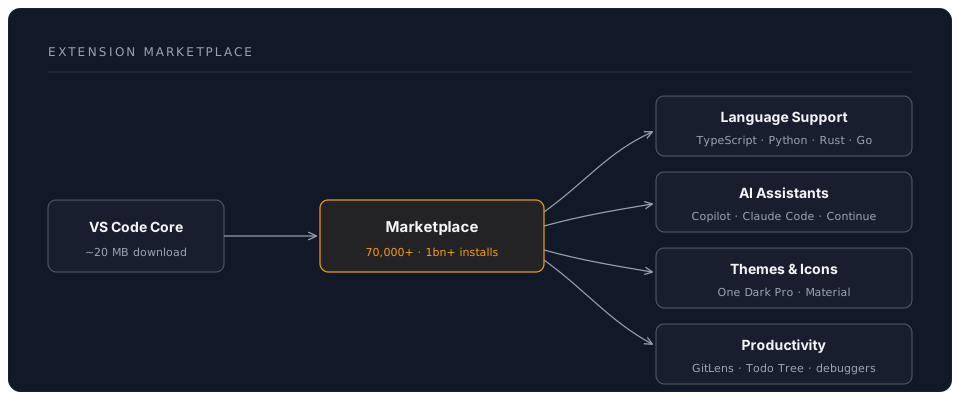
VS Code's power comes from its extension ecosystem:
## Core Concepts
### Extension Types
| Type | Purpose | Examples |
|------|---------|----------|
| **Language** | Language support & IntelliSense | Python, Go, Rust |
| **Formatter** | Code formatting | Prettier, Black, rustfmt |
| **Linter** | Code quality checks | ESLint, Pylint, Clippy |
| **Debugger** | Debug support | Python Debugger, Chrome Debugger |
| **Theme** | Visual customization | One Dark Pro, Dracula |
| **Icon Theme** | File icon customization | Material Icon Theme, vscode-icons |
| **Git** | Version control enhancement | GitLens, Git Graph |
| **AI** | AI-powered assistance | Copilot, Claude Code, Continue |
| **Remote** | Remote development | Remote-SSH, Dev Containers |
| **Productivity** | Workflow enhancement | Todo Tree, Bookmarks |
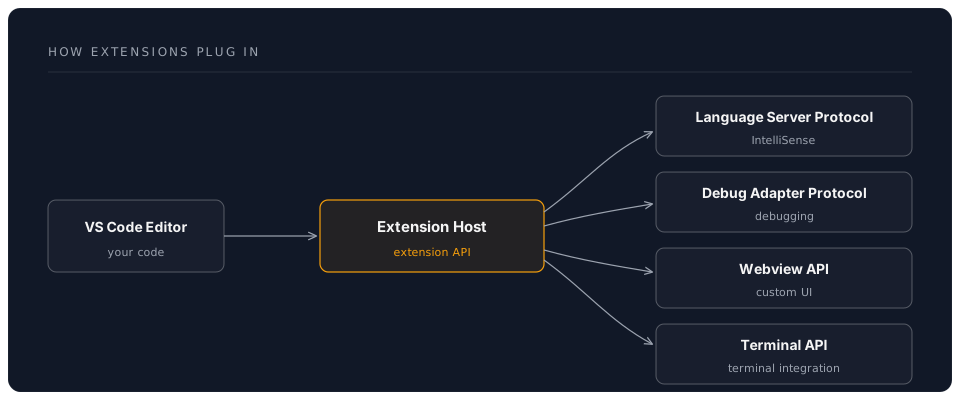
### Extension Architecture
## Essential Extension Categories
### 1. Language Support Extensions
**Must-Have for Each Language:**
**Python:**
```bash
code --install-extension ms-python.python
code --install-extension ms-python.vscode-pylance
code --install-extension ms-python.debugpy
```
**JavaScript/TypeScript:**
```bash
code --install-extension dbaeumer.vscode-eslint
code --install-extension esbenp.prettier-vscode
```
**Rust:**
```bash
code --install-extension rust-lang.rust-analyzer
```
**Go:**
```bash
code --install-extension golang.go
```
**Configuration:**
```json
{
"python.languageServer": "Pylance",
"python.analysis.typeCheckingMode": "basic",
"eslint.enable": true,
"prettier.requireConfig": true
}
```
### 2. AI Coding Assistants (Deep Dive)
**Option 1: GitHub Copilot (Cloud, Paid — Industry Standard)**
```bash
code --install-extension GitHub.copilot
code --install-extension GitHub.copilot-chat
```
**Features:**
- Inline code completion with multi-line suggestions
- Chat sidebar and inline chat (`Ctrl+I`)
- Workspace-aware context (`@workspace`)
- Test generation, documentation, and code explanation
- Copilot Workspace: issue-to-PR workflow on GitHub
**Configuration:**
```json
{
"github.copilot.enable": {
"*": true,
"yaml": false,
"plaintext": false
},
"github.copilot.editor.enableAutoCompletions": true
}
```
**Cost:** From $10/month for individuals (free for students and OSS maintainers). Check [github.com/features/copilot](https://github.com/features/copilot) for current plans.
**Option 2: Claude Code (Terminal Agent — Best for Complex Tasks)**
```bash
npm install -g @anthropic-ai/claude-code
```
Claude Code is not a VS Code extension — it is Anthropic's standalone agentic coding tool that runs in your terminal (including VS Code's integrated terminal). It reads your entire codebase, makes multi-file edits, runs commands, and handles complex reasoning tasks.
**Key Features:**
- Agentic: reads, edits, and creates files across your project
- Powered by Claude Opus by default; `/fast` mode for quicker responses
- Project configuration via `CLAUDE.md` files
- Hooks system, slash commands, MCP server integration
- Subagent workflows for breaking down complex tasks
- Also available as a desktop app, web app, and IDE extensions
**Setup:**
```bash
npm install -g @anthropic-ai/claude-code
export ANTHROPIC_API_KEY="your-key" # from console.anthropic.com
cd your-project && claude # start a session
```
**Cost:** Pay-per-use via the Anthropic API (or included with the Max subscription plan). Check [console.anthropic.com](https://console.anthropic.com) for current rates.
**Option 3: Continue.dev (Open Source, Multi-Model)**
```bash
code --install-extension Continue.continue
```
**Features:**
- Free and fully open-source
- Connect any model: Claude, GPT, Gemini, Ollama (local), and more
- Tab autocomplete with configurable models
- Chat with `@file`, `@folder`, `@docs` context references
- Inline editing (`Ctrl+I`)
- Customisable system prompts and slash commands
**Configuration (config.json):**
```json
{
"models": [
{
"title": "Claude Sonnet 4.6",
"provider": "anthropic",
"model": "claude-sonnet-4-6",
"apiKey": "YOUR_ANTHROPIC_KEY"
},
{
"title": "GPT-4o",
"provider": "openai",
"model": "gpt-4o",
"apiKey": "YOUR_OPENAI_KEY"
},
{
"title": "Local Llama",
"provider": "ollama",
"model": "llama3:8b"
}
]
}
```
### 3. Git & Version Control Extensions
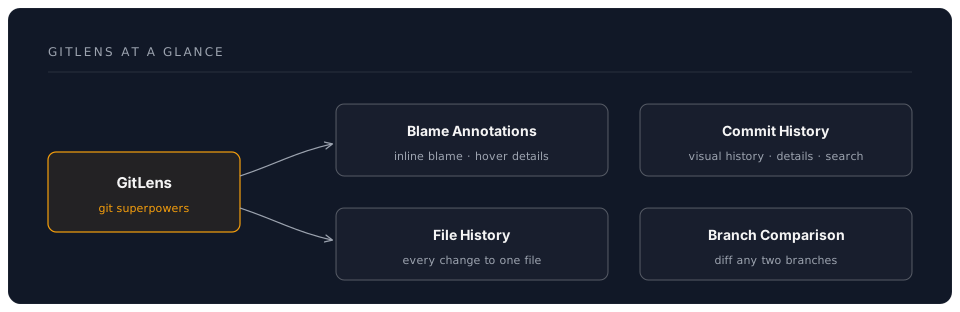
**GitLens (Essential)**
```bash
code --install-extension eamodio.gitlens
```
**Key Features:**
**Configuration:**
```json
{
"gitlens.currentLine.enabled": true,
"gitlens.hovers.currentLine.over": "line",
"gitlens.codeLens.enabled": false,
"gitlens.statusBar.enabled": true
}
```
**Git Graph:**
```bash
code --install-extension mhutchie.git-graph
```
**Use Case**: Visual commit history, branch management
### 4. Code Quality Extensions
**ESLint (JavaScript/TypeScript):**
```bash
code --install-extension dbaeumer.vscode-eslint
```
**Configuration:**
```json
{
"eslint.enable": true,
"eslint.autoFixOnSave": true,
"eslint.validate": [
"javascript",
"javascriptreact",
"typescript",
"typescriptreact"
]
}
```
**Error Lens (Visual Error Display):**
```bash
code --install-extension usernamehw.errorlens
```
Shows errors inline in the editor—game changer for catching issues.
**SonarLint (Multi-Language Quality):**
```bash
code --install-extension SonarSource.sonarlint-vscode
```
### 5. Productivity Boosters
**Path Intellisense:**
```bash
code --install-extension christian-kohler.path-intellisense
```
Autocompletes file paths—saves tons of time.
**Auto Rename Tag:**
```bash
code --install-extension formulahendry.auto-rename-tag
```
Automatically rename paired HTML/XML tags.
**Bracket Pair Colorizer (Built-in Now!):**
VS Code now has this built-in:
```json
{
"editor.bracketPairColorization.enabled": true,
"editor.guides.bracketPairs": "active"
}
```
**TODO Tree:**
```bash
code --install-extension Gruntfuggly.todo-tree
```
Highlights TODO, FIXME, etc. comments in sidebar tree.
**Better Comments:**
```bash
code --install-extension aaron-bond.better-comments
```
Colour-codes comments by type:
```javascript
// ! Critical issue
// ? Question or uncertainty
// TODO: Something to do
// * Highlighted information
```
### 6. Theme & Visual Extensions
**Popular Themes:**
```bash
# One Dark Pro (Atom-inspired)
code --install-extension zhuangtongfa.material-theme
# Dracula Official
code --install-extension dracula-theme.theme-dracula
# Night Owl
code --install-extension sdras.night-owl
# GitHub Theme
code --install-extension GitHub.github-vscode-theme
```
**Icon Themes:**
```bash
# Material Icon Theme
code --install-extension PKief.material-icon-theme
# VSCode Icons
code --install-extension vscode-icons-team.vscode-icons
```
**Configuration:**
```json
{
"workbench.colorTheme": "One Dark Pro",
"workbench.iconTheme": "material-icon-theme",
"material-icon-theme.folders.color": "#90a4ae",
"material-icon-theme.folders.theme": "specific"
}
```
### 7. Remote Development
**Remote - SSH:**
```bash
code --install-extension ms-vscode-remote.remote-ssh
```
**Dev Containers:**
```bash
code --install-extension ms-vscode-remote.remote-containers
```
**WSL:**
```bash
code --install-extension ms-vscode-remote.remote-wsl
```
More in the Remote Development workshop!
## Hands-On Exercises
### Exercise 1: Build Your Extension Set
**Create extension sets for different workflows:**
**Web Development Stack:**
```bash
#!/bin/bash
# install-web-dev-extensions.sh
# Core
code --install-extension dbaeumer.vscode-eslint
code --install-extension esbenp.prettier-vscode
code --install-extension formulahendry.auto-rename-tag
code --install-extension christian-kohler.path-intellisense
# Framework-specific
code --install-extension dsznajder.es7-react-js-snippets # React
code --install-extension Vue.volar # Vue
code --install-extension svelte.svelte-vscode # Svelte
# CSS
code --install-extension bradlc.vscode-tailwindcss
code --install-extension stylelint.vscode-stylelint
# Tools
code --install-extension ritwickdey.LiveServer
code --install-extension ms-vscode.live-server
```
**Python Data Science Stack:**
```bash
#!/bin/bash
code --install-extension ms-python.python
code --install-extension ms-toolsai.jupyter
code --install-extension ms-toolsai.vscode-jupyter-cell-tags
code --install-extension ms-toolsai.vscode-jupyter-slideshow
code --install-extension ms-python.vscode-pylance
code --install-extension KevinRose.vsc-python-indent
```
**DevOps/Infrastructure Stack:**
```bash
#!/bin/bash
code --install-extension ms-vscode-remote.remote-ssh
code --install-extension ms-vscode-remote.remote-containers
code --install-extension ms-azuretools.vscode-docker
code --install-extension ms-kubernetes-tools.vscode-kubernetes-tools
code --install-extension hashicorp.terraform
code --install-extension redhat.vscode-yaml
```
### Exercise 2: Configure Extension Workspace
**Create a `.vscode/extensions.json` for your project:**
```json
{
"recommendations": [
"dbaeumer.vscode-eslint",
"esbenp.prettier-vscode",
"eamodio.gitlens",
"GitHub.copilot"
],
"unwantedRecommendations": [
"ms-vscode.vscode-typescript-tslint-plugin"
]
}
```
When teammates open the project, VS Code suggests these extensions.
### Exercise 3: Extension Performance Audit
**Check extension impact:**
```
1. Ctrl+Shift+P
2. Type: "Developer: Show Running Extensions"
3. Sort by "Activation Time" or "Runtime"
4. Disable slow extensions
```
**Example Output:**
```
Extension Activation Time Runtime
─────────────────────────────────────────────────────
GitLens 450ms 12ms
Copilot 230ms 45ms
Python 180ms 8ms
ESLint 120ms 25ms
Theme 50ms 2ms
```
**Rule of Thumb:**
- Activation > 500ms: Consider alternatives
- Runtime > 50ms: Check if constantly active
## Pro Tips
### Tip 1: Use Extension Packs
Extension Packs bundle related extensions:
**Create Your Own Pack:**
```json
// package.json for custom extension pack
{
"name": "my-dev-pack",
"displayName": "My Dev Essentials",
"description": "All my essential extensions",
"version": "1.0.0",
"engines": {
"vscode": "^1.80.0"
},
"categories": ["Extension Packs"],
"extensionPack": [
"eamodio.gitlens",
"esbenp.prettier-vscode",
"dbaeumer.vscode-eslint",
"GitHub.copilot"
]
}
```
### Tip 2: Disable Extensions Per Workspace
**Right-click extension → "Disable (Workspace)"**
**Use Case:**
- Disable Python extensions in JavaScript projects
- Disable formatters in read-only projects
### Tip 3: Sync Extensions Across Machines
**Enable Settings Sync:**
```
1. Ctrl+Shift+P
2. "Settings Sync: Turn On"
3. Sign in with GitHub/Microsoft
4. Check "Extensions" checkbox
```
All your extensions sync automatically!
### Tip 4: Extension Keyboard Shortcuts
**Assign shortcuts to extension commands:**
```json
// keybindings.json
[
{
"key": "ctrl+shift+g g",
"command": "gitlens.showQuickCommitFileDetails"
},
{
"key": "ctrl+shift+a",
"command": "github.copilot.generate"
}
]
```
### Tip 5: Use Pre-Release Extensions
**For cutting-edge features:**
```
1. Go to extension page
2. Click "Switch to Pre-Release Version"
3. Get latest features before stable release
```
**Caution**: May have bugs, but often worth it for new AI features.
## Extension Recommendations by Role
### For Web Developers
```bash
# Core
code --install-extension dbaeumer.vscode-eslint
code --install-extension esbenp.prettier-vscode
# Productivity
code --install-extension formulahendry.auto-close-tag
code --install-extension formulahendry.auto-rename-tag
code --install-extension christian-kohler.path-intellisense
code --install-extension zignd.html-css-class-completion
# Frameworks
code --install-extension dsznajder.es7-react-js-snippets
code --install-extension bradlc.vscode-tailwindcss
# Testing
code --install-extension Orta.vscode-jest
# AI
code --install-extension GitHub.copilot
npm install -g @anthropic-ai/claude-code # Claude Code (terminal)
```
### For Python Developers
```bash
# Core
code --install-extension ms-python.python
code --install-extension ms-python.vscode-pylance
# Formatting & Linting
code --install-extension ms-python.black-formatter
code --install-extension charliermarsh.ruff
# Jupyter
code --install-extension ms-toolsai.jupyter
# Productivity
code --install-extension KevinRose.vsc-python-indent
code --install-extension njpwerner.autodocstring
# AI
code --install-extension Continue.continue
npm install -g @anthropic-ai/claude-code # Claude Code (terminal)
```
### For DevOps Engineers
```bash
# Remote & Containers
code --install-extension ms-vscode-remote.remote-ssh
code --install-extension ms-vscode-remote.remote-containers
code --install-extension ms-azuretools.vscode-docker
# Infrastructure
code --install-extension hashicorp.terraform
code --install-extension ms-kubernetes-tools.vscode-kubernetes-tools
code --install-extension redhat.vscode-yaml
# CI/CD
code --install-extension github.vscode-github-actions
code --install-extension ms-azure-devops.azure-pipelines
# Monitoring
code --install-extension humao.rest-client
```
### For Data Scientists
```bash
# Core
code --install-extension ms-python.python
code --install-extension ms-toolsai.jupyter
# Visualization
code --install-extension RandomFractalsInc.vscode-data-preview
code --install-extension mechatroner.rainbow-csv
# Databases
code --install-extension mtxr.sqltools
code --install-extension mtxr.sqltools-driver-pg
# AI
code --install-extension GitHub.copilot
```
## Common Pitfalls
### Pitfall 1: Extension Overload
**Problem**: 50+ extensions, slow startup
**Solution**: Audit regularly, disable unused
```
1. Check extension count: Extensions sidebar
2. Goal: < 20 extensions for most workflows
3. Use profiles for different project types (see Profiles & Sync)
```
### Pitfall 2: Conflicting Formatters
**Problem**: Multiple formatters fight over files
**Solution**: One formatter per language
```json
{
"[javascript]": {
"editor.defaultFormatter": "esbenp.prettier-vscode"
},
"[python]": {
"editor.defaultFormatter": "ms-python.black-formatter"
}
}
```
### Pitfall 3: Not Reading Extension READMEs
**Problem**: Missing powerful features
**Solution**: Read README after installing
```
1. Click extension in sidebar
2. Read "Features" section
3. Check "Configuration" options
```
### Pitfall 4: Outdated Extensions
**Problem**: Missing features, bugs
**Solution**: Auto-update enabled
```json
{
"extensions.autoUpdate": true,
"extensions.autoCheckUpdates": true
}
```
### Pitfall 5: Trusting All Extensions
**Problem**: Security/privacy risks
**Solution**: Check before installing
```
✅ Check:
- Number of installs (> 100k = safer)
- Rating (> 4 stars)
- Publisher (Verified publishers)
- Last update (< 6 months ago)
- Reviews (read negative ones)
❌ Avoid:
- Low installs + requests permissions
- No updates in 1+ years
- Unverified publishers for sensitive tools
```
## Assessment
### Knowledge Check
**Question 1**: What's the difference between an Extension Pack and installing multiple extensions individually?
Answer
An Extension Pack is a meta-extension that bundles multiple extensions together. Installing a pack installs all its included extensions at once. Benefit: Easier to share/install curated sets. Downside: You get all extensions, even ones you may not want.
**Question 2**: How do you recommend project-specific extensions to teammates?
Answer
Create a `.vscode/extensions.json` file in your project:
```json
{
"recommendations": [
"dbaeumer.vscode-eslint",
"esbenp.prettier-vscode"
]
}
```
When teammates open the project, VS Code prompts them to install recommended extensions.
**Question 3**: An extension is slowing down VS Code. How do you identify it?
Answer
1. `Ctrl+Shift+P` → "Developer: Show Running Extensions"
2. Sort by "Activation Time" or check "Runtime"
3. Look for extensions with high activation times (> 500ms) or runtime overhead
4. Disable the culprit, reload window, confirm improvement
### Practical Exercise
**Build Your Perfect Stack:**
1. **Audit Current Extensions:**
- List all installed extensions
- Categorize: Essential, Nice-to-have, Unused
- Disable/uninstall unused
2. **Create Your Stack:**
- Choose one AI assistant
- Install language-specific extensions
- Add 3-5 productivity extensions
- Add one theme you love
3. **Configure & Test:**
- Set up extension settings
- Create `.vscode/extensions.json`
- Test all features
- Document your choices
**Target**: 10-15 extensions total for optimal performance
## Next Steps
You now have extension mastery! Next:
- **Settings & Customisation**: Configure VS Code your way
- **Remote Development**: Extensions deep dive
- **AI Integration**: Advanced AI-powered workflows
## Additional Resources
**Extension Discovery:**
- [VS Code Marketplace](https://marketplace.visualstudio.com/vscode)
- [Open VSX Registry](https://open-vsx.org/) - Open source alternative
- [Awesome VS Code](https://github.com/viatsko/awesome-vscode) - Curated list
**Extension Development:**
- [Extension API Docs](https://code.visualstudio.com/api)
- [Extension Samples](https://github.com/microsoft/vscode-extension-samples)
- [Your First Extension](https://code.visualstudio.com/api/get-started/your-first-extension)
---
**Estimated Time to Complete**: 3-4 hours
**Difficulty**: Intermediate
**Prerequisites**: Introduction, Keyboard Shortcuts